
AdvancedCommandLogger
This plugin logs the commands players execute on the server. It uses a Discord webhook to send the logs to a channel. You can configure which commands you…
⬇ Download on Modrinth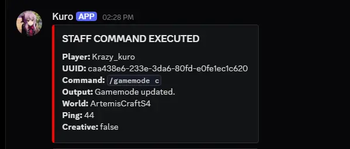
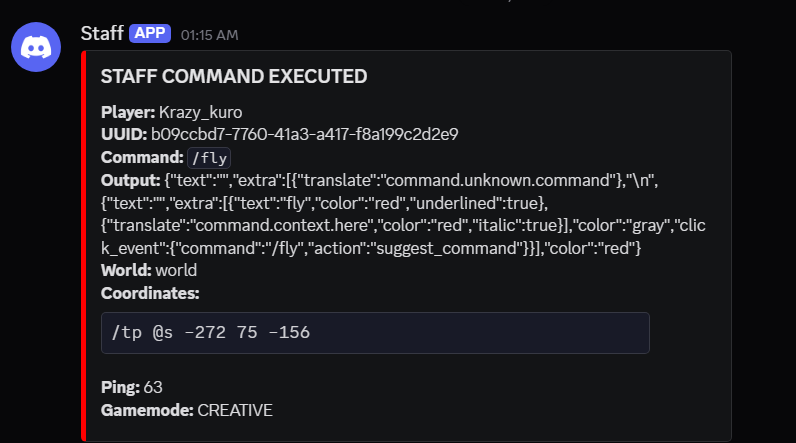
AdvancedCommandLogger is a lightweight and configurable Minecraft plugin that logs player and staff commands directly to Discord using webhooks. It helps server owners monitor command activity in real time with organized embeds and customizable logging settings.
Features
Logs player and staff commands separately Sends logs to Discord webhooks instantly Configurable command whitelist system Optional logging for:
- Coordinates
- World name
- Ping
- Command output
Ignore specific worlds, players, or permissions Async webhook support for better performance Simple and easy-to-edit config
Perfect for staff monitoring, moderation tracking, and server security.
P.S.: This plugin is just a fan project I made in my spare time, so I might not take the development of this plugin too seriously. I'm just going to develop it for fun. Thank you!
📈 Live Statistics
- Active Servers:
- Players Tracked:


Statistics: https://bstats.org/plugin/bukkit/AdvancedCommandLogger/31787
AdvancedCommandLogger 1.0.1v Config
settings:
  async-webhooks: true
  console-logging: true
  log-player-ip: false
  log-coordinates: true
  log-command-output: true
  log-world: true
  log-ping: true
  ignore-op: false
  debug-mode: false

webhooks:
  staff: "WebhookLinkStaff"
  player: "WebhookLinkPlayer"

cooldowns:
  webhook-ms: 1000

ignored-worlds:
  - "bedwars"

ignored-permissions:
  - "aclogger.bypass"

ignored-players:
  - "TestPlayer"

staff-commands:
  - "/gamemode"
  - "/give"
  - "/fly"
  - "/op"
  - "/deop"
  - "/ban"
  - "/unban"
  - "/irp"
  - "/invsee"
  - "/endersee"
  - "/seed"
  - "/seedcracker data"

player-commands:
  - "/spawn"
  - "/hub"
  - "/lobby"

embed-colors:
  staff: 16711680
  player: 255
- Edition: Minecraft Java
- File type: .jar
- Minecraft versions listed: 1.21, 1.21.1, 1.21.2
- How to install: Install the matching mod loader (Forge, Fabric or NeoForge) for your Minecraft version. → Download the .jar. → Put it in the .minecraft/mods folder and launch that loader profile.
- Where to get it: Opens on Modrinth — not every file is mirrored on our own servers.
Install steps are the general flow for this file type — How to install Minecraft Java mods & modpacks walks through it step by step.
- Ships as AdvancedCommandLogger-0.2.0-alpha.jar — drop this file into the mods folder
- Download size: 13.0 MB
- Download link checked 21 Aug 2026 — working
These come from our own check of the pack file, not from the source page.