
Custom Borders
Java mod listed for Minecraft 1.21. Downloads from the MC Java Mods app on Android.
Makes setting custom borders in minecraft possible with a simple command! Perfect for PvP events and other events on SMPs .
⬇ Download on Modrinth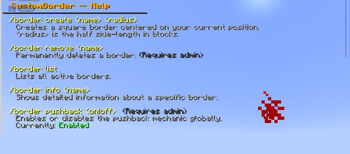
CustomBorder
Custom square world borders — fully independent of the vanilla Minecraft border.
Define named, persistent borders anywhere in your world. Players are kept inside with particles, pushback, and instant enforcement. Admins get fine-grained control over bypass, visibility, and settings — all at runtime, no restart needed.
✨ Features
- Square borders — defined by a center point and a radius (half side-length in blocks)
- Full build-height wall — the border spans 10,000 blocks vertically, covering the entire playable range
- Red particle wall — appears as players approach; each player can set their own visibility distance
- Pushback mechanic — players are pushed back toward the center when too close to the wall; can be toggled and tuned at runtime
- Instant movement enforcement — movement events are intercepted in real-time, preventing any crossing without rubberbanding
- Teleport-back safety net — if a player ends up outside anyway, they are immediately moved back in
- Admin bypass — admins can toggle border enforcement for themselves with
/borderop - Admin
/tpsupport — command-sourced teleports always cross borders freely, so admins can move players to either side - Per-player particle toggle — admins (even with bypass active) can hide the particle wall for themselves
- Multiple borders — define as many named borders as needed across any world
- Persistent storage — all borders are saved to
borders.ymland survive server restarts - Fully independent — does not touch or interact with the vanilla world border in any way
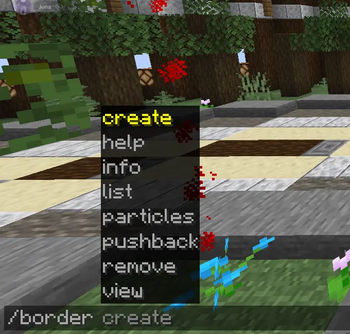
- Tab completion — all commands support full tab completion including border names and argument suggestions
🗂️ Commands
Player Commands
(Default: OP only — configurable via permissions)
| Command | Description |
|---|---|
/border help |
Shows all commands with explanations and your current settings |
/border list |
Lists all active borders with name, world, center, and radius |
/border info <name> |
Shows detailed info about a specific border |
/border view |
Shows your current and the server-default visibility distance |
/border view <blocks> |
Sets how far away you see the red particle wall (1–256 blocks) |
/border view reset |
Resets your visibility distance to the server default |
Admin Commands
(Requires customborder.admin)
| Command | Description |
|---|---|
/border create <name> <radius> |
Creates a square border centered on your current position |
/border remove <name> |
Permanently deletes a border |
/border pushback |
Shows current pushback status (enabled, distance, strength) |
/border pushback on |
Enables the pushback mechanic globally |
/border pushback off |
Disables the pushback mechanic globally |
/border pushback distance <blocks> |
Sets how close players must be before getting pushed back |
/border pushback strength <value> |
Sets the velocity force of the pushback (default: 1.2) |
/border particles on |
Shows the particle wall for yourself again |
/border particles off |
Hides the particle wall for yourself (bypass-independent) |
/borderop on |
Enables border bypass — you can freely cross all borders |
/borderop off |
Disables border bypass — borders are enforced for you again |
Note:
/tp(and any command-sourced teleport) always crosses borders freely, allowing admins to move players to either side without needing bypass.
🔐 Permissions
| Permission | Description | Default |
|---|---|---|
customborder.use |
Use basic commands: help, list, info, view |
op |
customborder.admin |
Full control: create/remove borders, pushback settings, particles, bypass | op |
⚙️ Configuration
All settings in plugins/CustomBorder/config.yml:
# Distance (in blocks) at which red particles become visible (server-wide default).
# Each player can override this individually with /border view.
particle-visibility-distance: 10.0

# Whether the pushback mechanic is active. Toggleable at runtime with /border pushback on|off.
pushback-enabled: true

# Distance (in blocks) from the wall at which players start getting pushed back.
pushback-distance: 3.0

# Velocity strength of the pushback toward the border center.
pushback-strength: 1.2

# How often (in ticks) the proximity check runs. 20 ticks = 1 second.
check-interval: 5

# Number of particle points rendered per visible wall per check.
particle-count: 8

# Height of the border wall in blocks. 10000 covers the full build range.
border-height: 10000
All pushback settings can be changed at runtime via commands — no need to edit the file or restart the server. Changes are saved immediately.
📖 How It Works
Stand at the center of where you want the border, then run
/border create <name> <radius>.radiusis the half side-length: a radius of100creates a 200 × 200 block area.- The border is square, axis-aligned, and centered on your exact position at the time of creation.
Players who approach within their visibility distance see a red particle wall along the border edge.
Within
pushback-distanceblocks of the wall, players are continuously pushed back toward the center.If a player somehow ends up outside (e.g. via a plugin teleport), they are immediately teleported back to the nearest safe location inside.
Admins can use
/borderop onto bypass all enforcement for themselves. When done,/borderop offre-enables it.Admins can freely teleport players across borders using the standard
/tpcommand.Every player can customize how far away they see the particle wall with
/border view <blocks>, between 1 and 256 blocks.
💾 Data & Persistence
Borders are stored in plugins/CustomBorder/borders.yml and loaded automatically on startup. The number of loaded borders is logged on enable:
[CustomBorder] Loaded 3 border(s) from storage.
Per-player settings (visibility distance, particles hidden, bypass) are session-only and reset on restart — this is intentional, as they are considered temporary preferences.
🔧 Requirements
- Server: Paper 1.21.1 or compatible fork
- Java: 21 or newer
🐛 Issues & Source
Found a bug or want to contribute? Open an issue or pull request on the GitHub repository.
- Edition: Minecraft Java
- File type: .jar
- Minecraft versions listed: 1.21, 1.21.1, 1.21.2
- How to install: Install the matching mod loader (Forge, Fabric or NeoForge) for your Minecraft version. → Download the .jar. → Put it in the .minecraft/mods folder and launch that loader profile.
- Where to get it: Opens on Modrinth — not every file is mirrored on our own servers.
Install steps are the general flow for this file type — How to install Minecraft Java mods & modpacks walks through it step by step.
- Ships as customborder-1.0.0.jar — drop this file into the mods folder
- Download size: 29 KB
- Download link checked 23 Oct 2026 — working
These come from our own check of the pack file, not from the source page.