
QuantumCrate
A Minecraft crate plugin for Paper 1.21 built around a web-first management philosophy — configure everything from a browser dashboard without touching a…
⬇ Download on Modrinth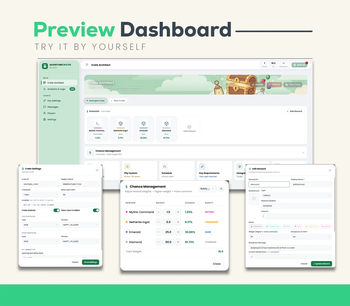

Quantum Crates
Web Based Crates Plugin
A Minecraft crate plugin built around a web-first management philosophy — configure everything from a browser dashboard without touching a single config file or restarting the server.
Key Features
More details available on our Wiki.
- Website Dashboard: Manage everything from your browser. No need to configure YAML or anything.
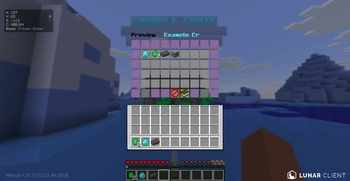
- GUI Animation: A cool GUI animation you can configure on the web dashboard.
- Pity System: First Soft & Hard pity system. Just like other RPG games' pity systems.
- Particle Animation: Cool idle & open animation types to make your crates more eye-catchy.
- Live Analytics: Real-time opening feed via Web Dashboard. Maintain player logs.
- Crates Schedule: Configure your crates to be opened on specific time, day or limited events.
Preview Dashboard
Try it by yourself! The web dashboard includes intuitive menus for:
- Main: Crate Architect, Analytics & Logs (Live).
- Config: Key Settings, Messages, Players, and Settings.
- Crate Management: Easily adjust Reward Chances/Weights, Pity Systems, Schedules, Key Requirements, Holograms, Idle & Open Particles, and GUI Animation styles directly from the browser.
Help / Support / Suggestion?
Join our Discord


Experience the Future of Crate Management
QuantumCrates is a revolutionary Minecraft plugin designed with a Web-First philosophy. Manage your crates, rewards, and real-time statistics through a powerful, built-in web dashboard.
- Edition: Minecraft Java
- File type: .jar
- Minecraft versions listed: 1.20, 1.20.1, 1.20.2
- How to install: Install the matching mod loader (Forge, Fabric or NeoForge) for your Minecraft version. → Download the .jar. → Put it in the .minecraft/mods folder and launch that loader profile.
- Where to get it: Opens on Modrinth — not every file is mirrored on our own servers.
Install steps are the general flow for this file type — How to install Minecraft Java mods & modpacks walks through it step by step.
- Ships as QuantumCrate-1.5.1.jar — drop this file into the mods folder
- Download size: 9.4 MB
- Download link checked 22 Aug 2026 — working
These come from our own check of the pack file, not from the source page.