

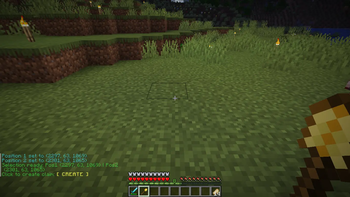

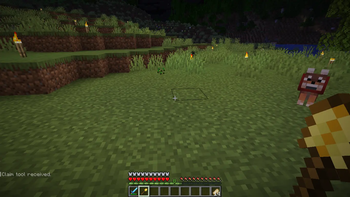
Welcome to GoldenClaims, the friendly Minecraft plugin that lets you claim and protect your land! Whether you're building a cozy home, a massive castle, or just want to keep your crops safe from griefers, GoldenClaims has got you covered. With a simple golden shovel tool and an intuitive claiming system, you can secure your territory in no time.
Features
- Easy Land Claiming: Use the special golden shovel to select and claim areas
- Block Protection: Keep your builds safe from other players
- Economy Integration: Buy claim blocks using in-game gold
- Multi-Language Support: Available in Portuguese, English, and Chinese
- Visual Feedback: See your claims highlighted in the world
- Claim Management: List, expand, and manage your claims easily
How to Use
Getting Started
First, get your claim tool:
/claimtool
This gives you a special golden shovel that you'll use for all claiming activities.
Selecting Your Land
- Hold the golden shovel in your hand
- Left-click a block to set the first corner of your claim
- Right-click a block to set the second corner
The area between these two points will become your claim!
Buying Claim Blocks
You need claim blocks to create claims. Buy them with gold:
/claim buy <amount>
For example, /claim buy 10 will let you buy claim blocks with 10 gold ingots.
Creating Your Claim
Once you have enough claim blocks and have selected an area:
/claim create
Your land is now protected!
Expanding Your Claim
If you wish to expand you claim, click any corner of the claim and select the next further point to expand your claim. You will be asked to confirm in chat!
Managing Your Claims
Check your claim blocks balance:
/claim blocks
List all your claims:
/claim list
Change language (Portuguese, English, or Chinese):
/claim language <pt/en/zh>
Commands
| Command | Description |
|---|---|
/claimtool |
Get your golden claim shovel |
/claim buy <gold> |
Buy claim blocks with gold |
/claim blocks |
Check your claim blocks balance |
/claim create |
Create a claim from your selection |
/claim list |
List all your claims |
/claim language <lang> |
Change your language |
Configuration
Edit config.yml to customize:
- Database settings
- Gold-to-claim ratio
- Maximum claim blocks per player
Contributing
We love contributions! Here's how you can help:
For Developers
- Fork the repository
- Create a feature branch
- Make your changes
- Test thoroughly
- Submit a pull request
For Testers
- Report bugs on the issues page
- Suggest new features
- Help test new versions
For Translators
- Help add more languages
- Improve existing translations
Please read our Contributing Guidelines for more details.
License
This project is licensed under the MIT License - see the LICENSE file for details.
- Edition: Minecraft Java
- File type: .jar
- Minecraft versions listed: 1.21, 1.21.1, 1.21.2
- How to install: Install the matching mod loader (Forge, Fabric or NeoForge) for your Minecraft version. → Download the .jar. → Put it in the .minecraft/mods folder and launch that loader profile.
- Where to get it: Opens on Modrinth — not every file is mirrored on our own servers.
Install steps are the general flow for this file type — How to install Minecraft Java mods & modpacks walks through it step by step.
- Ships as goldenclaims-0.1.0-SNAPSHOT.jar — drop this file into the mods folder
- Download size: 14.4 MB
- Download link checked 22 Aug 2026 — working
These come from our own check of the pack file, not from the source page.