HomeJavaModsSafeBase
SafeBase
ModsJava

SafeBase

by PaulHamdinger · on Modrinth

Create a safe zone around your base, allowing (or forbidding) other players. To designate a SafeBase, place a lectern on a wool platform, then add a…

⬇ Download on Modrinth

SafeBase : Create safe zones with vanilla blocks!

SafeBase lets you create a safe zone for just you and your friends, using simple vanilla game item. Just install and go, configuration is optional.

How it works : Lectern + White Wool

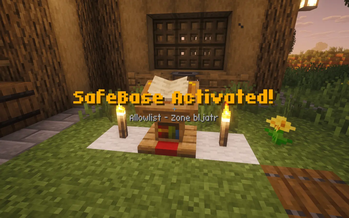
Place a lectern on top of a block of white wool, then add a book-and-quill to the lectern. That's all it takes to create a zone of protection around the lectern just for yourself! You'll see particles start to swirl nearby.

Whoever places the book-and-quill is always allowed into the SafeBase.

The safe zone takes the shape of a square, 128 blocks across, centered around the lectern. It extends the entire height of the world.

SafeBase particle ring effect

Add Your Friends...

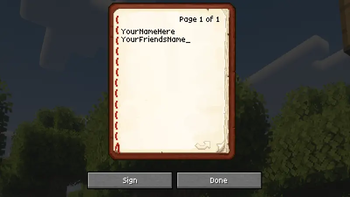
Write the names of your friends in the book-and-quill, and when you place it on the lectern they'll also be able to enter your SafeBase.

...Or Block Specific Griefers

If you put black wool under the lectern, the names of players in the book are forbidden into your SafeBase. In other words : Use white wool to make the list of names a "whitelist" and black wool to make the list of names a "blacklist".

How is a SafeBase protected?

When a forbidden player comes within 32 blocks of your SafeBase they'll be shown a warning. If they get close enough to actually cross into your SafeBase, they are immediately nudged back outside.

The forbidden player cannot use Ender Pearls, Nether Portals, Chorus Fruit, etc to get inside. If they're riding a vehicle, they and the vehicle are both moved outside the SafeBase. If the player flies into a SafeBase with Elytra, they are safely turned around mid-air.

As a final fail-safe, forbidden players who somehow get into a SafeBase are teleported away.

Customise Zone Size

You can add up to 8 more blocks of wool next to the original block, to form a 3x3 platform. Each additional block of wool expands your SafeBase by another 64 blocks across. The additional wool should be the same colour as the original block (ie, white or black).

The Nether Core Philosophy

All plugins developed by Nether Core share the same philosophy :

For Admins and Ops

Ops bypass all SafeBase enforcement.

By default all players can create SafeBases, and an Op can then selectively deny them from using SafeBase.

Alternative, by editing the config file, all players can be denied from using SafeBase unless selective allowed.

/safebase list : List all SafeBases /safebase info <id> : Learn more about a SafeBase /safebase disable <id> : Disable a SafeBase /safebase allow <player> : Allow a player to create SafeBases /safebase deny <player> : Deny a player from creating SafeBases /safebase help : Show all commands

Config Options

Admins can adjust the particle effects used around the lecterns. By default the effect color-ring is chosen but other effects include beacon, colored-beacon, and shield-dome.

Technical

This plugin works on Paper 1.21. Zones and config are stored as simple YAML files. There are no other plugin dependencies.

The list of SafeBases persists across server reboots. If there's ever a conflict between the on-disk info and the in-game info, the SafeBase is disabled.

SafeBases can be "reset", in the case of problems, by removing and re-placing the book-and-quill.

Thanks

Thank you to the Nether Core team (Liam K) for assisting in the development of this plugin; and also to Cash for being a donk who wouldn't stop stealing stuff from my base.

Quick facts

Install steps are the general flow for this file type — How to install Minecraft Java mods & modpacks walks through it step by step.

Verified by MCModsHub

These come from our own check of the pack file, not from the source page.

Explore more