
SpyDeathMessages
An advanced, fully customisable death messages plugin for Minecraft servers Replaces the vanilla death message with your own styled chat lines, action bar…
⬇ Download on Modrinth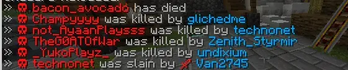
SpyDeathMessages
An advanced, fully customisable death messages plugin for Minecraft servers running Spigot / Paper 1.21+.
Replaces the vanilla death message with your own styled chat lines, action bar messages, titles, and subtitles — with full hex colour and Minecraft colour code support.

Features
- Two death message types: killed by player and died (any other cause)
- Four independent delivery channels per message: chat, action bar, title, subtitle
- Every channel can be turned on or off individually in the config
- Multiple messages per type — one is chosen at random each time
- Full hex colour support (
#ff1313) alongside legacy & colour codes (&c) - Per-player toggle — each player decides whether they want to see death messages
- Player preference persists across server restarts
- Three broadcast modes: global, world-only, or radius
- Configurable title animation timings
- Option to cancel the vanilla death message
- Tab-complete on all commands
Installation
- Download
SpyDeathMessages.jar - Place it in your server's
plugins/folder - Start or restart the server
- The plugin will generate
plugins/SpyDeathMessages/config.ymlautomatically - Edit the config to your liking, then run
/dm reload
Commands
| Command | Who can use it | What it does |
|---|---|---|
/dm toggle |
Every player | Turns death messages on or off for yourself only |
/dm reload |
Admins (op) | Reloads config.yml without restarting the server |
/dm help |
Everyone | Shows the help list in chat |
Alias:
/deathmessagesworks the same as/dm
Permissions
| Permission | Default | Description |
|---|---|---|
spydm.admin |
OP | Grants access to all admin commands (includes spydm.reload) |
spydm.reload |
OP | Allows reloading the config with /dm reload |
/dm togglerequires no permission — it is available to every player by default.
Per-Player Toggle
Any player can run /dm toggle to hide death messages from their own screen.
- Default state: messages are visible (opted in)
- After running
/dm toggle: messages are hidden (opted out) - Running
/dm toggleagain: messages become visible again (opted back in) - The choice is saved to disk (
opted_out.txtinside the plugin folder) so it survives server restarts
The player who died always appears in the message for others — the toggle only controls whether you see messages on your screen.
Configuration (config.yml)
Settings
settings:
  # Prefix shown in plugin feedback messages
  prefix: "#a8a8a8[#00a4fcDeathMsg#a8a8a8] "

  # Hide the vanilla Minecraft death message?
  cancel_vanilla_message: true

  # Who receives death messages:
  #   global  - all online players
  #   world   - only players in the same world
  #   radius  - only players within broadcast_radius blocks
  broadcast_mode: global
  broadcast_radius: 100

  # Title animation (in ticks, 20 ticks = 1 second)
  title_fade_in: 10
  title_stay: 60
  title_fade_out: 10
Message Types
There are two message types in the config:
| Key | When it triggers |
|---|---|
killed |
A player is killed by another player (melee or projectile) |
died |
A player dies from any other cause (fall, fire, lava, void, mob, etc.) |
Message Structure
Each message type follows this structure:
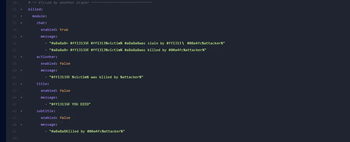
messages:
  killed:              # or: died
    module:
      chat:
        enabled: true      # show in chat? true/false
        message:
          - "Line one"     # if multiple lines, one is picked at random
          - "Line two"
      actionbar:
        enabled: true      # show in action bar? true/false
        message:
          - "Action bar text"
      title:
        enabled: false     # show as big title? true/false
        message:
          - "Title text"
      subtitle:
        enabled: false     # show as subtitle below title? true/false
        message:
          - "Subtitle text"
Set enabled: false on any channel to completely disable it.
Set enabled: true to activate it.
Placeholders
Use these inside any message string:
| Placeholder | Replaced with |
|---|---|
%victim% |
Name of the player who died |
%attacker% |
Name of the player who killed them |
%weapon% |
Name of the item the killer was holding |
%world% |
Name of the world the death happened in |
%attacker%and%weapon%are only filled forkilledmessages. They will be empty fordiedmessages.
Colour Codes
You can use both formats anywhere in messages:
Hex colours:
#ff1313   →  red
#00a4fc   →  blue
#a8a8a8   →  grey
#ffcc00   →  gold
Legacy & codes:
&a  →  green          &c  →  red
&b  →  aqua           &e  →  yellow
&d  →  light purple   &f  →  white
&0–&9  →  colours     &l  →  bold
&o  →  italic         &n  →  underline
&m  →  strikethrough  &k  →  obfuscated
&r  →  reset
Example combining both:
"#a8a8a8» #ff1313☠ #ff1313%victim% #a8a8a8was killed by #00a4fc%attacker%"
Random Messages
If you provide more than one line in the message list, the plugin picks one at random each time a player dies:
chat:
  enabled: true
  message:
    - "#a8a8a8» #ff1313☠ #ff1313%victim% #a8a8a8was slain by #00a4fc%attacker%"
    - "#a8a8a8» #ff1313☠ #ff1313%victim% #a8a8a8was killed by #00a4fc%attacker%"
    - "#a8a8a8» #ff1313☠ #ff1313%victim% #a8a8a8didn't survive %attacker%"
Default Config
settings:
  prefix: "#a8a8a8[#00a4fcDeathMsg#a8a8a8] "
  cancel_vanilla_message: true
  broadcast_mode: global
  broadcast_radius: 100
  title_fade_in: 10
  title_stay: 60
  title_fade_out: 10

messages:

  killed:
    module:
      chat:
        enabled: true
        message:
          - "#a8a8a8» #ff1313☠ #ff1313%victim% #a8a8a8was slain by #ff1313🗡 #00a4fc%attacker% #a8a8a8using #ffcc00%weapon%"
          - "#a8a8a8» #ff1313☠ #ff1313%victim% #a8a8a8was killed by #00a4fc%attacker%"
      actionbar:
        enabled: true
        message:
          - "#ff1313☠ %victim% was killed by %attacker%"
      title:
        enabled: false
        message:
          - "#ff1313☠ YOU DIED"
      subtitle:
        enabled: false
        message:
          - "#a8a8a8Killed by #00a4fc%attacker%"

  died:
    module:
      chat:
        enabled: true
        message:
          - "#a8a8a8» #ff1313☠ #ff1313%victim% #a8a8a8has died"
      actionbar:
        enabled: false
        message:
          - "#ff1313☠ %victim% has died"
      title:
        enabled: false
        message:
          - "#ff1313☠ YOU DIED"
      subtitle:
        enabled: false
        message:
          - ""
Files Created by the Plugin
| File | Location | Purpose |
|---|---|---|
config.yml |
plugins/SpyDeathMessages/ |
All message and settings configuration |
opted_out.txt |
plugins/SpyDeathMessages/ |
Saves UUIDs of players who turned off death messages |
Building from Source
Requires Java 8+ and Maven.
mvn package
Output: target/SpyDeathMessages.jar
Compatibility
| Item | Version |
|---|---|
| Minecraft | 1.21+ |
| Server software | Spigot, Paper |
| Java | 8 or higher |
Author
Made by YourSenior
- Edition: Minecraft Java
- File type: .jar
- Minecraft versions listed: 1.21, 1.21.1, 1.21.2
- How to install: Install the matching mod loader (Forge, Fabric or NeoForge) for your Minecraft version. → Download the .jar. → Put it in the .minecraft/mods folder and launch that loader profile.
- Where to get it: Opens on Modrinth — not every file is mirrored on our own servers.
Install steps are the general flow for this file type — How to install Minecraft Java mods & modpacks walks through it step by step.
- Ships as SpyDeathMessages (2).jar — drop this file into the mods folder
- Download size: 15 KB
- Download link checked 22 Aug 2026 — working
These come from our own check of the pack file, not from the source page.