
FakeVanish
A simple Vanish plugin. This plugin is designed to hide the server admin panel using the /va command. When Vanish is enabled, the boss panel is displayed.
⬇ Download on Modrinth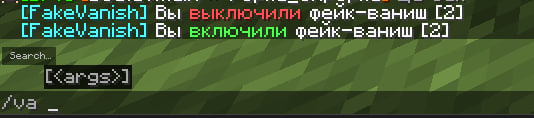

This plugin is designed to hide the server's admin panel using the /va command. When Vanish is enabled, the boss bar is displayed. Permissions for the group must be granted in luckperms for the plugin to work correctly. It's also worth noting that permissions must be granted strictly in ascending order, so that those with lower permissions won't be able to see those with higher permissions. The plugin is in Russian, but can be changed to English in the config.
- Edition: Minecraft Java
- File type: .jar
- Minecraft versions listed: 1.16, 1.16.1, 1.16.2
- How to install: Install the matching mod loader (Forge, Fabric or NeoForge) for your Minecraft version. → Download the .jar. → Put it in the .minecraft/mods folder and launch that loader profile.
- Where to get it: Opens on Modrinth — not every file is mirrored on our own servers.
Install steps are the general flow for this file type — How to install Minecraft Java mods & modpacks walks through it step by step.
- Ships as FakeVanish-1.2.5.jar — drop this file into the mods folder
- Download size: 9 KB
- Download link checked 24 Aug 2026 — working
These come from our own check of the pack file, not from the source page.