MV Gui
Java mod listed for Minecraft 1.21. Downloads from the MC Java Mods app on Android.
⬇ Download on Modrinth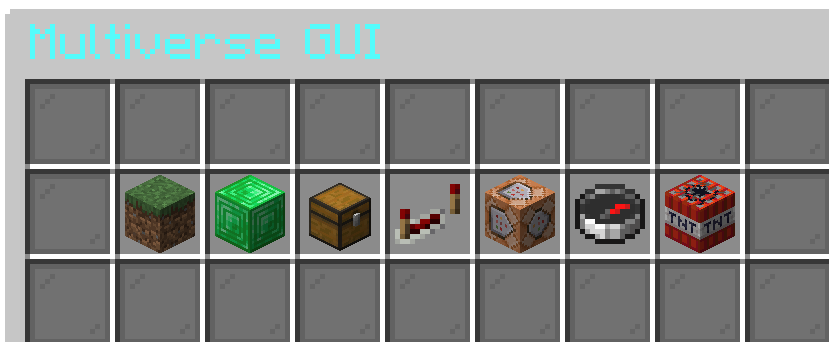
🧭 MV GUI Helper 📖 Overview
MV GUI Helper is a simple and user-friendly plugin that adds a GUI menu for navigating worlds created with Multiverse.
⚠️ Note: This plugin is NOT made by Multiverse-Core developers. It is an independent addon designed to make Multiverse easier to use — especially for new players.
✨ Features 🧭 Clean GUI world selector ⚡ Easy teleport between worlds 🎮 Beginner-friendly interface 🧩 Works alongside Multiverse-Core 🔒 Permission support 🚀 Lightweight and fast 👶 Perfect for New Players
Instead of using commands like:
/mvtp world
Players can simply:
/mvgui
…and choose a world from a menu!
📦 Requirements Multiverse-Core Paper / Spigot 📜 Commands /mvgui - Open the world GUI 🔐 Permissions mvgui.admin - Access the GUI ⚠️ Disclaimer
This plugin is not affiliated with or developed by the Multiverse-Core team. It is simply a helper plugin to improve usability.
💬 Support
Need help or found a bug? Contact me or open an issue on the project page.
🚀 Why use this? No command memorizing Better player experience Cleaner server navigation
- Edition: Minecraft Java
- File type: .jar
- Minecraft version listed: 1.21.11
- How to install: Install the matching mod loader (Forge, Fabric or NeoForge) for your Minecraft version. → Download the .jar. → Put it in the .minecraft/mods folder and launch that loader profile.
- Where to get it: Opens on Modrinth — not every file is mirrored on our own servers.
Install steps are the general flow for this file type — How to install Minecraft Java mods & modpacks walks through it step by step.
- Ships as MVGui.jar — drop this file into the mods folder
- Download size: 13 KB
- Download link checked 23 Oct 2026 — working
These come from our own check of the pack file, not from the source page.