
HereDed
Java mod listed for Minecraft 1.21–26.x. Downloads from the MC Java Mods app on Android.
A Paper Minecraft plugin that tracks player deaths as tributes and announces them Hunger-Games-style with cannon sounds. Also handles deaths to place…
⬇ Download on Modrinth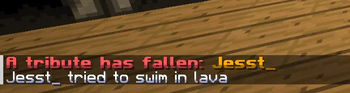
HereDed 💀
A feature-rich Paper Minecraft plugin that tracks player deaths as tributes, broadcasts Hunger Games-style announcements with custom sounds, and provides powerful, configurable death modes with an interactive Admin GUI.
Features
- 📣 Hunger Games Tributes — Plays a dramatic cannon explosion sound to all online players and broadcasts a bold announcement when a player dies: "A tribute has fallen: [Player]".
- ⚙️ Dynamic Death Modes — Configure how player deaths are managed server-wide. Choose between:
NORMAL(Vanilla behavior): Standard vanilla death where items and levels drop on the ground.TOMBSTONE: Saves all inventory, armor, and offhand items into a grave chest block at the death location.- Tells the player the exact coordinates and world name of their grave.
- Configurable ownership lock (
tombstone.lock-to-ownerinconfig.yml) to prevent other players from looting graves. - Fully protected from explosions, piston movements, and hopper extractions.
INFINITE: Keep inventory and level upon death with no penalties.HARDCORE: Automatic, instant resurrection but clears the inventory and resets levels to1.
- 🖥️ Admin GUI — Switch death modes in real-time using an intuitive, interactive inventory-based GUI.
- 📜 Join MOTD & Death Lists — Displays a welcome message (configurable in
motd.txt) and broadcasts a list of all tributes that have fallen in the last 24 hours to joining players. - 💾 Persistent Storage — Saves death history to
deaths.json(auto-pruned after 24 hours) and active graves totombstones.ymlso they persist through server reboots.
Requirements
- Server: Paper 1.21+
- Java: Java 21+
Installation
- Download the latest
HereDed-*.jarfrom the releases page. - Place the JAR file into your server's
plugins/directory. - Restart or start your server to generate config files.
- Customize settings in
plugins/HereDed/config.ymlandplugins/HereDed/motd.txtas needed.
Commands & Permissions
Commands
| Command | Alias | Description | Permission |
|---|---|---|---|
/hereded gui |
/hd gui |
Opens the Admin GUI to change the death mode. | hereded.admin |
/hereded admin |
/hd admin |
Opens the Admin GUI to change the death mode. | hereded.admin |
/hereded status |
/hd status |
Checks the active death mode, count of active graves, and recent deaths. | hereded.use |
/hereded reload |
/hd reload |
Reloads the configuration, motd.txt, and active tombstones. |
hereded.admin |
Permissions
hereded.use(Default: true) — Allows basic command usage (/hereded status).hereded.admin(Default: op) — Allows opening the Admin GUI and reloading the plugin configuration.
Configuration Files
All configuration files are located in the plugins/HereDed/ folder:
| File | Description |
|---|---|
config.yml |
Main configuration file. Set the default death mode (death-mode: NORMAL) and toggle grave ownership lock (tombstone.lock-to-owner: false). |
motd.txt |
Custom welcome message shown to players on join. Supports the {player} placeholder. |
deaths.json |
Auto-generated file containing recent death records. Pruned automatically every 24 hours. Do not edit manually. |
tombstones.yml |
Auto-generated registry of active tombstones. Do not edit manually. |
Building from Source
To compile the plugin yourself:
./gradlew build
The compiled JAR will be located in the build/libs/ directory.
License
This project is licensed under the GNU General Public License v3.0.
- Edition: Minecraft Java
- File type: .jar
- Minecraft versions listed: 1.21, 1.21.1, 1.21.2
- How to install: Install the matching mod loader (Forge, Fabric or NeoForge) for your Minecraft version. → Download the .jar. → Put it in the .minecraft/mods folder and launch that loader profile.
- Where to get it: Opens on Modrinth — not every file is mirrored on our own servers.
Install steps are the general flow for this file type — How to install Minecraft Java mods & modpacks walks through it step by step.
- Ships as HereDed-1.0.2.jar — drop this file into the mods folder
- Download size: 30 KB
- Download link checked 24 Oct 2026 — working
These come from our own check of the pack file, not from the source page.