
NetherBan
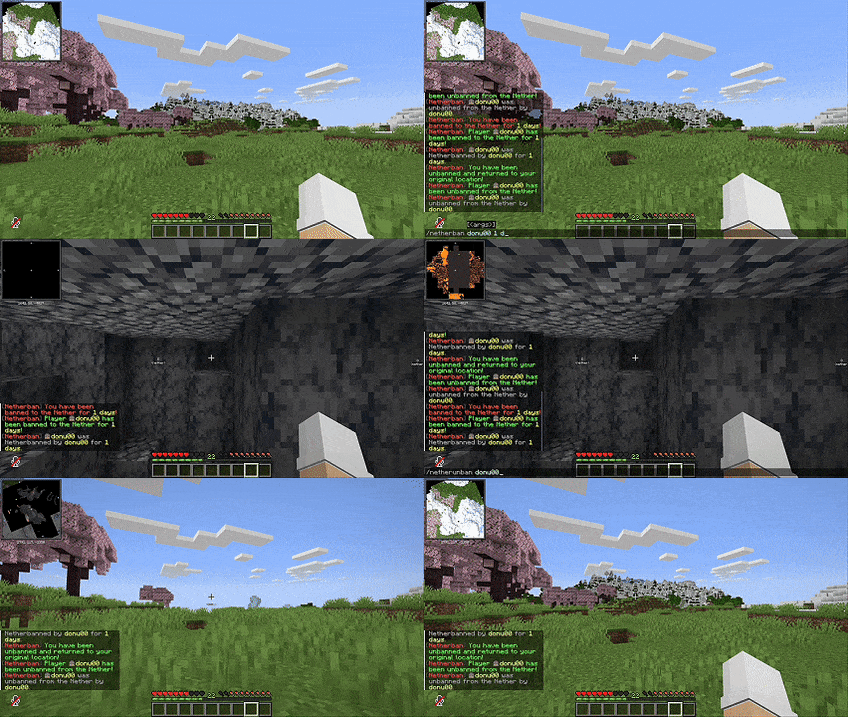
When a player gets in trouble NetherBan does not kick them out of the server. It sends them to the Nether instead.
NetherBan takes the player to a spot deep in the Nether. It also stops them from using portals teleporting or going to their homes and other safe places. When the time is up the player goes back to where they were
This is great for lots of servers like SMPs, hardcore servers, prisons, factions and custom punishment systems.
Features
We can choose how long the player stays in the Nether it can be for a while or forever.
The player goes to a random spot in the Nether each time.
They cannot use commands to get out.
They cannot use the Nether portal to escape.
When the time is up the player goes back, to where they were.
We can change the messages and settings to what we want.
NetherBan does not slow down the server.
Commands
/netherban <player> <time>

/unnetherban <player>

/netherbancheck <player>

/netherbanreload
Permissions
netherban.admin

netherban.ban

netherban.unban

netherban.reload
Configuration Example
nether-border-radius: 5000

min-teleport-distance: 1000

teleport-y-level: 70

blocked-commands:

Spawn

Home

Warp

Tp

Teleport

Tpa

Back

Rtp
Supported Platforms
Paper
Spigot
Purpur
Supported Versions
1.20 and higher
We recommend using 1.21 or higher
Punishment Reimagined
NetherBan does not just kick players out of the server. It makes them survive in the Nether until their time is up. This is a way to handle players who get in trouble. NetherBan is a way to punish players. NetherBan makes the game more fun.
- Edition: Minecraft Java
- File type: .jar
- Minecraft versions listed: 1.20, 1.20.1, 1.20.2
- How to install: Install the matching mod loader (Forge, Fabric or NeoForge) for your Minecraft version. → Download the .jar. → Put it in the .minecraft/mods folder and launch that loader profile.
- Where to get it: Opens on Modrinth — not every file is mirrored on our own servers.
Install steps are the general flow for this file type — How to install Minecraft Java mods & modpacks walks through it step by step.
- Ships as BanishedToTheNether-21.jar — drop this file into the mods folder
- Download size: 24 KB
- Download link checked 23 Aug 2026 — working
These come from our own check of the pack file, not from the source page.