
MCTiers & PVPTiers Commands
Java mod listed for Minecraft 1.20–1.21. Downloads from the MC Java Mods app on Android.
This is a command plugin for your players to view MCTiers & PVPTiers of a player using a command. Commands: /pvptiers --> Displays PVPTiers profile of…
⬇ Download on Modrinth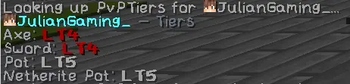
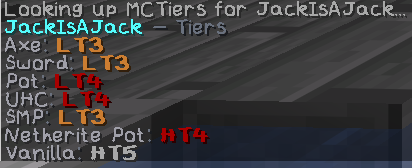
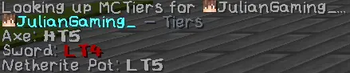
This is a command plugin for your players to view MCTiers & PVPTiers of a player using a command.
Commands:
- /pvptiers --> Displays PVPTiers profile of player specified
- /mctiers --> Displays MCTiers profile of player specified
This supports and editable config to edit the API URLs if they change, and also it allows you to change the colour of the tiers that show.
Why this plugin was made?
This plugins was developed and made for DementedPolars Minecraft Server. This is a PvP Server hosted and developed by JulianGaming_ & JackIsAJack.
Server IP: dementedpolars.net
Server Location: UK
Editable configuration
This supports and editable config to edit the API URLs if they change, and also it allows you to change the colour of the tiers that show.
cacheSeconds: 60
httpTimeoutSeconds: 6

pvptiers:
  url: "https://pvptiers.com/api/search_profile/{username_lower}"
  userAgent: "Mozilla/5.0 (TierLookupCommands; Paper)"

mctiers:
  url: "https://mctiers.com/api/v2/profile/by-name/{username}"
  userAgent: "Mozilla/5.0 (TierLookupCommands; Paper)"

format:
  ladderAliases:
    nethop: "neth_pot"
    netheritepot: "neth_pot"
  headerColor: "#9AA0A6"
  nameColor: "#E8EAED"
  ladderColor: "#A1A1AA"
  dashColor: "#6B7280"

  # How ladders are displayed (keys must match API keys)
  ladderNames:
    axe: "Axe"
    sword: "Sword"
    pot: "Pot"
    neth_pot: "Netherite Pot"
    uhc: "UHC"
    smp: "SMP"
    crystal: "Crystal"

  # Optional: show only these ladders first (others append after)
  ladderOrder: ["axe","sword","pot","neth_pot","uhc","smp","crystal"]

  # Tier colours (HT/LT + number)
  tierColors:
    ht1: "#FF3B30"
    ht2: "#FF453A"
    ht3: "#FF9F0A"
    ht4: "#FFD60A"
    ht5: "#30D158"
    lt1: "#0A84FF"
    lt2: "#64D2FF"
    lt3: "#5E5CE6"
    lt4: "#BF5AF2"
    lt5: "#FF2D55"

  defaultTierColor: "#E8EAED"
- Edition: Minecraft Java
- File type: .jar
- Minecraft versions listed: 1.20, 1.20.1, 1.20.2
- How to install: Install the matching mod loader (Forge, Fabric or NeoForge) for your Minecraft version. → Download the .jar. → Put it in the .minecraft/mods folder and launch that loader profile.
- Where to get it: Opens on Modrinth — not every file is mirrored on our own servers.
Install steps are the general flow for this file type — How to install Minecraft Java mods & modpacks walks through it step by step.
- Ships as DP-TierTagger-1.0.jar — drop this file into the mods folder
- Download size: 296 KB
- Download link checked 23 Oct 2026 — working
These come from our own check of the pack file, not from the source page.