
Plugin Engine
Plugin Engine is a live scripting IDE for Minecraft that lets you write and execute JavaScript or Java directly on a running server through a browser…
⬇ Download on Modrinth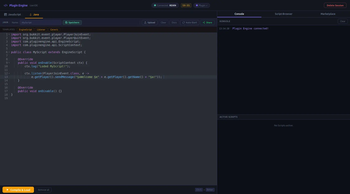
Plugin Engine, Live Scripting IDE for Minecraft
Write JavaScript or Java in your browser and execute it on your running server, no reload, no restart, no config.
Just drop the JAR into /plugins, type /plugin-engine in chat, click the link, and start coding. That's it.
✨ Features
🟡 JavaScript, Instant & No Boilerplate
Register Bukkit event handlers with a single line using the built-in scripting API:
on("playerJoin", (player) => {
  player.sendMessage("§aWelcome, §e" + player.name + "§a!");
  server.broadcast("§7[§a+§7] §a" + player.name + " joined.");
});

on("playerChat", (player, msg) => {
  if (msg.startsWith("!heal")) player.heal();
});
Press Ctrl+Enter → runs live on the server. No classes, no imports, no boilerplate.
☕ Java, Real Classes, Live Compiled
Compile actual Java classes at runtime using the server's JDK. Supports implements Listener, extends EngineScript, or any class with a run(ScriptContext) method:
public class JoinScript extends EngineScript {
    @Override
    public void onEnable(ScriptContext ctx) {
        ctx.listen(PlayerJoinEvent.class, e ->
            e.getPlayer().sendMessage("§aWelcome!"));
        ctx.scheduleRepeating(() -> ctx.log("Tick!"), 20L, 20L);
    }
    @Override public void onDisable() {}
}
Requires JDK (not just JRE) on the server.
🌐 Zero Config, Works Out of the Box
Plugin Engine automatically connects to the hosted cloud backend at gianhosting.tech. No API keys, no shared secrets, no reverse proxy setup required.
- Install JAR → start server → type
/plugin-engine→ get a link → code. - The plugin generates a unique server ID on first start and connects automatically.
- Want to self-host the backend? The Node.js backend is open source.
🔒 Secure Session Links
- Sessions are tied to your Minecraft account, identity cannot be spoofed.
- Each link is a one-time personalized token, valid for 60 minutes (configurable).
- All session routes are protected by session validation on every request.
- Security headers (CSP, X-Frame-Options, Referrer-Policy, Permissions-Policy) on all session pages.
🛒 Community Script Marketplace
Share your scripts with the community and discover scripts made by others, directly from within the IDE.
- Uploader identity is verified through the Minecraft session: the player name is pulled from the authenticated Minecraft session, not user input. It cannot be faked.
- Every script shows a warning that community code should be reviewed before execution.
- Filter by JS / Java, search by name, author, or description.
- Your own scripts show a delete button.
🔄 Scripts Survive Sessions & Restarts
Scripts keep running after your session ends, they are not tied to the browser tab.
- Use
/plugin-engine stopto explicitly stop all scripts (admin-only). - Mark any script as Auto-Start in the IDE: it will be saved to disk and re-executed automatically every time the server starts, with no further action required.
- Auto-Start entries are stored in
plugins/PluginEngine/startup.json.
💾 Script Storage
Save and load your scripts from within the IDE. Storage can be:
- Global (
global-storage: true, default), all players on the server share one script library. - Per-player (
global-storage: false), each player gets their ownscripts/{name}/folder.
🚀 Getting Started
1. Install
Drop PluginEngine-1.0.0.jar into your server's /plugins folder and restart.
2. Open the IDE In Minecraft chat, type:
/plugin-engine
A clickable link appears in chat. Click it to open the browser IDE.
3. Write & Execute Select JavaScript or Java, write your code, press Ctrl+Enter.
That's everything. No configuration required.
⚙️ Configuration (config.yml)
| Option | Default | Description |
|---|---|---|
port |
5000 |
Port for the built-in web server (fallback if no backend) |
max-sessions |
5 |
Maximum number of simultaneous open sessions |
session-duration-minutes |
60 |
How long a session link stays valid |
global-storage |
true |
true = shared script folder, false = per-player folders |
backend-url |
wss://gianhosting.tech/plugin-wss |
WebSocket URL of the backend |
public-url |
https://gianhosting.tech |
Public URL used in session links |
server-id |
(auto-generated) | Unique identifier for this server, do not edit manually |
You don't have to change anything, everything is already setup.
📋 Permissions
| Permission | Default | Description |
|---|---|---|
pluginengine.use |
op |
Open a session and use the IDE |
pluginengine.admin |
op |
Access to /plugin-engine stop and revoke all |
🖥️ Commands
| Command | Description |
|---|---|
/plugin-engine |
Open a new session and receive a link |
/plugin-engine revoke |
End your own sessions (scripts keep running) |
/plugin-engine stop |
Stop all running scripts [Admin] |
/plugin-engine status |
Show active sessions, script count, backend status |
/plugin-engine help |
Show all available commands |
Aliases: /pe, /peng
📦 Requirements
- Paper 1.21 or higher (Spigot is not officially supported)
- Java 21 or higher
- JDK (not just JRE), required for Java compilation. JavaScript works without JDK.
🔧 JavaScript API Reference
// Event handler
const id = on("eventName", callback)  // register
off(id)                                // unregister

// Events
"playerJoin"       // (player)
"playerQuit"       // (player)
"playerDeath"      // (player)
"playerRespawn"    // (player)
"playerMove"       // (player)
"playerInteract"   // (player)
"playerChat"       // (player, msg)
"blockBreak"       // (player, block)
"blockPlace"       // (player, block)

// Player
player.name           player.health      player.gameMode
player.sendMessage("§aText")
player.kick("reason")
player.teleport(x, y, z)
player.giveItem("DIAMOND", 1)
player.heal()
player.setGameMode("creative")

// Server
server.broadcast("§6Text")
server.runCommand("say hello")
server.getOnlinePlayers()
server.getTPS()

// Logging
log("message")
❓ FAQ
Does this work without internet?
Yes. If the cloud backend is unreachable, the plugin falls back to the built-in web server on the configured port. You can also set backend-url to blank in config.yml to always use the local server.
Are scripts persisted across reloads?
Scripts in memory are lost on /reload or restart. Use the Auto-Start feature in the IDE to re-execute scripts automatically on every server start.
Can players grief with this?
The pluginengine.use permission defaults to op. Only grant it to trusted players. Scripts run with full server permissions, treat them like plugins.
Why does Java compilation require JDK?
The javax.tools.JavaCompiler API used for runtime compilation is only available in a JDK, not a plain JRE. Most server hosting providers include a JDK; if yours doesn't, JavaScript still works without it.
Is the cloud backend safe?
The server authenticates to the backend using its auto-generated UUID server-id (stored in config.yml). This ID acts as a 128-bit random secret. Don't share your config.yml.
Built with Mozilla Rhino for JavaScript · Ace Editor · Fastify backend on Raspberry Pi via Cloudflare Tunnel
- Edition: Minecraft Java
- File type: .jar
- Minecraft versions listed: 1.21, 1.21.1, 1.21.2
- How to install: Install the matching mod loader (Forge, Fabric or NeoForge) for your Minecraft version. → Download the .jar. → Put it in the .minecraft/mods folder and launch that loader profile.
- Where to get it: Opens on Modrinth — not every file is mirrored on our own servers.
Install steps are the general flow for this file type — How to install Minecraft Java mods & modpacks walks through it step by step.
- Ships as CodingPluginEngine.jar — drop this file into the mods folder
- Download size: 46.9 MB
- Download link checked 14 Sept 2026 — working
These come from our own check of the pack file, not from the source page.