
Floyd-Backpack
Java mod listed for Minecraft 1.20–26.x. Downloads from the MC Java Mods app on Android.
I don't know my version or loader
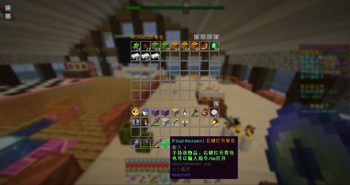
Floyd-Backpack
Overview
Floyd-Backpack is a PaperMC server backpack plugin that provides each player with an independent 54-slot storage space. The plugin is developed based on the Floyd-Core framework and supports data persistence, internationalization, quick backpack access via tool items, and secondary confirmation to prevent accidental operations.
Features
- 54-Slot Backpack: Each player has independent double-chest capacity storage space, isolated by UUID
- Backpack Tool: Players automatically receive a tool item (Eye of Ender) when joining or respawning; right-click to open the backpack; to prevent accidental operations, the tool item cannot be stored in the backpack
- Data Persistence: Automatically saves when players quit, and batch persists to JSON files when the server shuts down
- Clear Function: One-click backpack clearing with secondary confirmation mechanism and configurable timeout
- Internationalization: Built-in English and Simplified Chinese, switchable via configuration file; backpack title updates dynamically with language
- Hot Reload: Supports reloading configuration without restarting the server
- Thread Safety: Backpack data uses
ReentrantLockto ensure thread safety
Commands
| Command | Alias | Permission | Description |
|---|---|---|---|
/backpack |
/bp |
floydbackpack.open |
Open personal backpack (default action) |
/backpack open |
- | floydbackpack.open |
Open personal backpack |
/backpack clear |
- | floydbackpack.clear |
Clear backpack (requires secondary confirmation) |
/backpack clear confirm |
- | floydbackpack.clear |
Confirm backpack clearing |
/backpack clear cancel |
- | floydbackpack.clear |
Cancel clearing |
/backpack reload |
- | floydbackpack.reload |
Reload configuration |
/backpack help |
- | floydbackpack.help |
Display help information |
Console cannot execute backpack-related commands.
Usage Examples
# Open backpack
/bp

# Or full command
/backpack

# Clear backpack (triggers secondary confirmation)
/bp clear

# Confirm clearing (irreversible operation)
/bp clear confirm

# Cancel clearing
/bp clear cancel

# Reload configuration
/bp reload

# View help
/bp help
Clear Operation Flow
- Enter
/bp clear, the system displays confirmation message and countdown - Enter
/bp clear confirmto confirm clearing (irreversible) - Enter
/bp clear cancelto cancel the operation - If not confirmed within timeout, the operation automatically expires
Permissions
| Permission Node | Default Value | Description |
|---|---|---|
floydbackpack.open |
true (everyone) |
Allows players to open backpack |
floydbackpack.clear |
op (administrators) |
Allows players to clear backpack |
floydbackpack.reload |
op (administrators) |
Allows reloading configuration |
floydbackpack.help |
true (everyone) |
Display help information |
Backpack Tool
When players join the server or respawn, if there is no tool item in their inventory, they will automatically receive an Eye of Ender as the backpack tool.
- Acquisition Method: Automatically issued when players join/respawn
- Usage Method: Right-click while holding the tool item to open the backpack
- Lock Protection: The tool item cannot be placed into the backpack interface through clicking, dragging, Shift-moving, or hotkeys, preventing accidental storage
- Recognition Mechanism: Identified via
PersistentDataContainertags, supporting multi-language environments; also maintains backward-compatible recognition based on item type and enchantments - Alternative Method: Can also use
/bpcommand to open the backpack
Configuration
Configuration file location: plugins/FloydBackpack/config.yml.
Complete Configuration Items
logging:
  file:
    enable: true       # Whether to enable file logging
  level: INFO          # Log level

command:
  backpack:
    clear:
      enable: true         # Whether to enable backpack clear command
      need-confirm: true   # Whether secondary confirmation is required before clearing
      confirm-interval: 30000  # Secondary confirmation timeout (milliseconds)

i18n:
  locale: en           # Language setting, options: en / zh_cn
Configuration Item Descriptions
| Path | Type | Default Value | Description |
|---|---|---|---|
logging.file.enable |
boolean | true |
Whether to output logs to file |
logging.level |
string | INFO |
Log output level |
command.backpack.clear.enable |
boolean | true |
Whether to enable /bp clear command |
command.backpack.clear.need-confirm |
boolean | true |
Whether secondary confirmation is required before clearing backpack |
command.backpack.clear.confirm-interval |
long | 30000 |
Timeout for secondary confirmation (milliseconds) |
i18n.locale |
string | en |
Language locale setting |
Hot Reload
After modifying the configuration file, there is no need to restart the server. Execute the following command to apply changes:
/bp reload
Internationalization
The plugin includes two built-in language files:
| Language | Filename | Config Value |
|---|---|---|
| English | language/en.yml |
en |
| Simplified Chinese | language/zh_cn.yml |
zh_cn |
Execute /bp reload after switching languages to take effect. The backpack interface title will dynamically update with the language setting. Old interfaces that are already open will be rebuilt with the new language title on next operation, without losing item contents.
Custom Language Files
To add languages not built-in (such as Japanese), you can manually create language files:
- Create a new YAML file in the
plugins/FloydBackpack/language/directory (create the directory manually if it doesn't exist) - Refer to the structure of built-in language files and translate all message keys. For example, create a Japanese file
language/ja.yml:
command:
  backpack:
    console-not-allowed: "§cコンソールからこのコマンドを実行できません。"
    reload:
      start: "§a設定を再読み込み中..."
      success: "§a再読み込みが完了しました ({0}ms)。"
      failure: "§c再読み込みに失敗しました。コンソールを確認してください。"
    help:
      line1: "§b[Floyd-Backpack] §a§lヘルプ"
      line2: "§6§n>> コマンド"
      line3: "§3/bp open §e- §7バックパックを開く"
      line4: "§3/bp clear §e- §7バックパックを空にする"
      line5: "§3/bp reload §e- §7設定を再読み込み"
      line6: "§e詳細: §f§nhttps://github.com/codeNoob2281/Floyd-Backpack"
    clear:
      feature-disabled: "§cバックパックを空にする機能は無効です。"
      pending-operation-exists: "§e保留中の確認操作があります。続行してください。"
      confirm-delete: "§6バックパックを空にしてもよろしいですか?この操作は元に戻せません。"
      confirm-timeout: "§9残り {0} 秒以内に確認してください。"
      no-active-operation: "§e有効な確認操作がありません。"
      operation-cancelled: "§eバックパックを空にする操作はキャンセルされました。"
      cleared: "§aバックパックを空にしました。§c{0}§a 個のアイテムを削除。"
      tip-confirm: "§6確認するには §c/bp clear confirm §6を入力"
      tip-cancel: "§6キャンセルするには §c/bp clear cancel §6を入力"
      operation-expired: "§e[Floyd-Backpack] §6前回の操作は期限切れです。"
chest-ui:
  backpack-title: "§6{0}のバックパック"
backpack-tool:
  item-name: "§b[Floyd-Backpack]§6 右クリックでバックパックを開く"
  lore-line1: "§aこのアイテムを持って右クリックでバックパックを開く"
  lore-line2: "§aまたは /bp コマンドを使用"
- Modify the language configuration in
config.yml:
i18n:
  locale: ja
- Execute
/bp reloadto make the new language effective
Language files must maintain the same YAML structure and key names as built-in files, otherwise the plugin may fail to load correctly. If the plugin cannot automatically read external language files, place the file in the source code
src/main/resources/language/directory and rebuild.
Data Storage
Player backpack data storage location:
plugins/FloydBackpack/backpack/<player-UUID>.json
- Each player's backpack data is saved independently with UUID naming
- Save Timing: Automatically saved when players quit the server; batch saves all online player data when the server shuts down
- Loading Method: Loaded from disk when opening the backpack for the first time, subsequent operations use memory cache
- Fault Tolerance: If JSON data is corrupted, it is automatically backed up as
.bak.<timestamp>file, and a new empty backpack is created for the player - Thread Safety: Each backpack instance holds a
ReentrantLock, ensuring data safety in multi-threaded environments
Usage Notes
- Clearing the backpack is an irreversible operation; with secondary confirmation enabled, be sure to confirm before executing
- Console cannot execute any backpack commands
- Floyd-Core is embedded in the plugin as a Maven dependency, no additional installation required
- Backpack tool items cannot be stored in the backpack interface; this prevents accidental storage that would make it impossible to open the backpack
- After switching languages, execute
/bp reloadto make the new language settings effective - It is recommended to regularly backup the data files in the
plugins/FloydBackpack/backpack/directory
- Edition: Minecraft Java
- File type: .jar
- Minecraft versions listed: 1.20.6, 1.21, 1.21.1
- How to install: Install the matching mod loader (Forge, Fabric or NeoForge) for your Minecraft version. → Download the .jar. → Put it in the .minecraft/mods folder and launch that loader profile.
- Where to get it: Opens on Modrinth — not every file is mirrored on our own servers.
Install steps are the general flow for this file type — How to install Minecraft Java mods & modpacks walks through it step by step.
- Ships as Floyd-Backpack-1.1.0.jar — drop this file into the mods folder
- Download size: 7.4 MB
- Download link checked 21 Oct 2026 — working
These come from our own check of the pack file, not from the source page.