
ModsJava
WorldGuard ItemBlocker
Issues & Suggestions Visit our Discord for any issues or suggestions! Summary: Restrict Players from entering specific regions with restricted items. Good…
⬇ Download on Modrinth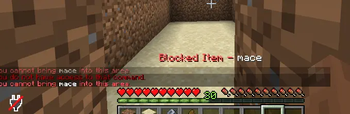
Issues & Suggestions
Visit our Discord for any issues or suggestions!
Summary:
Restrict Players from entering specific regions with restricted items. Good for pvp zones, mace vs sword area etc
Features
- Hooks into WorldGuard to prevent users from entering regions with any items you list in the config
- Sends hotbar and or chat message about the block & whats blocking you from entering
- Easily configurable and reload new restrictions and regions with one command
Commands:
/wgib reload
Permissions:
- worldguarditemblocker.reload - Reload config
- worldguarditemblocker.bypass - Bypass restrictions
Dependancies:
- WorldGuard
Config:
# AUTHOR: JAMPLIFIER
# SUPPORT: http://discord.gg/simplestudio

WARNINGS:
  HOTBAR: true
  CHAT: true

REGION-BLOCKS:
  test:
    BLOCKED-ITEMS:
      - MACE

  test2:
    BLOCKED-ITEMS:
      - MACE
      - FIREWORK_ROCKET

MESSAGES:
  BLOCKED-HOTBAR: "&cBlocked Item - &f<item>"
  BLOCKED-CHAT: "&cYou cannot bring &f<item> &cint
Quick facts
- Edition: Minecraft Java
- File type: .jar
- Minecraft versions listed: 1.21, 1.21.1, 1.21.2
- How to install: Install the matching mod loader (Forge, Fabric or NeoForge) for your Minecraft version. → Download the .jar. → Put it in the .minecraft/mods folder and launch that loader profile.
- Where to get it: Opens on Modrinth — not every file is mirrored on our own servers.
Install steps are the general flow for this file type — How to install Minecraft Java mods & modpacks walks through it step by step.
Verified by MCModsHub
- Ships as WorldGuardItemBlocker-1.0-SNAPSHOT.jar — drop this file into the mods folder
- Download size: 14 KB
- Download link checked 11 Sept 2026 — working
These come from our own check of the pack file, not from the source page.