
🎤 Voice Command Block for Minecraft
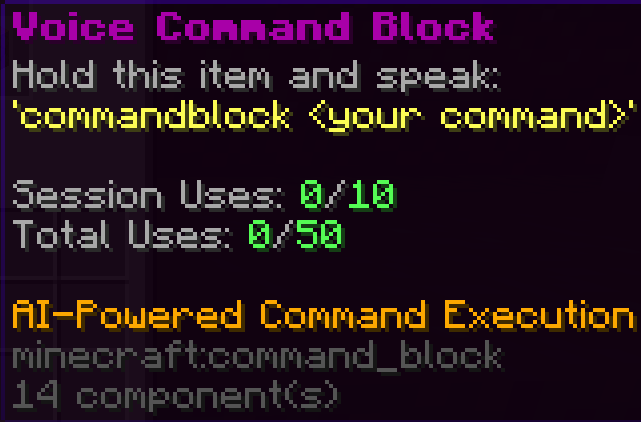
This plugin adds a craftable Command Block that reacts to voice commands.
When a player holds the block in their hand and speaks into their microphone:
“Commandblock … ”
The spoken request is interpreted by an AI and executed in-game.
Examples:
“Commandblock give me food” “Commandblock teleport me home” “Commandblock spawn a horse” “Commandblock make it daytime”
The goal is simple and natural voice control without typing commands.
🧱 The Voice Command Block
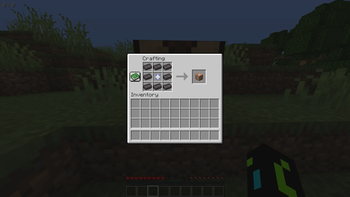
Players can craft a special Command Block.
When the block is held in the player’s hand:
The plugin listens for the activation word “Commandblock” Speech is sent to an AI The wish is interpreted The matching action is executed
Perfect for:
SMP servers Roleplay servers Adventure maps Events & content creation ⚙️ Full Configuration with /vcmd
Using the command:
/vcmd
you can configure nearly everything.
Examples of configurable settings:
Add your API key Configure the AI provider Choose the AI model Customize the name / activation word Set limits & cooldowns Enable or disable features
👉 Important: The plugin only works after your own setup. Server owners must configure it themselves:
Enter an API key Choose a model Select a provider Adjust the settings
The plugin provides the system — the AI configuration is up to the server owner.
🔧 Requirements Simple Voice Chat (microphone required) Your own Speech/AI API key Your own model configuration 💡 Plugin Idea
This plugin turns a Command Block into a voice assistant inside the game. Hold it, speak your wish, and let the AI handle the rest.
WARNING It might have some bugs. it is not the full version Bug reporting can be done on my YouTube Showcase Video: https://www.youtube.com/watch?v=M9g11YHfU94 or my Discord server: https://discord.gg/th6fGzE2f
- Edition: Minecraft Java
- File type: .jar
- Minecraft versions listed: 1.21, 1.21.1, 1.21.2
- How to install: Install the matching mod loader (Forge, Fabric or NeoForge) for your Minecraft version. → Download the .jar. → Put it in the .minecraft/mods folder and launch that loader profile.
- Where to get it: Opens on Modrinth — not every file is mirrored on our own servers.
Install steps are the general flow for this file type — How to install Minecraft Java mods & modpacks walks through it step by step.
- Ships as VoiceCommandAgent-1.0.0.jar — drop this file into the mods folder
- Download size: 42.7 MB
- Download link checked 23 Aug 2026 — working
These come from our own check of the pack file, not from the source page.