
RatsCurrencies
Java mod listed for Minecraft 1.16–26.x. Downloads from the MC Java Mods app on Android.
A Simple Custom Currency Plugin Which Adds A Shop And A Currency Distribution System For Your Server. This Also Helps To Save The Memory And CPU Usage…
⬇ Download on Modrinth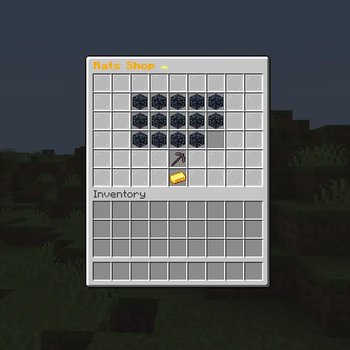
RatsCurrencies - A Unique Economy Plugin Add a fun and engaging rat-themed currency system to your Minecraft server! RatsCurrency provides a complete economy solution with a custom shop system, rewards, and full Vault integration.
Features ✨ Custom Rat Currency System
Independent economy separate from server money Automatic rewards for active players Easy balance management with admin commands 🛍️ Interactive Shop GUI
Beautiful inventory-based shop interface Display-only items (set price to -1) Easy item management with commands 💰 Dual Economy Support
Works with Vault for Money economy Separate Rats economy for special shops Compatible with EconomyShopGUI 🎯 PlaceholderAPI Integration
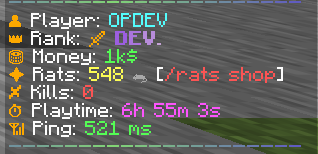
%rats_balance% - Player's rat balance %rats_balance_formatted% - Formatted balance with decimals Use in chat, scoreboards, holograms, and more ⚙️ Admin Tools
Add/remove/set player balances Manage shop items easily Reload configuration without restart Full LuckPerms permission support Commands Player Commands:
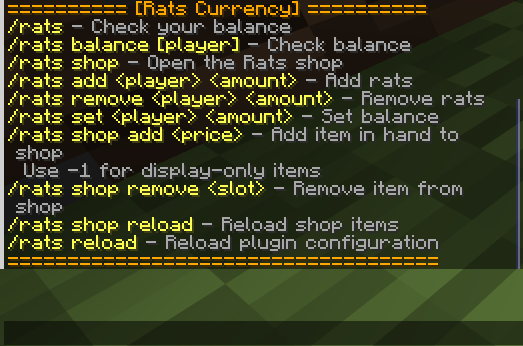
/rats - Check your balance /rats shop - Open the shop Admin Commands:
/rats add - Add rats to player /rats remove - Remove rats from player /rats set - Set player balance /rats shop add - Add item to shop (hold item, use -1 for display-only) /rats shop remove - Remove item from shop /rats reload - Reload all configurations Permissions rats.balance - Check balance rats.shop - Use the shop rats.admin - All admin commands Requirements Spigot/Paper 1.16+ Vault (for economy integration) PlaceholderAPI (optional, for placeholders) LuckPerms (recommended, for permissions) Configuration Customize in config.yml:
Reward amount and interval Starting balance for new players Currency display name and symbol Reward notifications
- Edition: Minecraft Java
- File type: .jar
- Minecraft versions listed: 1.16, 1.16.1, 1.16.2
- How to install: Install the matching mod loader (Forge, Fabric or NeoForge) for your Minecraft version. → Download the .jar. → Put it in the .minecraft/mods folder and launch that loader profile.
- Where to get it: Opens on Modrinth — not every file is mirrored on our own servers.
Install steps are the general flow for this file type — How to install Minecraft Java mods & modpacks walks through it step by step.
- Ships as v1.0.jar — drop this file into the mods folder
- Download size: 31 KB
- Download link checked 24 Oct 2026 — working
These come from our own check of the pack file, not from the source page.