
ModsJava
FGFareas
I don't know my version or loader
Open the Minecraft launcher and look at the profile you play on — it names both, like fabric-loader-1.21.4. The version also shows in the bottom-right corner of the game's main menu.
No loader in the profile name? Then it's plain Minecraft, and these mods won't run — you need Fabric or NeoForge installed first.
🌍 Need a Server for This Plugin?
🚀 Create your own Minecraft server in minutes!
Play with friends, install mods/plugins easily, and get started fast ⚡

💖 Support the project by using the link above!

✨ FGFarea – Area Plugin
FGFarea is a plugin for Paper / Folia / Purpur 1.21.x that creates temporary build zones without permanently damaging your world. 🔄
🌟 Features
🧱 Destruction
- Place any blocks you want
- ❌ Only player-placed blocks can be broken
- 🌍 Original terrain is protected
⏳ Reset
- Timer per area
- On end:
- 🧹 Blocks removed
- 💧 Water cleared
- 🚫 Waterlogging fixed
- 🛤️ Paths restored
🔔 Countdown
- 💜 Styled messages (§d)
- 🔔 15s warning
- ⏱️ 5–1 countdown
🛠️ Admin
- 📍 Selection:
/fgfareas pos1&/fgfareas pos2 - 🏗️ Build mode (bypass)
- 🐞 Debug mode
- 📋 Area list
⚙️ Config
- 💬 Custom messages
- 🔊 Custom sounds
- ⏱️ Adjustable timers
- 💾 Saved in
areas.yml
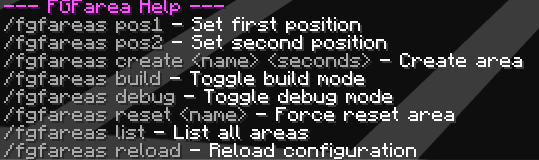
⌨️ Commands
/fgfareas pos1
/fgfareas pos2
/fgfareas create
/fgfareas list
/fgfareas reset
/fgfareas build
/fgfareas debug
/fgfareas reload
🎯 Use Cases
- 🏹 Bridge maps
- 🛏️ Bedwars practice
- 🧪 Testing arenas
- 🎨 Creative events
🧠 Summary
Build freely. Reset instantly. Keep your world clean.
FGFarea handles everything automatically.
 ```
# ======================================================
#                FGFarea Configuration
# ======================================================
# Support: Paper 1.21.11
# Formatting: Use § for color codes.
#
# Available Placeholders:
#     - Name of the area
#     - Time in seconds (used in reset countdowns/list)
#    - Name of the world
#   - The debug action (e.g., PLACED, BREAK)
# - Block type name
#   - X, Y, Z coordinates (debug only)

# --- [ General Settings ] ---
settings:
  # Enable or disable all sounds played by the plugin
  play_sounds: true

  # Seconds at which a countdown message should be sent in the chat
  announcement_times: [15, 5, 4, 3, 2, 1]

  # Interval in seconds to remind admins that they are still in Build Mode
  build_mode_reminder_interval: 5

  # --- [ Sounds ] ---
  # Valid sounds can be found here: https://jd.papermc.io/paper/1.21.1/org/bukkit/Sound.html
  sounds:
    warning_15s: "BLOCK_NOTE_BLOCK_PLING"
    countdown: "BLOCK_NOTE_BLOCK_BIT"
    reset_success: "ENTITY_PLAYER_LEVELUP"

# --- [ Plugin Messages ] ---
messages:
  # Prefix prepended to most plugin messages
  prefix: "§d[FGFarea] "

  # System & Error Messages
  no_permission: "§cNo permission."
  only_placed_blocks: "§cYou can only break placed blocks!"
  config_reloaded: "§aConfiguration successfully reloaded!"

  # Admin & Build Mode
  build_mode_enabled: "§7Build mode: §aENABLED"
  build_mode_disabled: "§7Build mode: §cDISABLED"
  build_mode_reminder: "§eReminder: You are still in BUILD MODE!"
  debug_mode_enabled: "§7Debug mode: §aENABLED"
  debug_mode_disabled: "§7Debug mode: §cDISABLED"

  # Area Management
  pos1_set: "§aPosition 1 successfully set!"
  pos2_set: "§aPosition 2 successfully set!"
  pos_missing: "§cPlease set both pos1 and pos2 first!"
  area_created: "§aArea '' created with a s timer!"
  area_not_found: "§cThe specified area was not found."
  invalid_timer: "§cError: Invalid timer value. Please use a number."

  # Reset System
  # Placeholders:  (Area Name),  (Seconds remaining)
  reset_announcement_15s: "§eArea  will reset in 15 seconds!"
  reset_announcement_countdown: "§cReset in ..."
  reset_success: "§aArea '' has been reset to its original state!"

  # List Command (/fgfareas list)
  # Placeholders: , ,
  area_list_header: "§d--- Active FGFareas ---"
  area_list_format: "§7- §f §7(World: , Reset: s)"
❓ Can I use these plugins in a server pack? 📦
Of course! Please feel free to include these plugins in your server packs! 💜✨
You may:
- ✅ Use these plugins on public and private servers
- ✅ Include them in server packs
- ✅ Share server packs containing these plugins
Just please:
- ❌ Do not reupload the plugins themselves
- ❌ Do not claim them as your own
Have fun and enjoy! 🌟
Quick facts
- Edition: Minecraft Java
- File type: .jar
- Minecraft versions listed: 1.21, 1.21.1, 1.21.2
- How to install: Install the matching mod loader (Forge, Fabric or NeoForge) for your Minecraft version. → Download the .jar. → Put it in the .minecraft/mods folder and launch that loader profile.
- Where to get it: Opens on Modrinth — not every file is mirrored on our own servers.
Install steps are the general flow for this file type — How to install Minecraft Java mods & modpacks walks through it step by step.
Verified by MCModsHub
- Ships as FGFarea-1.2.jar — drop this file into the mods folder
- Download size: 31 KB
- Download link checked 14 Sept 2026 — working
These come from our own check of the pack file, not from the source page.