
Advanched White
Java mod listed for Minecraft 1.20–1.21. Downloads from the MC Java Mods app on Android.
Whitelist plugin with temporary access, twink management, closed mode, player stats, and customizable messages
⬇ Download on Modrinth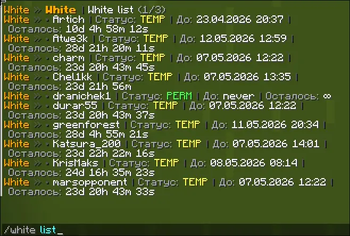
AdvancedWhite is a flexible Minecraft whitelist plugin for Spigot/Paper that supports permanent and temporary access, twink management, closed-server mode, player playtime stats, and configurable reminder messages.
- Permanent and temporary whitelist entries
- Twink support
- Closed mode
- Player statistics
- Paginated list and stats display
- LuckPerms support
Usage
Admin commands
/white list— view the whitelist/white add <player>— add a player to the whitelist/white remove <player>— remove a player from the whitelist/white addtemp <player> <time>— add a player to the temporary whitelist/white timetemp <player> <time>— change a player’s temporary whitelist duration/white twink add <owner> <twink>— add a twink to a player/white twink remove <owner> <twink>— remove a twink from a player/white reload— reload the plugin configuration
Closed mode
/white closed close— close the server for everyone except players in the closed allow list/white closed open— reopen the server/white closed add <player>— add a player to the closed allow list/white closed remove <player>— remove a player from the closed allow list/white closed list— view the closed allow list
Player commands
/white mytwink add <player>— add a twink for yourself/white mytwink remove <player>— remove one of your twinks/white stat— view player statistics/white temp— check remaining temporary whitelist time
Permissions
white.list - View the whitelist
white.add - Add a player to the whitelist
white.remove - Remove a player from the whitelist
white.addtemp - Add a player to the temporary whitelist
white.timetemp - Change temporary whitelist duration
white.twink.add - Add a twink to a player
white.twink.remove - Remove a twink from a player
white.reload - Reload the plugin
white.closed.close - Enable closed mode
white.closed.open - Disable closed mode
white.closed.add - Add a player to the closed allow list
white.closed.remove - Remove a player from the closed allow list
white.closed.list - View the closed allow list
white.mytwink.add - Add a twink for yourself
white.mytwink.remove - Remove a twink from yourself
white.stat - View statistics
white.stat.all - View statistics for everyone
white.temp - View remaining temporary whitelist time
- Edition: Minecraft Java
- File type: .jar
- Minecraft versions listed: 1.20, 1.20.1, 1.20.2
- How to install: Install the matching mod loader (Forge, Fabric or NeoForge) for your Minecraft version. → Download the .jar. → Put it in the .minecraft/mods folder and launch that loader profile.
- Where to get it: Opens on Modrinth — not every file is mirrored on our own servers.
Install steps are the general flow for this file type — How to install Minecraft Java mods & modpacks walks through it step by step.
- Ships as advancedwhite-1.0.0.jar — drop this file into the mods folder
- Download size: 45 KB
- Download link checked 14 Nov 2026 — working
These come from our own check of the pack file, not from the source page.