
KeepBody
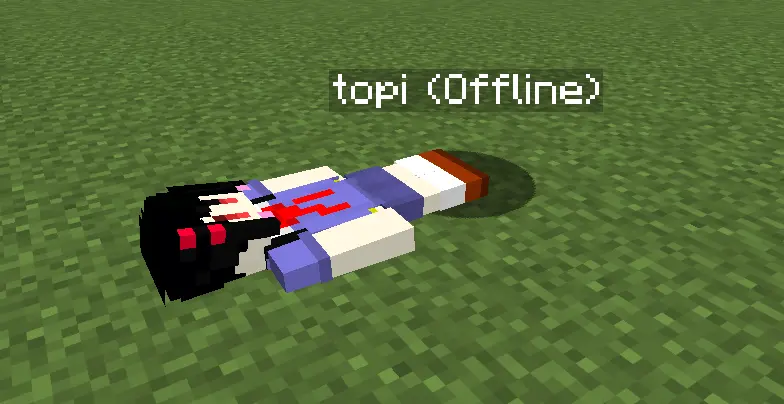 Inspired by the offline body mechanic in Rust, this plugin brings a similar experience to your Minecraft server. When a player logs out, a Citizens NPC (player-type) is spawned at their location as an offline "body".
Upon login, the NPC's state (location, HP, inventory) is synced back to the player and the NPC is removed.
Requirements
| Server | Spigot or Paper 1.21.1+ |
| Java | 21+ |
| Required Plugin | Citizens |
Features
- Offline body — Spawns an NPC with the player's skin and equipment at logout
- State sync — Restores location, HP, and inventory to the player on login
- NPC death — If the NPC is killed while the player is offline, items drop naturally and the player dies on next login
- Inventory access — Right-clicking the NPC opens its inventory (configurable)
Required Plugin
| Plugin | Checked version | Download |
|---|---|---|
| Citizens | 2.0.35-SNAPSHOT | https://ci.citizensnpcs.co/job/citizens2/ |
Citizens must be placed in the
plugins/folder. KeepBody declares it as a required dependency so Citizens is always enabled first.
Installation
- Download Citizens and place it in
plugins/ - Download KeepBody and place
KeepBody-1.0-SNAPSHOT.jarinplugins/ - Start the server
Configuration (plugins/KeepBody/config.yml)
# Whether right-clicking the NPC allows editing its inventory
# true: items can be added/removed  /  false: inventory cannot be opened
allow-inventory-edit: true
# Whether the NPC lies down (uses SleepTrait) at the player's logout position
sleep-npc: true
# Whether to keep the NPC frozen in place when hit
# true: velocity and position are restored each hit so the NPC never moves
immobilize-npc: false
# Whether the NPC is invincible (takes no damage while the player is offline)
# Hurt animation and knockback still occur; only HP tracking is skipped
invincible-npc: false
# Language setting: 'en' (English) or 'ja' (Japanese)
language: 'en'
# Ghost NPC cleanup interval in seconds
# A "ghost" is an untracked "(Offline)" NPC left behind by a crash or reload.
# This interval controls how often the plugin scans for and removes them,
# and respawns any missing body NPCs for currently-offline players.
ghost-cleanup-interval: 300
# Debug mode
# true: show debug messages in console and in-game (OP only)
debug: false
# In-game messages. Color codes using '&' are supported (e.g. &cRed, &aGreen).
messages:
  en:
    inventory-name: "%s's inventory"
    barrier-name: "&cUnavailable"
    npc-spawned: "Spawned body of %s."
    npc-died: "Body of %s has died."
    inventory-opened: "'%s' opened the body of '%s'."
  ja:
    inventory-name: "%sのインベントリ"
    barrier-name: "&c使用不可"
    npc-spawned: "%s のボディーを生成しました。"
    npc-died: "%s のボディーが死亡しました。"
    inventory-opened: "'%s' が '%s' のボディーを開きました。"
Quick facts
- Edition: Minecraft Java
- File type: .jar
- Minecraft versions listed: 1.21, 1.21.1, 1.21.2
- How to install: Install the matching mod loader (Forge, Fabric or NeoForge) for your Minecraft version. → Download the .jar. → Put it in the .minecraft/mods folder and launch that loader profile.
- Where to get it: Opens on Modrinth — not every file is mirrored on our own servers.
Install steps are the general flow for this file type — How to install Minecraft Java mods & modpacks walks through it step by step.
Verified by MCModsHub
- Ships as KeepBody-1.1.1.jar — drop this file into the mods folder
- Download size: 32 KB
- Download link checked 21 Aug 2026 — working
These come from our own check of the pack file, not from the source page.