GetServerStatus
GetServerStatus is a plugin for Spigot/Paper that allows you to check the status of your Minecraft server directly from Discord.
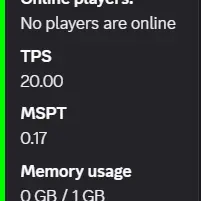
When you send getstatus in the main Discord channel, the bot returns server information in an embedded message.
Features
- Current number of online players
- List of online player names
- TPS
- MSPT
- Memory usage
- CPU usage
Requirements
- Minecraft 1.18 or later
DiscordSRVspark
Usage
- Install this plugin on your server.
- Install
DiscordSRVandspark, then start the server. - Send
getstatusin the main DiscordSRV channel. - The bot will reply with the server status in an embed.
Notes
- This plugin only monitors messages in the main DiscordSRV channel.
- The embed color changes based on TPS as an indicator of server performance.
- It seems that starting from version 1.21 the following flag is required
-Dpaper.preferSparkPlugin=true
Support
If you have any questions, please contact us on Discord.
Quick facts
- Edition: Minecraft Java
- File type: .jar
- Minecraft versions listed: 1.18, 1.18.1, 1.18.2
- How to install: Install the matching mod loader (Forge, Fabric or NeoForge) for your Minecraft version. → Download the .jar. → Put it in the .minecraft/mods folder and launch that loader profile.
- Where to get it: Opens on Modrinth — not every file is mirrored on our own servers.
Install steps are the general flow for this file type — How to install Minecraft Java mods & modpacks walks through it step by step.
Verified by MCModsHub
- Ships as GetServerStatus-1.1.1.jar — drop this file into the mods folder
- Download size: 12 KB
- Download link checked 13 Sept 2026 — working
These come from our own check of the pack file, not from the source page.