
ModsJava
HOSH Tpa
Java mod listed for Minecraft 1.19–1.21. Downloads from the MC Java Mods app on Android.
⬇ Download on Modrinth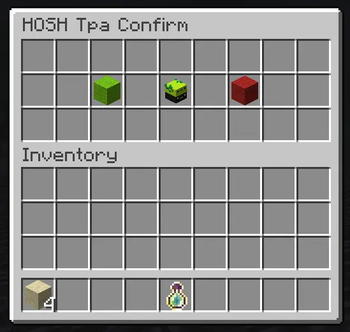
HOSH TPA
A lightweight, feature-rich teleport-request plugin for Spigot servers. Send, accept, and deny /tpa and /tpahere requests with a polished GUI, clickable chat actions, titles, sounds, and configurable timeouts.
Requirements
- Paper (or compatible) — 1.19.x / 1.20.x / 1.21.x
- Java 17+
- Hosh Loader (mandatory) — This plugin will not stay enabled without it. If
HoshLoader.jaris missing, HOSH TPA disables itself and server operators get a message on join. Use/hosh tpa reload(via Hosh Loader) to reload this plugin after config changes. - Auto updates via loader — Use
/hosh update allto prepare newest compatible HOSH plugin updates for next restart.
Downloads
| Modrinth | |
|---|---|
| Hosh Loader (install first) | Download Hosh Loader |
| HOSH TPA (this plugin) | Download HOSH TPA |
Features
- Dual command aliases —
/tpaand/htpa(same for/tpahere//htpahere) behave identically - Confirmation GUI — Before a request is sent, the requester sees a small inventory GUI with Accept / Cancel buttons and the target's player head
- Clickable chat actions — Targets receive
[ACCEPT]/[DECLINE]clickable messages in chat - Title & sound feedback — Configurable titles on request received / accepted / denied, plus success and error sounds
- Teleport countdown — Configurable delay before the teleport executes; cancelled on movement (toggleable)
- Request timeout — Pending requests automatically expire after a configurable number of seconds; both parties are notified
- Toggle system — Players can block incoming requests with
/tpatoggle - Target self-check — Players cannot send requests to themselves
- Tab completion — All player-facing commands support tab-completing online player names
Commands
| Command | Description |
|---|---|
/tpa <player> |
Open the confirmation GUI to send a teleport-to-player request |
/htpa <player> |
Same as /tpa |
/tpahere <player> |
Open the confirmation GUI to send a teleport-here request |
/htpahere <player> |
Same as /tpahere |
/tpaaccept [player] |
Accept the latest pending request (optionally from a specific player) |
/tpadeny [player] |
Deny the latest pending request (optionally from a specific player) |
/tpatoggle |
Toggle whether you accept incoming teleport requests |
Configuration
All settings live in the default config.yml generated on first run.
prefix: "&8[&bHOSH TPA&8] "

teleport:
  delay-seconds: 5            # Countdown before teleport (0 = instant)
  cancel-on-move: true        # Cancel countdown if the player moves
  request-timeout-seconds: 60 # How long a pending request stays valid

feedback:
  sounds-enabled: true
  sound-success: ENTITY_EXPERIENCE_ORB_PICKUP
  sound-error: ENTITY_VILLAGER_NO
  titles-enabled: true
  title-received: "&eTPA Request"
  subtitle-received: "&7From &f{player}"
  title-accepted: "&aAccepted"
  subtitle-accepted: "&7Teleport starting..."
  title-denied: "&cDeclined"
  subtitle-denied: "&7Request denied"

gui:
  title: "HOSH Tpa Confirm"
  accept-slot: 11
  head-slot: 13
  deny-slot: 15
  accept-name: "&aAccept"
  deny-name: "&cCancel"
  head-name: "&eTarget: &f{player}"

messages:
  player-only: "&cThis command can only be executed by a player."
  usage-htpa: "&7Usage: /htpa <player>"
  usage-htpahere: "&7Usage: /htpahere <player>"
  player-not-found: "&cPlayer '{player}' not found."
  self-target: "&cYou cannot send a request to yourself."
  target-blocked: "&c{player} is currently not accepting requests."
  request-already-exists: "&cYou already have a pending request to {player}."
  request-sent: "&aRequest sent to {player}."
  request-received-tpa: "&e{player} wants to teleport to you."
  request-received-tpahere: "&e{player} wants you to teleport to them."
  request-cancelled: "&7Request cancelled."
  request-expired: "&cRequest expired."
  no-pending-request: "&cYou have no pending requests."
  teleport-cancel-offline: "&cThe other player is no longer online."
  teleport-countdown: "&7Teleporting in {seconds} seconds... Don't move."
  teleport-started: "&aTeleporting..."
  teleport-cancel-move: "&cTeleport cancelled — you moved."
  toggle-enabled: "&aYou are now blocking incoming teleport requests."
  toggle-disabled: "&aYou are now accepting incoming teleport requests."
  request-accepted-target: "&aYou accepted the request from {player}."
  request-accepted-sender: "&a{player} accepted your request."
  request-denied-target: "&cYou denied the request from {player}."
  request-denied-sender: "&c{player} denied your request."
Config Sections
| Section | Purpose |
|---|---|
prefix |
Prepended to every chat message |
teleport |
Delay, move-cancellation, and request expiry |
feedback |
Sounds, titles, and subtitles for every interaction state |
gui |
Inventory title, slot positions, and item display names |
messages |
Every user-facing message with {player} / {seconds} placeholders |
Permissions
No permissions are required — all commands are open by default. Restrict access with your preferred permission plugin if needed.
Installation
- Download and install Hosh Loader in
plugins/(required). - Download HOSH TPA and place
hosh-tpa-<version>.jarinplugins/. - Restart the server (full restart recommended after first install).
- Edit
plugins/HOSH_Tpa/config.yml(folder name matches the plugin) to your liking. - Apply config changes with
/hosh tpa reloador another restart.
Quick facts
- Edition: Minecraft Java
- File type: .jar
- Minecraft versions listed: 1.19, 1.19.1, 1.19.2
- How to install: Install the matching mod loader (Forge, Fabric or NeoForge) for your Minecraft version. → Download the .jar. → Put it in the .minecraft/mods folder and launch that loader profile.
- Where to get it: Opens on Modrinth — not every file is mirrored on our own servers.
Install steps are the general flow for this file type — How to install Minecraft Java mods & modpacks walks through it step by step.
File checked by MCModsHub
- Ships as hosh-tpa-1.0.0.jar — drop this file into the mods folder
- Download size: 28 KB
- Download link checked 2 Oct 2026 — working
These come from our own check of the pack file, not from the source page.