
 English
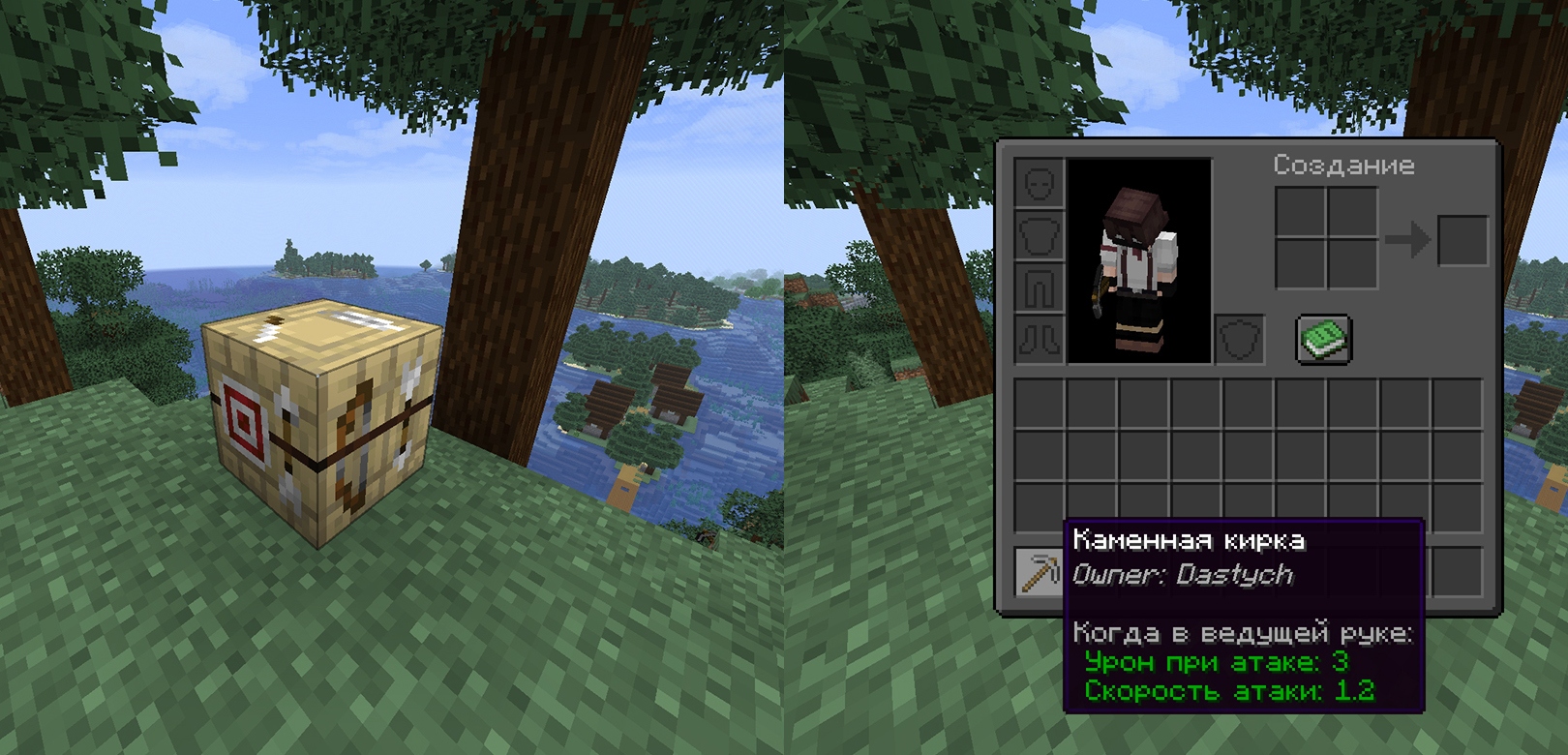
PlayerMark is a lightweight Minecraft plugin that allows players to permanently mark items with their name. By using any item (except blocks) on a Fletching Table, the item becomes signed and displays the owner's name in its lore. Once marked, the ownership cannot be changed — even by the original player.
This creates a simple and effective item ownership system, ideal for survival servers, roleplay, trading, or anti-theft protection.
🏹 Features:
- ✍️ Item signing — Use any item on a Fletching Table to assign an owner
- 🔒 Permanent ownership — Once marked, the owner cannot be changed
- 📜 Visible lore — The owner's name is shown directly in the item description
- 🧱 Block-safe — Blocks cannot be signed
- 🌐 Multiplayer ready — Works seamlessly on servers
- ⚙️ Lightweight — No commands, configs, or dependencies required
Русский
PlayerMark — лёгкий плагин для Minecraft, который позволяет игрокам навсегда подписывать предметы своим именем. При использовании любого предмета (кроме блоков) по столу лучника предмет получает владельца, имя которого отображается в описании (лоре). После подписания владелец не может быть изменён — даже самим игроком.
Простой и эффективный механизм владения предметами, идеально подходит для серверов выживания, ролевых игр, торговли или защиты от кражи.
🏹 Особенности:
- ✍️ Подписание предметов — используйте любой предмет по столу лучника, чтобы назначить владельца
- 🔒 Постоянный владелец — после подписания владелец не может быть изменён
- 📜 Видимое описание — имя владельца отображается прямо в лоре предмета
- 🧱 Игнор блоков — блоки нельзя подписать
- 🌐 Поддержка мультиплеера — работает на сервере без сбоев
- ⚙️ Лёгкий плагин — без команд, конфигов и зависимостей
Discord: dastych_
- Edition: Minecraft Java
- File type: .jar
- Minecraft version listed: 1.21.7
- How to install: Install the matching mod loader (Forge, Fabric or NeoForge) for your Minecraft version. → Download the .jar. → Put it in the .minecraft/mods folder and launch that loader profile.
- Where to get it: Opens on Modrinth — not every file is mirrored on our own servers.
Install steps are the general flow for this file type — How to install Minecraft Java mods & modpacks walks through it step by step.
- Ships as PlayerMark-1.0.jar — drop this file into the mods folder
- Download size: 3 KB
- Download link checked 24 Aug 2026 — working
These come from our own check of the pack file, not from the source page.