
UpgradeFurnaces
UpgradeFurnace lets players spend in-game currency to upgrade their furnaces through four powerful tiers, increasing smelting speed at the cost of burning…
⬇ Download on Modrinth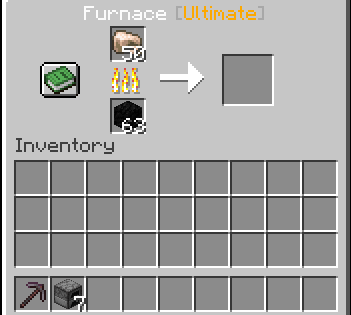
THIS PLUGIN IS AI/VIBE CODED.
UpgradeFurnace gives your players a reason to grind — upgrade their furnaces and blast furnaces through four tiers of smelting power, each faster than the last but at the cost of burning through fuel quicker.
⚙️ Features
Four upgrade tiers — Basic, Elite, Advanced, and Ultimate, each with configurable speed multipliers, fuel multipliers, and prices Vault economy integration — upgrades cost in-game currency, fully compatible with any Vault-supported economy plugin Inventory linking — link a Chest, Double Chest, Barrel, or Shulker Box to a furnace to automatically feed fuel and raw materials in, and pull finished output back out Upgrade persistence — upgrades are stored via PDC and survive server restarts; breaking and replacing a furnace restores its previous tier Blast Furnace support — optionally allow blast furnaces to be upgraded alongside regular furnaces, toggleable in config Tier display — the furnace GUI title updates to reflect the current tier (e.g. Furnace [Ultimate]) Clean MiniMessage formatting — all messages use Kyori Adventure MiniMessage, fully customisable in config
🖱️ How to Use
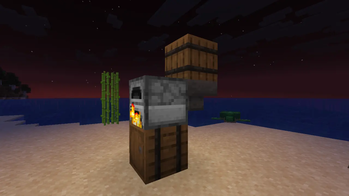
Shift + Right-click a furnace or blast furnace to open the upgrade menu Shift + Left-click a furnace then a chest, barrel, or shulker box to link an inventory Shift + Left-click an already-linked furnace to unlink it
📋 Requirements
Paper 1.21.1 or later Vault + a compatible economy plugin (e.g. EssentialsX, CMI)
🔧 Configuration Everything is configurable in config.yml — tier prices, speed multipliers, fuel multipliers, blast furnace toggle, automation interval, and all plugin messages.
Built for server owners who want to give economy meaning and automation a purpose.
permissions:
  upgradefurnace.info:
    description: Allows using /upgradefurnace info
    default: true
  upgradefurnace.reload:
    description: Allows using /upgradefurnace reload
    default: op
  upgradefurnace.link.limit.1:
    description: Allows linking up to 1 furnace
    default: true
  upgradefurnace.link.limit.3:
    description: Allows linking up to 3 furnaces
    default: false
  upgradefurnace.link.limit.5:
    description: Allows linking up to 5 furnaces
    default: false
  upgradefurnace.link.limit.bypass:
    description: Bypass furnace link cap (unlimited)
    default: op
- Edition: Minecraft Java
- File type: .jar
- Minecraft versions listed: 1.21, 1.21.1, 1.21.2
- How to install: Install the matching mod loader (Forge, Fabric or NeoForge) for your Minecraft version. → Download the .jar. → Put it in the .minecraft/mods folder and launch that loader profile.
- Where to get it: Opens on Modrinth — not every file is mirrored on our own servers.
Install steps are the general flow for this file type — How to install Minecraft Java mods & modpacks walks through it step by step.
- Ships as UpgradeFurnace-1.0.0.jar — drop this file into the mods folder
- Download size: 51 KB
- Download link checked 23 Aug 2026 — working
These come from our own check of the pack file, not from the source page.