
DiscordStatus
Java mod listed for Minecraft 1.21. Downloads from the MC Java Mods app on Android.
A lightweight Minecraft plugin that allows you to display and monitor your Minecraft Server status directly on Discord through a dedicated Discord Bot.
⬇ Download on Modrinth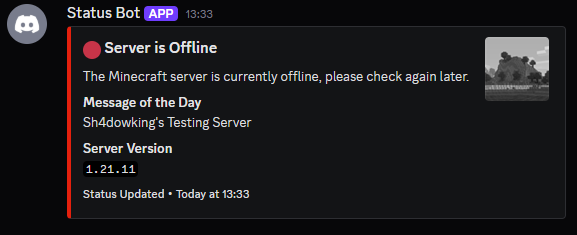

Description
DiscordStatus is a lightweight Minecraft server plugin that connects your ingame server activity with your Discord community. It is built for server owners who want a reliable and always updated Discord status presence without manually posting updates.
The plugin keeps a dedicated Discord status message synchronized with your server state, so players can immediately see whether the server is online or offline. It also reports player activity events, making Discord a practical companion space for your Minecraft server.
Core Features
- Live online/offline server status displayed in a Discord embed.
- Automatic player join and leave notifications in Discord.
- Customizable online and offline status text, including:
- status title
- status description
- embed color
- Configurable embed sections so each server can choose what to show:
- description
- server icon thumbnail
- MOTD
- online player count
- player list
- server version
- Slash-command based management for status text, colors, and toggles, allowing quick updates without constantly editing files.
What It Enables for Server Owners
- Keep your community informed in real time, even when they are not ingame.
- Reduce repetitive manual announcements in Discord.
- Present a clear and professional server status panel to players.
- Tailor exactly which status details are visible based on your server style and privacy preferences.
- Manage presentation and behavior quickly through commands and configuration.
For the full setup and installation steps, see the official installation guide: https://github.com/Sh4dowking/MC-DiscordStatus/blob/main/README.md
- Edition: Minecraft Java
- File type: .jar
- Minecraft versions listed: 1.21, 1.21.1, 1.21.2
- How to install: Install the matching mod loader (Forge, Fabric or NeoForge) for your Minecraft version. → Download the .jar. → Put it in the .minecraft/mods folder and launch that loader profile.
- Where to get it: Opens on Modrinth — not every file is mirrored on our own servers.
Install steps are the general flow for this file type — How to install Minecraft Java mods & modpacks walks through it step by step.
- Ships as DiscordStatus-1.3.0.jar — drop this file into the mods folder
- Download size: 18.0 MB
- Download link checked 22 Oct 2026 — working
These come from our own check of the pack file, not from the source page.