
CrimsonDiscord
CrimsonDiscord A powerful, lightweight bridge between Minecraft and Discord that keeps your community connected across platforms.
⚠️ NOTE This plugin requires a Discord Bot Token in order to function. Please read the documentation for setup instructions.
Please join the Discord if you have questions!
Downloads
Bukkit/Spigot/Paper
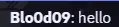
Features Two-Way Chat: Seamlessly sync in-game messages to Discord and vice versa.
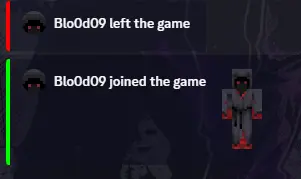
Webhook Support: Display player skins and names directly in Discord for a native feel.
Server Status Alerts: Automated messages for server startup, shutdown, and crashes.
Player Activity: Broadcast joins, leaves, deaths, and advancements.
Discord Console: Securely view your server console from a private Discord channel.
Command Sync: Execute Minecraft commands directly from Discord (Permission based).
High Performance: Designed with an asynchronous architecture to ensure 0.00% impact on TPS.
- Icons
- Icon Description
- 🟢 Server is Online
- 🔴 Server is Offline
- 💬 Player is Chatting
- 💀 Player has Died
- 🏆 Advancement Reached
- 🛠️ Admin Command Executed
The Configuration You can manage the plugin via the config.yml file located in your plugins folder. This allows you to toggle specific channel IDs, and customize the appearance of every message sent to Discord.
Important Notes You must create a Discord Application and obtain a Bot Token from the Discord Developer Portal.
Ensure the bot has View Channels, Send Messages, and Manage Webhooks permissions in your target server.
Privacy: While CrimsonDiscord facilitates communication, we recommend setting up private channels for console logging to protect sensitive server data.
- Edition: Minecraft Java
- File type: .jar
- Minecraft versions listed: 1.21, 1.21.1, 1.21.2
- How to install: Install the matching mod loader (Forge, Fabric or NeoForge) for your Minecraft version. → Download the .jar. → Put it in the .minecraft/mods folder and launch that loader profile.
- Where to get it: Opens on Modrinth — not every file is mirrored on our own servers.
Install steps are the general flow for this file type — How to install Minecraft Java mods & modpacks walks through it step by step.
- Ships as discordchatv2-1.0-all.jar — drop this file into the mods folder
- Download size: 14.9 MB
- Download link checked 14 Sept 2026 — working
These come from our own check of the pack file, not from the source page.