
此插件专为Minecraft服务器管理和安全而设计。
It effectively prevents players from using sensitive commands, such as the commonly used /pl and /ver commands to check server information. This stops players from accessing core data including the server plugin list and version information, significantly improving server security and management standardization.
该插件易于使用,无需复杂配置。
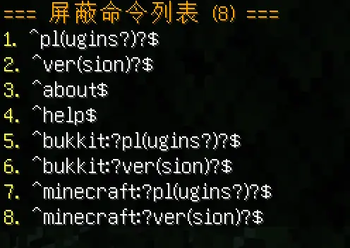
作为管理员,您可以直接在 config.yml 文件中完全自定义被阻止命令的列表。您可以随意添加、编辑或删除任何命令,以满足您服务器的特定需求。
它在生存服务器、迷你游戏服务器和RPG服务器上运行流畅。
此工具可帮助您高效管理玩家命令权限,维护稳定、安全的服务器环境。它是日常服务器管理中实用且不可或缺的工具。
 使用方法
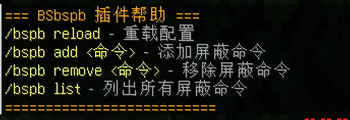
将命令添加到阻止列表:/bsblock add xxxx
从阻止列表中移除命令:/bsblock remove xxxx
查看已屏蔽的指令:/bsblock list
重新加载插件:/bsblock(建议重启服务器)
使用方法
将命令添加到阻止列表:/bsblock add xxxx
从阻止列表中移除命令:/bsblock remove xxxx
查看已屏蔽的指令:/bsblock list
重新加载插件:/bsblock(建议重启服务器)
- Edition: Minecraft Java
- File type: .jar
- Minecraft versions listed: 1.21, 1.21.1, 1.21.2
- How to install: Install the matching mod loader (Forge, Fabric or NeoForge) for your Minecraft version. → Download the .jar. → Put it in the .minecraft/mods folder and launch that loader profile.
- Where to get it: Opens on Modrinth — not every file is mirrored on our own servers.
Install steps are the general flow for this file type — How to install Minecraft Java mods & modpacks walks through it step by step.
- Ships as BSblock.jar — drop this file into the mods folder
- Download size: 28 KB
- Download link checked 14 Sept 2026 — working
These come from our own check of the pack file, not from the source page.