
PVPChoice
Players are prompted on their first join to choose whether PvP is enabled or disabled for their account. This choice is permanent to prevent combat abuse…
⬇ Download on Modrinth
A plugin that allows players to choose whether PvP is enabled or disabled for their account. On their next join, they will be prompted to select their preferred PvP mode, and once chosen, the setting becomes permanent to prevent combat abuse such as disabling PvP during a fight. Server operators retain the ability to change a player’s PvP setting if needed.
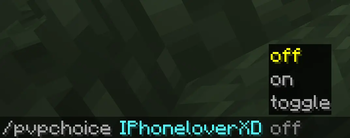
/pvpchoice on/off/toggle is the toggle command for operators
You can go to the questions channel for support in the discord server listed but note its a community server for my youtube its not made for the plugin.
- Edition: Minecraft Java
- File type: .jar
- Minecraft version listed: 1.21.11
- How to install: Install the matching mod loader (Forge, Fabric or NeoForge) for your Minecraft version. → Download the .jar. → Put it in the .minecraft/mods folder and launch that loader profile.
- Where to get it: Opens on Modrinth — not every file is mirrored on our own servers.
Install steps are the general flow for this file type — How to install Minecraft Java mods & modpacks walks through it step by step.
- Ships as minecraft-pvp-choice-1.0.0.jar — drop this file into the mods folder
- Download size: 14 KB
- Download link checked 24 Aug 2026 — working
These come from our own check of the pack file, not from the source page.