
Synced
Java mod listed for Minecraft 1.21. Downloads from the MC Java Mods app on Android.
Sync inventories, health, hunger, XP, potion effects, ender chests and positions across teams of players, fully configurable via in-game GUI.
⬇ Download on Modrinth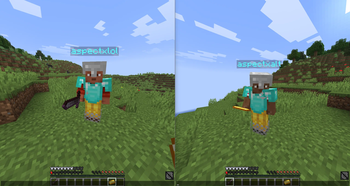
Synced
Synced is a Paper plugin that lets players link together in teams and share their game state in real time. When one player in a team takes damage, eats food, gains XP, or picks up items, the change is reflected across every member of the team instantly.
Features
- Inventory sync — all 36 slots and offhand stay identical across teammates
- Health sync — damage and healing is shared
- Hunger sync — food level, saturation, and exhaustion stay in step
- XP sync — experience points and levels are mirrored
- Potion effects sync — active effects propagate to all members
- Ender chest sync — shared ender chest contents across the team
- Position sync — optional teleporting to keep the team together
How to use
Run /synced start to open the configuration menu. From there you can toggle each sync feature on or off. Invite other players with /synced invite and they join with /synced join .
Commands
| Command | Description |
|---|---|
/synced start |
Open the config menu and create your team |
/synced invite <player> |
Invite a player to your team |
/synced join <name> |
Join a team by name |
/synced leave |
Leave your current team |
/synced disband |
Disband your team (leader only) |
/synced info |
View your team and current settings |
Server-side only, no client mod required Position sync is disabled by default All settings are configurable per team via the in-game GUI
- Edition: Minecraft Java
- File type: .jar
- Minecraft versions listed: 1.21, 1.21.1, 1.21.2
- How to install: Install the matching mod loader (Forge, Fabric or NeoForge) for your Minecraft version. → Download the .jar. → Put it in the .minecraft/mods folder and launch that loader profile.
- Where to get it: Opens on Modrinth — not every file is mirrored on our own servers.
Install steps are the general flow for this file type — How to install Minecraft Java mods & modpacks walks through it step by step.
- Ships as Synced-1.0-SNAPSHOT.jar — drop this file into the mods folder
- Download size: 317 KB
- Download link checked 13 Nov 2026 — working
These come from our own check of the pack file, not from the source page.