
AmavyaDecoration
AmavyaDecoration is a plugin that provides additional ways to decorate your Minecraft worlds and builds and adds some quality of life features.
⬇ Download on Modrinth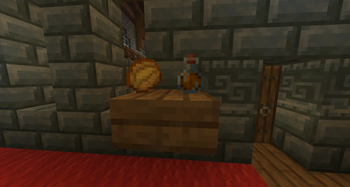
AmavyaDecoration
AmavyaDecoration is a plugin for Minecraft servers running Paper.
The aim of the plugin is to provide additional ways to decorate your Minecraft worlds and builds, as well as add some quality of life features.
Installation
Simply download the latest jar file and place it in your plugins folder.
If you want to disable certain features, edit the config.yml file that is generated when you start the server.
After saving the config file, run /adreload in the server console to reload the config.
Features
Each feature below can be enabled / disabled in the config.yml file
Slab Shelves
Slab shelves allow you to place items on slabs to display them. To create a slab shelf, simply right click on a slab twice while holding a stick.
Afterwards, you can then place items on the shelf by right clicking with an item in your hand. Each shelf can hold four items.
To remove an item from the shelf, crouch and right click the corner of the shelf.
You can rotate items individually on the shelf by right clicking them.

Chiseled Bookshelf Title Display
When this feature is enabled, the titles of books inside Chiseled bookshelves will be displayed when you get close.
Enchanted books will also show the enchantments on them.
You can adjust the radius from the player at which the titles will display in config.yml

Automatic Feeding (cows and sheep)
When this feature is enabled, cows and sheep can be automatically fed by placing hay blocks.
- Note: this feature is disabled by default. To enable it, add / set the following in your config:
auto_animal_feeding:
  enabled: true
- When a hay block is placed, it will attract nearby cows and sheep.
- When a cow or sheep is close enough, they will "eat" part of the block and enter love mode.
- After a hay block has been eaten 9 times it will be destroyed.
- If a hay block that has been partially eaten is broken, it will drop the corresponding amount of wheat. ie, if it has been eaten 3 times, it will drop 6 wheat, because 9 wheat makes one hay block.
Permissions
The only permission is amavyadecoration.reload which gives access to the /adreload command to reload the config.yml file.
- Edition: Minecraft Java
- File type: .jar
- Minecraft versions listed: 1.21, 1.21.1, 1.21.2
- How to install: Install the matching mod loader (Forge, Fabric or NeoForge) for your Minecraft version. → Download the .jar. → Put it in the .minecraft/mods folder and launch that loader profile.
- Where to get it: Opens on Modrinth — not every file is mirrored on our own servers.
Install steps are the general flow for this file type — How to install Minecraft Java mods & modpacks walks through it step by step.
- Ships as AmavyaDecoration-1.2.2.jar — drop this file into the mods folder
- Download size: 36 KB
- Download link checked 22 Aug 2026 — working
These come from our own check of the pack file, not from the source page.