
ExChatMod
Java mod listed for Minecraft 1.19–1.21. Downloads from the MC Java Mods app on Android.
⬇ Download on Modrinth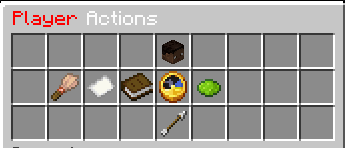



✦ ExChatMod
A powerful, AI-ready chat moderation plugin for modern Paper servers.
Clean. Smart. Secure.
✦ Overview
ExChatMod provides real-time chat moderation with AI filtering, spam protection, auto-mute systems, and a full admin GUI.
Intercept messages → Analyze → Flag or Block → Auto-Moderate.
Built for modern Paper servers.
✦ Core Moderation
• Real-time chat interception (AsyncPlayerChatEvent)
• Bypass permission: exchatmod.bypass
• Configurable max message length
• Optional blocking of muted players’ commands
Reliable first-line protection for any server.
✦ AI Moderation
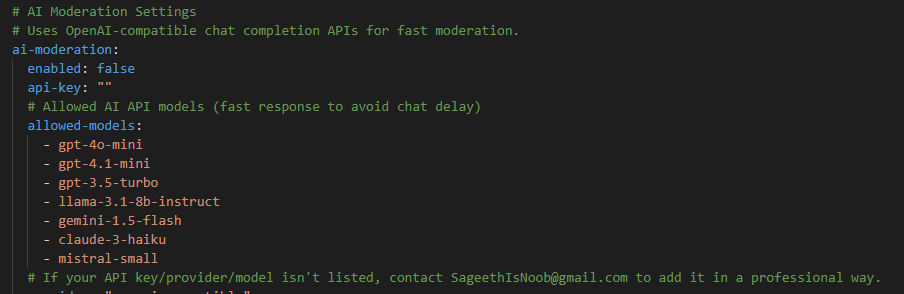
Optional OpenAI-compatible AI filtering.
• ALLOW / BLOCK system with sensitivity levels (1–10) • Configurable provider, model, base URL, API key, timeout • Allowed-models allowlist • Auto-disable if API key missing • Debug logging for failed requests • Only BLOCK responses trigger flags
Smart filtering without false positives.
✦ Word Filter
• Case-insensitive blocked words list • Actions: BLOCK, FLAG, or MUTE • Default mute duration with cap • Staff notifications on word-filter mutes • Flagged message logging
Flexible manual moderation layer.
✦ Anti-Links
• Regex URL detection • Allowlist for safe links • Optional flag counting • Message blocking on detection
Stop unwanted ads and scams.
✦ Anti-Spam
• Cooldown-based rate limiting • Duplicate message detection • Configurable duplicate threshold • Optional flag counting • Automatic spam blocking
No more chat flooding.
✦ Anti-Caps
• Minimum letters before check • Uppercase percentage threshold • Optional flag counting • Blocks excessive caps
Keeps chat readable.
✦ Flagging System
• Flags tracked per player UUID
• Stores last 10 flagged messages
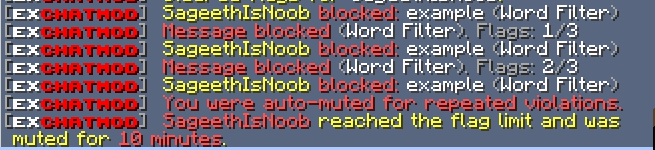
• Auto-mute on threshold
• Staff alerts on flagged messages
• Saved to flags.yml
Smart escalation without manual work.
✦ Mute System
• Temporary or permanent mutes
• Default & max mute duration limits
• Expired mutes auto-cleared
• Remaining mute time shown to players
• Saved to mutes.yml
Consistent punishment handling.
✦ Logging
• Full chat logging to file
• Flagged chat → logs/flagged.log
• Optional logging modes
• [FLAGGED] markers for quick review
Track everything safely.
✦ Staff Notifications
Staff alerted on:
• Flagged messages • Auto-mute actions • Word-filter mutes • Manual mute actions
Permissions: exchatmod.admin / exchatmod.notify
Stay informed instantly.
✦ Commands
• /chatmod reload – reload configs
• /chatmod mute <player> [duration]
• /chatmod unmute <player>
• /chatmod admin – open GUI
• /chatmod help
Aliases: /cm, /chatmoderation
Includes full tab completion.
✦ Admin GUI
Clean GUI with live moderation controls.
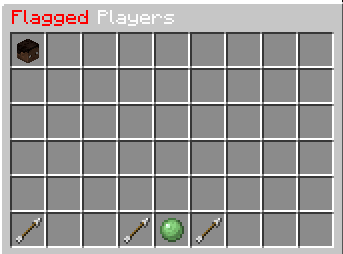
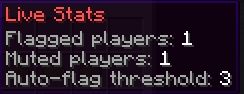
• Toggle AI / filters / anti-spam / anti-caps • Reload config • Clear flags or mutes • View flagged players with pagination • Per-player actions (mute, unmute, clear flags) • Live stats display
Moderate without commands.
✦ Messaging & Config
• Fully configurable messages.yml
• Hex colors & & color support
• config.yml, mutes.yml, flags.yml
• Auto-created logs directory
• Safe config reload
Fully customizable.
✦ Permissions
• exchatmod.admin
• exchatmod.bypass
• exchatmod.reload
• exchatmod.mute
• exchatmod.unmute
• exchatmod.notify
Fine-grained control.
✦ Why ExChatMod?
Because moderation should be:
✔ Fast ✔ Smart ✔ Automated ✔ Configurable ✔ Professional
ExChatMod keeps your server chat clean... automatically.
- Edition: Minecraft Java
- File type: .jar
- Minecraft versions listed: 1.19, 1.19.1, 1.19.2
- How to install: Install the matching mod loader (Forge, Fabric or NeoForge) for your Minecraft version. → Download the .jar. → Put it in the .minecraft/mods folder and launch that loader profile.
- Where to get it: Opens on Modrinth — not every file is mirrored on our own servers.
Install steps are the general flow for this file type — How to install Minecraft Java mods & modpacks walks through it step by step.
- Ships as ExChatMod-1.3.0.jar — drop this file into the mods folder
- Download size: 332 KB
- Download link checked 3 Oct 2026 — working
These come from our own check of the pack file, not from the source page.