
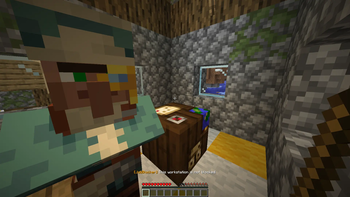

JobBlocker allows you to block a workstation from being a villager job site. This lets you have builds containing lecterns, barrels, etc. without villagers walking around them and working there.
Features
- Block any villager workstation from being claimed.
- Blocked state persists through server restarts.
- Existing villagers linked to a workstation have their job removed on block.
- Check if a workstation is blocked by left clicking.
How to block workstations?
Right click with a JobBlocker Wand any villager workstation with the JobBlocker Wand to mark it as blocked. Any villager that attempts to claim that block as their job site will be immediately rejected. If any villager claimed this workstation beforehand, he will lose his profession.
Left click a workstation with a JobBlocker Wand to see if it is blocked. This will be shown in action bar. Check gallery for examples.
Commands & permissions
/jobblocker - gives you the JobBlocker Wand, needed permission: jobblocker.use.
- Edition: Minecraft Java
- File type: .jar
- Minecraft versions listed: 1.21, 1.21.1, 1.21.2
- How to install: Install the matching mod loader (Forge, Fabric or NeoForge) for your Minecraft version. → Download the .jar. → Put it in the .minecraft/mods folder and launch that loader profile.
- Where to get it: Opens on Modrinth — not every file is mirrored on our own servers.
Install steps are the general flow for this file type — How to install Minecraft Java mods & modpacks walks through it step by step.
- Ships as JobBlocker-1.0.jar — drop this file into the mods folder
- Download size: 9 KB
- Download link checked 13 Sept 2026 — working
These come from our own check of the pack file, not from the source page.