
FableStats
Lightweight plugin designed to display detailed player statistics directly in the chat. It offers deep customization via config.yml and full…
⬇ Download on Modrinth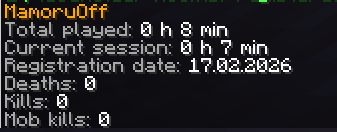
FableStats
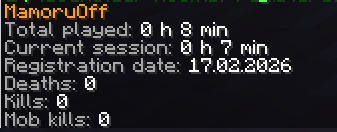
FableStats is a lightweight and highly flexible Spigot/Paper plugin (compatible with versions 1.16–1.21.x) that allows players to instantly view their personal statistics directly in the chat.
Forget bulky menus - now your players can check their progress with a single, simple command. With full PlaceholderAPI support, you can tailor every message to match your server's unique style.
✨ Features
- Customizable Statistics: Display anything from total playtime to specific combat data.
- Complete Control: Every message sent to the player is fully configurable in the config.yml, including support for color codes.
- Multi-language Support: Includes built-in support for English and Russian.
- PlaceholderAPI Integration: Use hundreds of external placeholders to create detailed player summaries.
- Built-in Placeholders: The plugin provides its own set of placeholders for session tracking and specific stats.
📊 Available Placeholders
The plugin registers its own expansion with the following built-in placeholders:
  Placeholder: %fablestats_player_name%
  Description: Player name
  ────────────────────────────────────────
  Placeholder: %fablestats_time_played_total%
  Description: Total play time
  ────────────────────────────────────────
  Placeholder: %fablestats_time_since_last_played%
  Description: Current session duration
  ────────────────────────────────────────
  Placeholder: %fablestats_first_join_date%
  Description: First join date (DD.MM.YYYY)
  ────────────────────────────────────────
  Placeholder: %fablestats_deaths%
  Description: Total deaths
  ────────────────────────────────────────
  Placeholder: %fablestats_kills%
  Description: Player kills (PvP)
  ────────────────────────────────────────
  Placeholder: %fablestats_mob_kills%
  Description: Mob kills
  ────────────────────────────────────────
  Placeholder: %fablestats_damage_dealt%
  Description: Total damage dealt
  ────────────────────────────────────────
  Placeholder: %fablestats_damage_taken%
  Description: Total damage taken
  ────────────────────────────────────────
  Placeholder: %fablestats_distance_walked%
  Description: Distance walked
💬 Supported Languages
- English
- Ukranian
- Russian
🛠 Commands & Permissions
- /stats - Displays the player's statistics (Permission: customstats.use).
- /stats reload - Reloads the configuration and language files (Permission: customstats.reload).
Note: You can change the base command name in the config.yml.
⚙️ Installation
- Download the JAR file and place it into your server's plugins folder.
- (Recommended) Install PlaceholderAPI to enable full placeholder functionality.
- Restart your server to generate the default configuration.
- Configure your preferred language and message format in plugins/CustomStats/config.yml.
- Edition: Minecraft Java
- File type: .jar
- Minecraft versions listed: 1.16, 1.16.1, 1.16.2
- How to install: Install the matching mod loader (Forge, Fabric or NeoForge) for your Minecraft version. → Download the .jar. → Put it in the .minecraft/mods folder and launch that loader profile.
- Where to get it: Opens on Modrinth — not every file is mirrored on our own servers.
Install steps are the general flow for this file type — How to install Minecraft Java mods & modpacks walks through it step by step.
- Ships as fablestats-1.1.jar — drop this file into the mods folder
- Download size: 13 KB
- Download link checked 13 Sept 2026 — working
These come from our own check of the pack file, not from the source page.