

🎫 DiscordSupport v2.0
The most complete and professional Discord/Minecraft support system
Transform your server support with interactive Discord tickets, private channels, and instant two-way communication!
✨ Main Features
🎯 Two Ticket Modes
📢 Public Tickets
- All tickets in a single Discord channel
- Perfect for small servers
- Ultra-simple configuration
🔒 Private Tickets ⭐ NEW!
- Dedicated Discord channel for each ticket
- Visible only by staff (role-based permissions)
- Automatic deletion after closure
- Private and secure communication
💬 Two-Way Communication
Discord → Minecraft
- Staff messages in Discord arrive directly to the player in-game
- "Send Message" button with integrated popup
- Support for long messages (500 characters)
Minecraft → Discord
/commandsend <message>to reply from the game- Only works with an active ticket
- Formatted and timestamped messages
🎮 Interactive Buttons
Click to act instantly:
- 🏠 TP Spawn - Teleport player to spawn
- 🗑️ Clear Inventory - Clear inventory
- ❤️ Heal - Restore health and hunger
- 🍖 Give Food - 64 steaks instantly
- 👮 Moderator Arriving - Notify player that staff is coming
- 🔨 Ban Player - Ban with confirmation and reason
- 💬 Send Message - Popup for custom message
- 🔒 Close Ticket - Archive/delete the ticket
All actions are ephemeral: only the person who clicks sees the confirmation!
🌍 Multilingual
- 🇬🇧 English (complete version)
📸 Screenshots
Private Discord Ticket
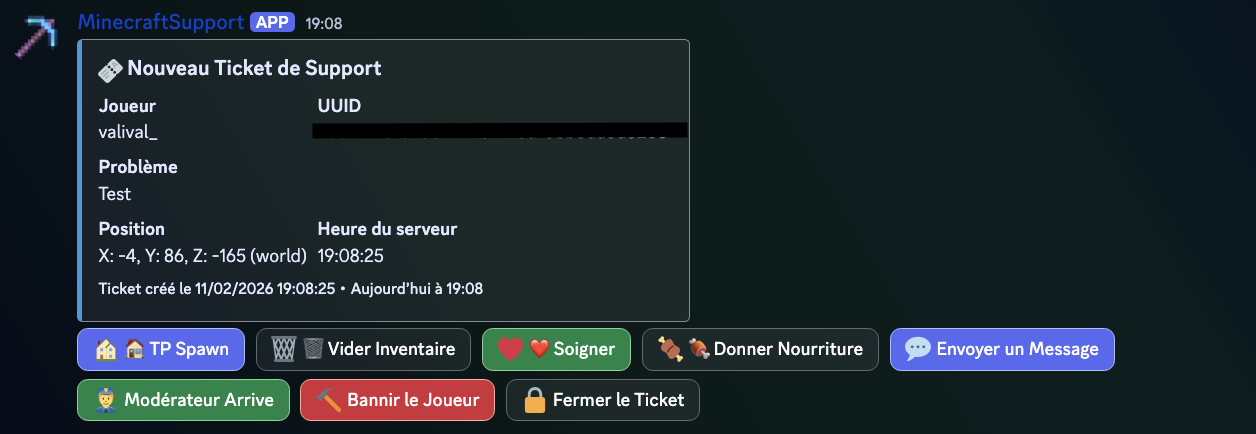 Automatic private channel with action buttons
Real-Time Communication
Staff → Player and Player → Staff instant
⚡ Quick Installation
1️⃣ Create the Discord Bot
- Go to https://discord.com/developers/applications
- Create an application → Bot
- Copy the token
- IMPORTANT: Enable these intents in "Bot":
- ✅ MESSAGE CONTENT INTENT
- ✅ SERVER MEMBERS INTENT
- OAuth2 → URL Generator:
- Check
botandapplications.commands - Permissions: View Channels, Send Messages, Manage Channels, Manage Permissions
- Check
- Invite the bot to your server
2️⃣ Install the Plugin
- Download
DiscordSupport-v2.0.jar - Place in
/plugins/ - Restart the server
- Edit
plugins/DiscordSupport/config.yml /supportreload
3️⃣ Minimal Configuration
Public Tickets (easy):
discord:
  bot-token: "YOUR_TOKEN_HERE"
  public-tickets:
    enabled: true
    channel-id: "123456789012345678"  # Your #support channel ID
Private Tickets (recommended):
discord:
  bot-token: "YOUR_TOKEN_HERE"
  private-tickets:
    enabled: true
    category-id: "123456789012345678"  # Your category ID
    allowed-roles: "987654321098765432,111222333444555666"  # Staff, Admin
    delete-on-close: true
🎮 Commands
| Command | Description | Permission |
|---|---|---|
/support <problem> |
Create a ticket | discordsupport.use |
/commandsend <message> |
Reply to support | discordsupport.use |
/supportreload |
Reload config | discordsupport.admin |
/supportsend <test> |
Test connection | discordsupport.admin |
🔧 Advanced Configuration
Customize Buttons
action-buttons:
  teleport-spawn:
    enabled: true
    label: "🏠 TP Spawn"
    command: "tp %player% 0 100 0"

  heal-player:
    enabled: true
    label: "❤️ Heal"
    command: "heal %player%"
Anti-Spam Cooldown
cooldown:
  enabled: true
  time: 60  # seconds between each ticket
Custom Messages
messages:
  support-sent: "&a&l✔ &aTicket sent successfully!"
  no-active-ticket: "&c&l✘ &cYou don't have an active ticket."
📋 Usage Example
Player creates a ticket
Player: /support I'm stuck in a wall
Discord - Private Channel Created
🎫 New Support Ticket

Player: Valival_
UUID: 123e4567-e89b-12d3-a456-426614174000
Problem: I'm stuck in a wall
Location: X: 150, Y: 64, Z: -230 (world)
Time: 18:30:42

[Buttons] 🏠 TP Spawn | 🗑️ Clear | ❤️ Heal | 🍖 Food | 💬 Message | 👮 Arriving | 🔨 Ban | 🔒 Close
Staff responds
Staff (Discord): Clicks "Send Message"
→ Popup: "I'll teleport you to spawn"
Player (Minecraft): Receives "[Support] I'll teleport you to spawn"
Staff clicks "TP Spawn"
Player: [Teleported to spawn]
Staff sees (only them): "✅ Action TP Spawn executed for Valival_"
Player responds
Player: /commandsend Thanks, it's fixed!
Discord: "💬 Message from Valival_: Thanks, it's fixed!"
Staff closes the ticket
Staff: Clicks "Close Ticket"
Player: Receives "Your ticket has been closed"
Discord Channel: Deleted after 5 seconds
🛡️ Security & Performance
✅ Thread-safe - Uses ConcurrentHashMap
✅ Asynchronous - No server lag
✅ Discord Permissions - Role-based access control
✅ Anti-spam - Configurable cooldown
✅ Complete Logs - All actions tracked
✅ Validation - Bot status verification
🔗 Compatibility
- Minecraft: 1.20.5 - 1.21.4+
- Server: Paper, Spigot, Purpur
- Java: 17+
- Discord: JDA 5.0 (included)
📦 Download
French Version: Configuration and messages in French
English Version: Configuration and messages in English
Both versions are 100% functional and identical in terms of features.
💝 Support & Contact
- 🐛 Bugs: Use the "Issues" tab on Modrinth
- 💡 Suggestions: Share your ideas!
- ⭐ Reviews: Leave a review if you like the plugin
📝 Changelog v2.0
Major New Features:
- ✨ Private ticket system with dedicated channels
- 💬 Two-way Discord ↔ Minecraft communication
- 🎮 "Moderator Arriving" button to notify players
- 🔨 "Ban" button with confirmation and reason
- 🌍 Complete FR/EN support
- ⚡ Asynchronous initialization (no lag)
- 🛡️ Bot status verification before creation
Improvements:
- Ephemeral messages (visible only to the person who clicks)
- Improved error handling
- Clearer and more informative logs
- Complete documentation
Fixes:
- Fixed server freeze during initialization
- Fixed "Guild does not have a self member"
- Fixed Discord intents handling
🏆 Why DiscordSupport?
Before
Player: "I'm stuck!"
→ Staff must go in-game
→ Wastes time
→ Player waits a long time
After with DiscordSupport
Player: /support I'm stuck
→ Instant Discord ticket
→ Staff sees position, problem, info
→ Clicks "TP Spawn"
→ Player teleported in 2 seconds
→ Problem solved!
Time saved: 90%
Player satisfaction: +200%
Happy staff: Priceless 😊
📜 License
MIT License - Free to use and modify
Made with ❤️ by Valival_
If this plugin helps you, leave a ⭐ review!
- Edition: Minecraft Java
- File type: .jar
- Minecraft versions listed: 1.20, 1.20.1, 1.20.2
- How to install: Install the matching mod loader (Forge, Fabric or NeoForge) for your Minecraft version. → Download the .jar. → Put it in the .minecraft/mods folder and launch that loader profile.
- Where to get it: Opens on Modrinth — not every file is mirrored on our own servers.
Install steps are the general flow for this file type — How to install Minecraft Java mods & modpacks walks through it step by step.
- Ships as DiscordSupport-2.1.0.jar — drop this file into the mods folder
- Download size: 15.0 MB
- Download link checked 22 Aug 2026 — working
These come from our own check of the pack file, not from the source page.