
CoffeeStreams
Java mod listed for Minecraft 1.21. Downloads from the MC Java Mods app on Android.
CoffeeStreams is a lightweight Paper 1.21+ plugin that lets players link and showcase their live streams directly in-game for SMP and creator-friendly…
⬇ Download on Modrinth



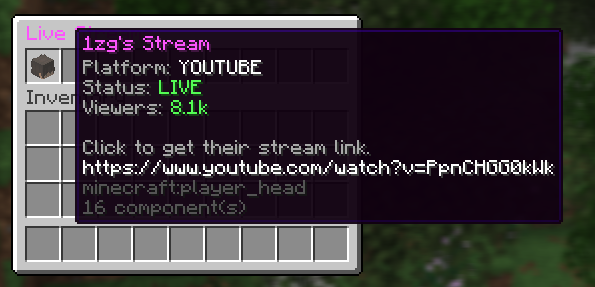

☕ CoffeeStreams Live Stream Integration for SMPs
CoffeeStreams is a lightweight Paper 1.21+ plugin that lets players link their live streams directly in-game. Designed for SMPs and creator-friendly servers, it provides a clean way to showcase streamers.
⚠️ Configuration is REQUIRED before use. This plugin will not function correctly out of the box until API keys are set.
✨ Features
- 🔗 Player stream linking with
/stream - 📺 Streams GUI via
/streams - 🛠 Staff approval system for streamers
- 🚀 Lightweight & SMP-friendly
- 💤 Streams persist across restarts
⚙️ REQUIRED CONFIGURATION (IMPORTANT)
Before using CoffeeStreams, you must configure API credentials in config.yml.
Required
- YouTube Data API key Used to detect live status and viewer counts
Optional (but recommended)
- Twitch Client ID
- Twitch Client Secret
Without these:
- Live status will not update
- Viewer counts will not display
/streamsmay show offline or empty results
➡️ Restart the server after editing config.yml.
🧑💻 Commands
| Command | Description |
|---|---|
/stream <url> |
Set your stream link |
/stream remove |
Remove your stream |
/stream approve <player> |
Approve a streamer (staff) |
/stream unapprove <player> |
Unapprove a streamer |
/streams |
Open the streams GUI |
🔐 Permissions
| Permission | Description |
|---|---|
coffeestreams.stream |
Use /stream |
coffeestreams.streams |
Use /streams |
coffeestreams.stream.approve |
Approve / unapprove streamers |
🧩 Requirements
- Paper 1.21+
- Java 21
- YouTube Data API key (REQUIRED)
- Twitch API credentials (optional)
📦 Installation
- Download the plugin
- Place the
.jarinto/plugins - Start the server once
- Open
plugins/CoffeeStreams/config.yml - Add required API keys
- Restart the server ☕
⚠️ Notes
- API credentials are not included for security reasons
- Each server must use its own keys
- Missing or invalid keys will cause features to be disabled
- Edition: Minecraft Java
- File type: .jar
- Minecraft versions listed: 1.21, 1.21.1, 1.21.2
- How to install: Install the matching mod loader (Forge, Fabric or NeoForge) for your Minecraft version. → Download the .jar. → Put it in the .minecraft/mods folder and launch that loader profile.
- Where to get it: Opens on Modrinth — not every file is mirrored on our own servers.
Install steps are the general flow for this file type — How to install Minecraft Java mods & modpacks walks through it step by step.
- Ships as coffeestreams-1.0.jar — drop this file into the mods folder
- Download size: 24 KB
- Download link checked 3 Oct 2026 — working
These come from our own check of the pack file, not from the source page.