

🎲 CrashGame
CrashGame brings the popular Crash gambling mechanic to Minecraft.
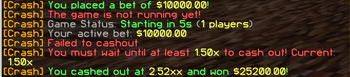
Players place bets, watch the multiplier rise in real time, and must cash out before the crash happens.
⚠️ Ingame currency only — no real money involved.
✅ Features (based on the config)
- 👥 Minimum players to start
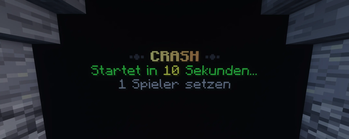
- ⏳ Prestart countdown
- 🧮 Tick-based multiplier updates
- 📉 House edge support
- 💵 Bet limits
- 🔒 Minimum cashout multiplier (players can’t cash out before this multiplier is reached)
🪄 FancyHolograms Display
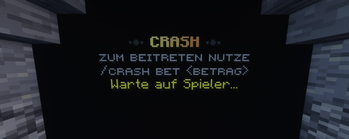
CrashGame updates a FancyHolograms hologram in real time using your configured hologram:
- Hologram ID:
hologram.hologram-id - Proximity radius:
hologram.proximity-radius - State-based lines:
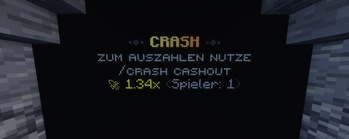
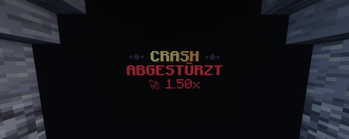
hologram.lines.idlehologram.lines.prestarthologram.lines.runninghologram.lines.crashed
Supported placeholders (as used in your config):
{countdown}{player_count}{multiplier}
⚡ Actionbar Fallback
If players are not near the hologram (or if you simply want a global view), CrashGame can show the multiplier in the actionbar:
- Enable/disable:
actionbar.enabled - Text:
actionbar.text - Distance check:
actionbar.distance
🎮 How It Works
- Players place a bet using an ingame command
- After a short countdown, the round starts
- The multiplier increases continuously
- Players can cash out at any time
- If the game crashes before cashout — the bet is lost
🧩 Commands
/crash bet <amount>Place a bet/crash cashoutCash out during a running round/crash statusView current game status/crash reloadReload configuration (admin)
🔐 Permissions
crash.useAllow plugin usagecrash.adminAdmin commands
⚙️ Requirements
- Paper / Spigot or Folia
- Java 17+
- Vault (with an economy plugin)
- FancyHolograms
📦 Configuration
CrashGame is fully configurable, config: config.yml
🧠 Notes
- No real money transactions
- Designed for performance and stability
- Ideal for SMPs, casino servers, and event-based gameplay
Quick facts
- Edition: Minecraft Java
- File type: .jar
- Minecraft versions listed: 1.21, 1.21.1, 1.21.2
- How to install: Install the matching mod loader (Forge, Fabric or NeoForge) for your Minecraft version. → Download the .jar. → Put it in the .minecraft/mods folder and launch that loader profile.
- Where to get it: Opens on Modrinth — not every file is mirrored on our own servers.
Install steps are the general flow for this file type — How to install Minecraft Java mods & modpacks walks through it step by step.
Verified by MCModsHub
- Ships as CrashGambling-1.0.1.jar — drop this file into the mods folder
- Download size: 66 KB
- Download link checked 10 Sept 2026 — working
These come from our own check of the pack file, not from the source page.