Guardian - Logging
🛡️ Guardian Block & Container Logging with Web Dashboard for Paper Servers Track who did what, when. Now with a modern Web Dashboard. ✨ Features Feature…
⬇ Download on Modrinth
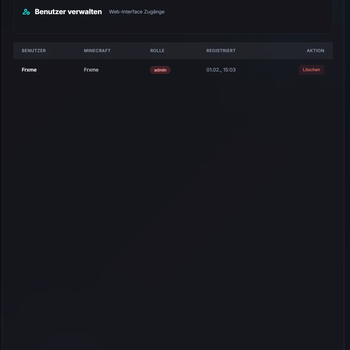
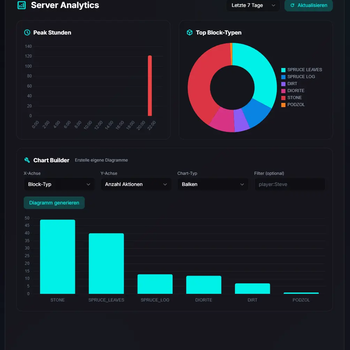
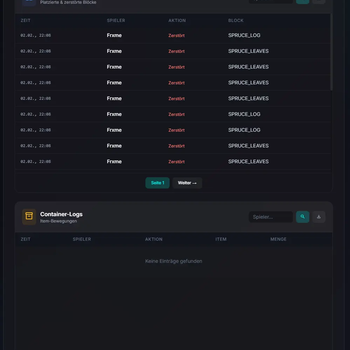
🛡️ Guardian
Block & Container Logging with Web Dashboard for Paper Servers




Track who did what, when. Now with a modern Web Dashboard.
✨ Features
| Feature | Description |
|---|---|
| 🌐 Web Dashboard | Modern, responsive admin panel for managing logs and analytics |
| 📊 Analytics | Action distribution charts and server activity insights |
| 📦 Block Logging | Track all block breaks and placements with player attribution |
| 📦 Container Logging | Monitor item additions and removals from chests, barrels, etc. |
| 🔍 Inspector Mode | Click blocks directly to view their history |
| 🔒 User Authentication | Secure login with JWT tokens and role-based access |
| ⚡ Async Database | Zero lag - all operations run in the background |
| 💾 SQLite Storage | No external database setup required |
| 🗄️ Double Chest Support | Correct handling of large container logging |
📥 Installation
1. 📁 Download the latest Guardian.jar from releases
2. 📂 Drop it into your server's plugins folder
3. 🔄 Restart your server
4. ✅ Done! Database created automatically
5. 🌐 Access web dashboard at http://your-server-ip:7070
🌐 Web Dashboard
Access the dashboard at http://your-server-ip:6746 after installation.
Features
- 📈 Real-time analytics and charts
- 📋 Browse and filter block/container logs
- 👤 User management with role-based access (Admin/User)
- 🔒 Secure JWT authentication
- 📱 Mobile-responsive design
First-Time Setup
- Navigate to the dashboard URL
- Create your admin account
- Configure your preferences
💻 Commands
| Command | Description | Permission |
|---|---|---|
/lookup [page] |
🔍 View block history at targeted block | guardian.lookup |
/inspect |
👁️ Toggle inspector mode | guardian.inspect |
/guardian [page] |
📦 View container item history | guardian.inspect |
🔗 Aliases
| Main Command | Aliases |
|---|---|
/lookup |
/guard, /glookup |
/inspect |
/ginspect, /gi |
/guardian |
/gcont |
🔐 Permissions
| Permission | Description | Default |
|---|---|---|
guardian.lookup |
Access block history lookup | OP |
guardian.inspect |
Access inspector mode & container history | OP |
🔍 Inspector Mode
Toggle with /inspect for interactive lookups:
| Action | Result |
|---|---|
| Left-click any block | View block break/place history |
| Right-click a container | View item add/remove history |
| Right-click non-container | View block history |
💡 All interactions are cancelled in inspector mode to prevent accidents!
📋 Supported Versions
| Requirement | Version |
|---|---|
| Minecraft | 1.21 - 1.21.5 |
| Server | Paper, Purpur, or compatible forks |
| Java | 17+ |
📜 License
🤝 Partner

Powered by EmeraldHost
DDoS-Protection, NVMe Performance und 99.9% Uptime. Der Host meines Vertrauens für alle Development-Server.

Made with ❤️ by Frxme
- Edition: Minecraft Java
- File type: .jar
- Minecraft versions listed: 1.21, 1.21.1, 1.21.2
- How to install: Install the matching mod loader (Forge, Fabric or NeoForge) for your Minecraft version. → Download the .jar. → Put it in the .minecraft/mods folder and launch that loader profile.
- Where to get it: Opens on Modrinth — not every file is mirrored on our own servers.
Install steps are the general flow for this file type — How to install Minecraft Java mods & modpacks walks through it step by step.
- Ships as Guardian-2.0.jar — drop this file into the mods folder
- Download size: 19.3 MB
- Download link checked 22 Aug 2026 — working
These come from our own check of the pack file, not from the source page.