
Server Bridge CMD
This plugin can send commands from one server to another server. For example, admin can send commands from lobby server to afk server.
⬇ Download on Modrinth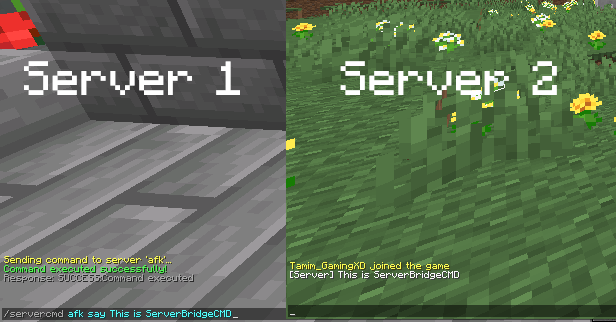
Server-to-Server Command Execution Plugin
What does the Plugin?
This plugin can send commands from one server to another, such as sending commands from a main server to an afk server.
How to use it?
• First you have to restart or start the server with the plugin.
• Then it will create a new folder with a config.yml file.
• In the config.yml, You have to configure like the image.
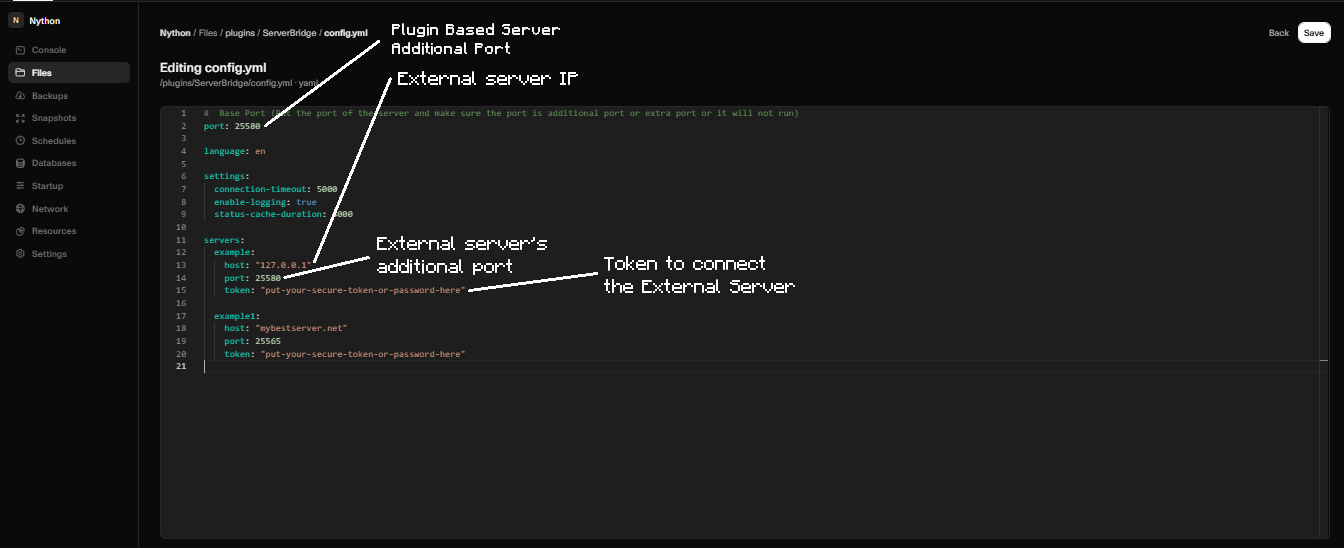
• Make sure you have to configure extra or new ports with both servers.
• And check both servers should have same token.
Dependency :
• It's mainly designed for 1.21.1 Paper.
• It's support viaversion (1.15.x - 1.21.x).
• It's support other pluginloader like spigot,purpur,pufferfish,paper.
Important :
• You also need a extra port for this or it will not work. Most of the hostings provide new port or port allowcation.
- Edition: Minecraft Java
- File type: .jar
- Minecraft versions listed: 1.13, 1.13.1, 1.13.2
- How to install: Install the matching mod loader (Forge, Fabric or NeoForge) for your Minecraft version. → Download the .jar. → Put it in the .minecraft/mods folder and launch that loader profile.
- Where to get it: Opens on Modrinth — not every file is mirrored on our own servers.
Install steps are the general flow for this file type — How to install Minecraft Java mods & modpacks walks through it step by step.
- Ships as ServerBridge-1.0.5.jar — drop this file into the mods folder
- Download size: 35 KB
- Download link checked 21 Aug 2026 — working
These come from our own check of the pack file, not from the source page.