
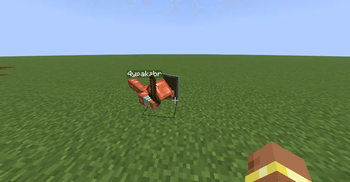
После смерти появляется ваш труп.
Чтобы забрать свою экипировку (броню и предметы в руках), нужно присесть (Shift) и нажать ПКМ по трупу, чтобы забрать остальные вещи просто нажать ПКМ по трупу
После респавна у вас будет:
- Уменьшенное здоровье и сытость
- Наложенные дебаффы (из списка в конфиге)
Команды
/realisticdeaths:reload— перезагрузка конфига
Конфигурация
| Название | Описание | Значение по умолчанию |
|---|---|---|
corpse-lava-damage |
Получает ли труп урон в лаве (1 ед./тик) | true |
corpse-max-health |
Макс. урон трупа до исчезновения | 1200 |
corpse-lifetime |
Время жизни трупа (в тиках) | 12000 (10 мин.) |
custom-respawn |
Включить кастомное возрождение | true |
resp-health |
Здоровье при возрождении | 6 (❤❤❤) |
resp-food |
Уровень сытости при возрождении | 6 |
resp-effects |
Эффекты при возрождении | Темнота (100 тиков), Тошнота (200 тиков) |
After death, your corpse appears at the location where you died.
To retrieve your equipment (armor and held items), you must sneak (Shift) and right-click on the corpse. To collect other items, simply right-click on the corpse
Upon respawning, you will have:
- Reduced health and hunger
- Applied debuffs (from the config list)
Commands
/realisticdeaths:reload— config relaod
Configuration
| Config Key | Description | Default Value |
|---|---|---|
corpse-lava-damage |
Whether the corpse takes damage in lava (1 dmg/tick) | true |
corpse-max-health |
Max damage the corpse can take before disappearing | 1200 |
corpse-lifetime |
Corpse lifetime (in ticks) | 12000 (10 min.) |
custom-respawn |
Enable custom respawn effects | true |
resp-health |
Health on respawn | 6 (❤❤❤) |
resp-food |
Food level on respawn | 6 |
resp-effects |
Potion effects on respawn | Darkness (100 ticks), Nausea (200 ticks) |
Quick facts
- Edition: Minecraft Java
- File type: .jar
- Minecraft versions listed: 1.21.9, 1.21.10, 1.21.11
- How to install: Install the matching mod loader (Forge, Fabric or NeoForge) for your Minecraft version. → Download the .jar. → Put it in the .minecraft/mods folder and launch that loader profile.
- Where to get it: Opens on Modrinth — not every file is mirrored on our own servers.
Install steps are the general flow for this file type — How to install Minecraft Java mods & modpacks walks through it step by step.
Verified by MCModsHub
- Ships as RealisticDeaths v.1.4.4.jar — drop this file into the mods folder
- Download size: 139 KB
- Download link checked 21 Aug 2026 — working
These come from our own check of the pack file, not from the source page.