
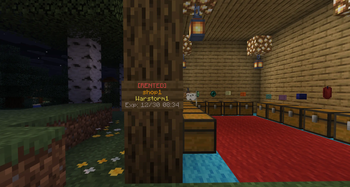
ZoneRental - Complete WorldGuard Region Rental System
A comprehensive Minecraft plugin for managing rental regions with clickable signs, multi-world support, and complete lifecycle automation.



What is ZoneRental?
ZoneRental is a feature-rich rental management plugin that allows players to rent WorldGuard regions through clickable signs. The plugin handles the complete rental lifecycle including automatic expiration, block restoration, item storage, and economy integration.
Perfect for servers with player shops, market stalls, or any rentable spaces where you need automatic management and restoration.
Why Download This?
- Zero Manual Management - Everything is automated from rental to expiration
- WorldEdit Restoration - Regions automatically restore to original state
- Item Safety - All items from containers are saved and retrievable
- Multi-World Support - Works across overworld, nether, end, and custom worlds
- Flexible Configuration - Per-region pricing, durations, and settings
- Economy Integration - Full Vault support with any economy plugin
- Member System - Allow friends to access your rented regions
- Extension System - Players can extend rentals with configurable limits
- Complete Refund Tracking - Full transaction history for all refunds
- EzChestShop Integration - Automatic shop removal on expiration
Essential Information Before Downloading
Requirements
Required Dependencies:
- Vault (economy API)
- WorldGuard 7.0.14+ (region management)
- WorldEdit 7.3.16+ (block restoration)
- Any economy plugin (EssentialsX, CMI, etc.)
Optional Dependencies:
- LuckPerms (advanced permissions)
- EzChestShop (automatic shop removal)
Compatibility
- Server Software: Paper, Spigot, or any Paper-based fork
- Minecraft Version: 1.21+
- Java Version: Java 21 required (OpenJDK recommended)
Installation Steps
- Install required dependencies (Vault, WorldGuard, WorldEdit, Economy plugin)
- Download ZoneRental JAR file
- Place in
plugins/folder - Restart server (configuration files will be auto-generated)
- Configure
config.ymlto your preferences - Create WorldGuard regions:
/rg define <region> - Place signs and create rental signs:
/zrcreatesign <region>
Core Features
Rental Management
- Clickable Signs - Right-click to rent, shift-click to extend
- Multi-World Support - Same region names work independently across worlds
- Automatic Expiration - Regions automatically expire and restore
- Extension System - Players can extend rentals up to configured limits
- Member Management - Add/remove members to share rented regions
- Teleportation - Players can teleport to their rented regions
Economy & Pricing
- Vault Integration - Works with any economy plugin
- Per-Region Pricing - Set custom prices for specific regions
- Extension Pricing - Configurable extension costs
- Permission-Based Discounts - VIP pricing through permissions
- Full Refund System - Admin resets provide 100% refunds
- Extension Refunds - Optional refunds when duration is reset
Block Restoration
- WorldEdit Integration - Captures and restores block states
- Entity Restoration - Optionally restore entities (mobs, armor stands)
- Biome Restoration - Optionally restore biome data
- Auto-Cleanup - Configurable automatic schematic deletion
- World-Aware - Restoration happens in the correct world
Item Storage
- Container Scanning - Automatically saves items from all containers
- Player Retrieval -
/zrretrievecommand to get stored items - Notification System - Players notified when items are stored
- Auto-Cleanup - Items removed after retrieval
Admin Tools
- Command-Based Config - All per-region settings via
/zroverridecommands - Region Groups - Group regions for mass configuration changes
- Duration Management - Add, remove, set, or reset rental time
- Auto-Verification - Startup verification of region configurations
- Refund History - Complete transaction tracking per rental
- Sign Protection - Signs and support blocks are protected from breaking
Integration Features
- EzChestShop - Automatic chest shop removal on expiration
- WorldGuard - Automatic member management
- LuckPerms - Full permission system integration
- Notification System - Configurable expiration warnings
User Commands
/zr help- Show help menu/zrinfo <region>- View rental information/zrlist [player]- List active rentals/zrextend <region>- Extend a rental/zrretrieve- Get stored items from expired rentals/zrmember add/remove <region> <player>- Manage members/zrmembers <region>- List members of rented region/zrtp <region>- Teleport to rented region
Admin Commands
/zrcreatesign <region>- Create rental sign/zrreload- Reload configuration/zrreset <region>- Reset rental with full refund/zrduration <add|remove|set|reset> <region> [time]- Modify duration/zroverride <subcommand> <target> <value>- Per-region settings/zrgroup <subcommand>- Manage region groups/zrremove <region>- Remove rental setup completely/zrrefundhistory <region>- View refund transaction history/zrverify- Verify region configurations
Permissions
User Permissions (default: true):
ZoneRental.rent- Rent regionsZoneRental.extend- Extend rentalsZoneRental.retrieve- Retrieve stored itemsZoneRental.info- View rental infoZoneRental.list- List your rentalsZoneRental.member- Manage membersZoneRental.members- View membersZoneRental.tp- Teleport to rentals
Admin Permissions (default: op):
ZoneRental.admin.*- All admin permissionsZoneRental.admin.reload- Reload pluginZoneRental.admin.createsign- Create rental signsZoneRental.admin.reset- Reset rentalsZoneRental.admin.duration- Modify durationsZoneRental.admin.override- Per-region settingsZoneRental.admin.remove- Remove rental setupZoneRental.admin.refundhistory- View refund historyZoneRental.admin.verify- Verify configurationsZoneRental.admin.bypass- Bypass restrictionsZoneRental.admin.breaksign- Break rental signsZoneRental.admin.list.others- List others' rentalsZoneRental.admin.group- Manage region groups
Configuration Files
The plugin creates six configuration files:
- config.yml - Main configuration (economy, durations, messages)
- regions.yml - Per-region overrides (managed via commands)
- groups.yml - Region group definitions
- signs.yml - Sign locations and support blocks
- storage.yml - Item storage from expired rentals
- rentals.yml - Active rental data (runtime)
Plus a schematics/ folder for WorldEdit region snapshots.
Quick Start Guide
- Install dependencies (Vault, WorldGuard, WorldEdit, Economy plugin)
- Restart server to generate configs
- Configure settings in
config.yml - Create a WorldGuard region:
/rg define shop1 - Place a sign where you want players to interact
- Create rental sign:
/zrcreatesign shop1 - Optionally customize:
/zroverride price shop1 500.0 - Done! Players can now right-click the sign to rent
Support & Documentation
- Full Documentation: See repository README.md
- Build Instructions: See BUILDING.md
- Version History: See CHANGELOG.md
Source Code & License
- Repository: https://github.com/Warstorm548/ZoneRental
- License: AGPL-3.0 (open source)
Development Note
- this plugin was Developed utilizing claude code, ai-assisted Development
- The plugin is tested manually in a test server environment to ensure minimal bugs and reduce issues that may be persent in the code.
- Edition: Minecraft Java
- File type: .jar
- Minecraft versions listed: 1.21, 1.21.1, 1.21.2
- How to install: Install the matching mod loader (Forge, Fabric or NeoForge) for your Minecraft version. → Download the .jar. → Put it in the .minecraft/mods folder and launch that loader profile.
- Where to get it: Opens on Modrinth — not every file is mirrored on our own servers.
Install steps are the general flow for this file type — How to install Minecraft Java mods & modpacks walks through it step by step.
- Ships as ZoneRental-3.2.0.jar — drop this file into the mods folder
- Download size: 3.8 MB
- Download link checked 21 Aug 2026 — working
These come from our own check of the pack file, not from the source page.