
MythicItemSync
MythicItemSync keeps MythicMobs items up to date across player inventories after reloads, safely and efficiently.
⬇ Download on Modrinth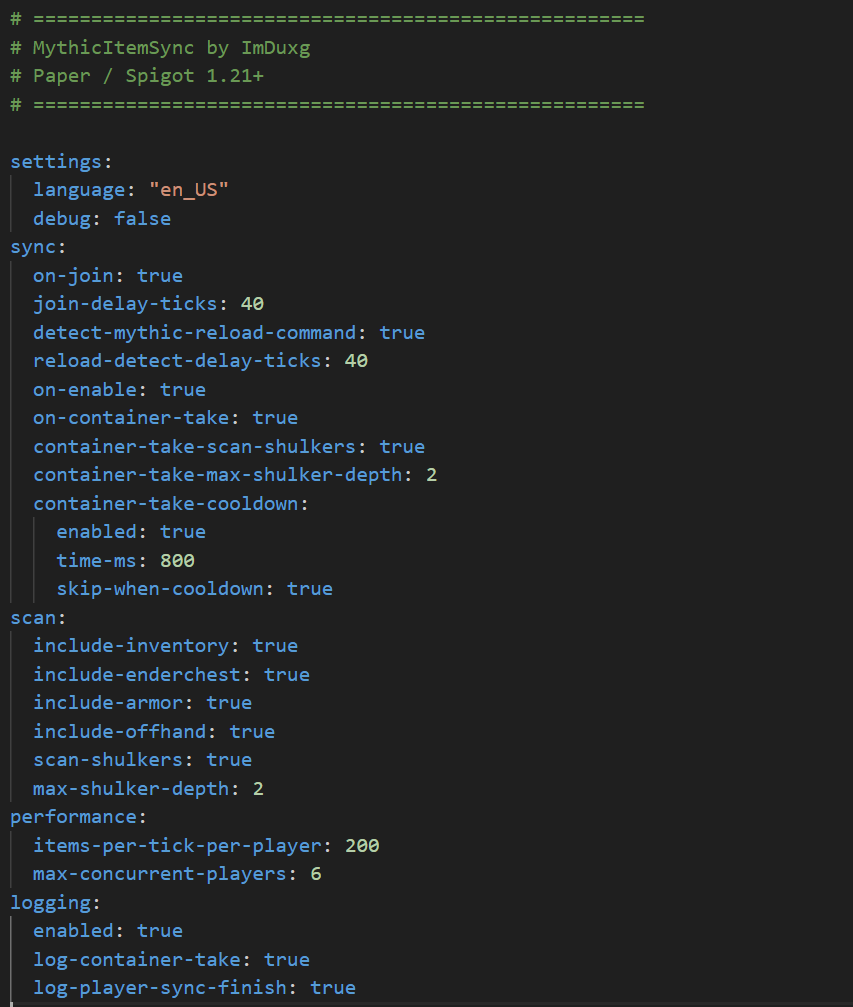
MythicItemSync is a lightweight, performance-focused utility plugin designed to automatically keep MythicMobs items synchronized across player inventories. It safely updates Mythic items after MythicMobs reloads and during gameplay interactions, while preserving enchantments (including unsafe), durability, and custom NBT / PersistentDataContainer data added by players or other plugins.
The plugin uses a queue-based, tick-safe synchronization engine to prevent lag and performance spikes on live servers. Mythic items are updated in real time when players take them from containers (such as chests or shulker boxes), with anti-spam cooldown protection to prevent abuse. Nested shulker boxes are supported with configurable depth limits for safety.
All sync activity is written to a dedicated log file (logs/sync.log) with timestamps and execution time, keeping the console and player chat completely clean.
Every feature is fully configurable through config.yml, with bilingual EN / VI comments for easy setup.
Designed for Paper / Spigot 1.21+ servers running MythicMobs.
Commands
/mythicitemsync/msync/mis
Command List
/msync sync <player|all>Manually synchronize MythicMobs items for a specific player or all online players./msync reloadReload the plugin configuration and language files./msync statusView current sync queue size and running sync tasks.
Permissions
| Permission | Description |
|---|---|
mythicitemsync.use |
Access basic MythicItemSync commands |
mythicitemsync.sync |
Allows manual item synchronization |
mythicitemsync.reload |
Allows reloading the plugin |
mythicitemsync.admin |
Full access to all plugin features |
Note:
mythicitemsync.adminincludes all other permissions.
- Edition: Minecraft Java
- File type: .jar
- Minecraft versions listed: 1.21, 1.21.1, 1.21.2
- How to install: Install the matching mod loader (Forge, Fabric or NeoForge) for your Minecraft version. → Download the .jar. → Put it in the .minecraft/mods folder and launch that loader profile.
- Where to get it: Opens on Modrinth — not every file is mirrored on our own servers.
Install steps are the general flow for this file type — How to install Minecraft Java mods & modpacks walks through it step by step.
- Ships as MythicItemSync-1.0.0.jar — drop this file into the mods folder
- Download size: 39 KB
- Download link checked 10 Sept 2026 — working
These come from our own check of the pack file, not from the source page.