
ModsJava
GobangGameMC
Java mod listed for Minecraft 1.21. Downloads from the MC Java Mods app on Android.
⬇ Download on Modrinth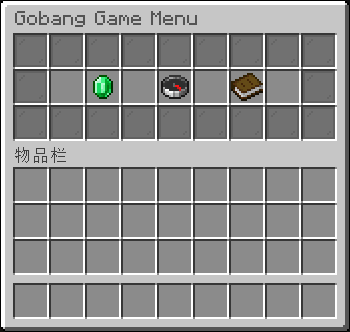
GobangGame MC



This is a Minecraft Bukkit Server plugin version of GobangGame
See GobangGame for the original desktop program made by me
Description
A Minecraft plugin that brings the classic game of Gobang (Five in a Row) into Minecraft with beautiful GUI interfaces and multiplayer support.
Installation
For server owners
- Download the latest
GobangGameMC.jarfrom Github Release page or the Modrinth Versions page - Place the JAR file in your server's
plugins/folder - Restart your server
- Players can now use
/gobanggameto play!
🎮 Commands
| Command | Description | Permission |
|---|---|---|
/gobanggame |
Open main menu | gobanggame.use |
/gg |
Alias for /gobanggame | gobanggame.use |
/gobanggame invite <player> |
Invite a player to play | gobanggame.invite |
/gobanggame accept <player> |
Accept an invitation | gobanggame.accept |
/gobanggame deny <player> |
Deny an invitation | gobanggame.use |
/gobanggame quit |
Leave current game | gobanggame.use |
/gobanggame help |
Show help menu | gobanggame.use |
📖 How to Play
Starting a game:
- Type
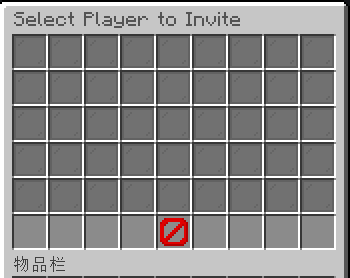
/gobanggameto open the main menu - Click "Create New Game" to invite a player
- Select a player from the online list
- They'll receive an invitation notification
- Once they accept, the game begins!
Game rules:
- Black goes first, White goes second
- Players take turns placing their pieces
- Connect 5 pieces in a row to win (horizontal, vertical, or diagonal)
- You have 60 seconds per move
- If the board fills completely, it's a draw
Game interface:
- Top 5 rows: 15x15 game board (showing first 45 slots)
- Bottom row: Game information and controls
- Turn Indicator: Shows whose turn it is (black/white dye)
- Quit Button: Red barrier to leave the game
⚙️ Configuration
After first run, a config.yml file will be created in plugins/GobangGameMC/:
# Gobang Game Configuration
version: 1.0

# Game Settings
game:
  turn-time: 60          # Seconds per turn
  board-size: 15         # Size of the board (15x15)
  max-games: 10          # Maximum concurrent games

# Invitations
invitations:
  timeout: 300           # 5 minutes in seconds
  max-pending: 5         # Max pending invites per player

# Performance
performance:
  autosave-interval: 300 # Save games every 5 minutes
  cleanup-interval: 600  # Clean up old data every 10 minutes
🧩 Permissions
| Permission | Description | Default |
|---|---|---|
gobanggame.use |
Use main commands | true |
gobanggame.invite |
Invite players | true |
gobanggame.accept |
Accept invitations | true |
gobanggame.admin |
Admin commands | op |
🔧 Troubleshooting
Common Issues:
- Plugin won't enable:
- Ensure you're using Java 21 or higher
- Check server logs for errors
- Verify plugin.yml is correctly formatted
- Commands not working:
- Type /reload confirm to reload plugins
- Check that you have the required permissions
- Ensure you're using Minecraft 1.21.11+
- GUI not opening:
- Make sure you're a player (not console)
- Check for inventory conflicts with other plugins
- Win detection not working:
- Verify you have 5 pieces in a straight line
- Check server logs for win detection errors
🤝 Contributing
Contributions are welcome! Here's how you can help:
- Fork the repository
- Create a feature branch: git checkout -b feature/amazing-feature
- Commit your changes: git commit -m 'Add amazing feature'
- Push to the branch: git push origin feature/amazing-feature
- Open a Pull Request
🙏 Acknowledgments
- Mojang for Minecraft
- SpigotMC for the plugin API
- PaperMC for server optimizations
📞 Support
- Issues: GitHub Issues
- Email: hanruericqiu@gmail.com
🎮 Game Preview
[Player1] invited you to play Gobang!
Use /gobanggame accept Player1 to accept

══════════════════════════════════════
Player1 defeated Player2
in a game of Gobang!
══════════════════════════════════════
Enjoy playing Gobang in Minecraft! 🎮⚫⚪
Quick facts
- Edition: Minecraft Java
- File type: .jar
- Minecraft versions listed: 1.21, 1.21.1, 1.21.2
- How to install: Install the matching mod loader (Forge, Fabric or NeoForge) for your Minecraft version. → Download the .jar. → Put it in the .minecraft/mods folder and launch that loader profile.
- Where to get it: Opens on Modrinth — not every file is mirrored on our own servers.
Install steps are the general flow for this file type — How to install Minecraft Java mods & modpacks walks through it step by step.
File checked by MCModsHub
- Ships as GobangGameMC-1.0.0.jar — drop this file into the mods folder
- Download size: 37 KB
- Download link checked 3 Oct 2026 — working
These come from our own check of the pack file, not from the source page.