
ReviveSystem
Java mod listed for Minecraft 1.21–26.x. Downloads from the MC Java Mods app on Android.
Revive players after death Special items and mechanics Customizable settings Compatible with Minecraft 1.21–1.21.10 + (- 26.2)
⬇ Download on Modrinth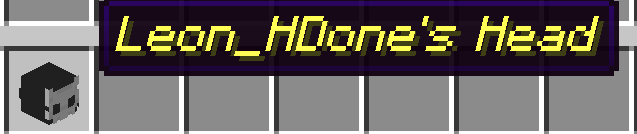

ReviveSystem v2.0
A full-featured revival system for Minecraft Hardcore and Semi-Hardcore servers.
ReviveSystem gives dead players a second chance — but only through teamwork and strategic decisions. When a player dies, they aren't permanently eliminated. Instead, they enter Spectator Mode and must wait for another player to bring them back. This keeps the Hardcore feeling intact while preventing frustration from permanent death.
Compatible with: Paper, Spigot, Bukkit — Minecraft 1.21 through 26.2+
Table of Contents
- How It Works — Step by Step
- The Head Mechanic (Bonus Hearts)
- Items & Crafting Recipes
- All Commands
- All Permissions
- Full Configuration Guide
- Language & Messages
- Installation Guide
- Frequently Asked Questions
- Troubleshooting
How It Works — Step by Step
Here's exactly what happens during a typical gameplay session:
1. A Player Dies
When a player dies in your world, three things happen automatically:
- Their head drops as a physical item at their death location (a Player Head with their skin).
- They enter Spectator Mode — they can fly around and watch, but they cannot interact with the world, break blocks, or chat commands that affect gameplay.
- A death info screen appears — a GUI window showing their Level and total Playtime, which automatically closes after 5 seconds (configurable).
The player is now "dead" and waiting for revival.
2. How to Revive a Dead Player
There are two ways to bring a dead player back:
Method A: The Respawn Point (Player Head on Soul Sand)
- Another player picks up the dead player's dropped head.
- They surround it with Soul Sand in a crafting table (head in center, soul sand all around).
- This creates a Respawn Point — a special head item.
- When they place this head on the ground, the dead player is teleported to that location and revived.
- The placed head disappears after 2 seconds.
Method B: Admin Command
- A server admin or operator can use the command
/revive <playername>to instantly revive any dead player.
3. After Revival
- The player returns to Survival Mode with the configured amount of health (default: full 10 hearts).
- Their death count and revival status are saved. Depending on the server configuration, they can be revived up to a certain limit or infinitely.
- All their progress (XP, items they had) follows normal Minecraft death rules.
The Head Mechanic (Bonus Hearts)
This is a separate, optional feature that works alongside the revive system:
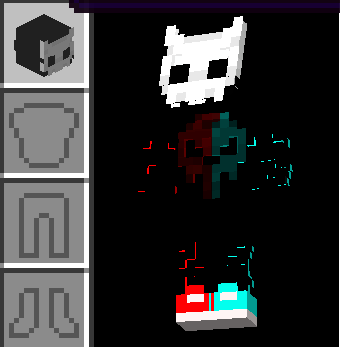
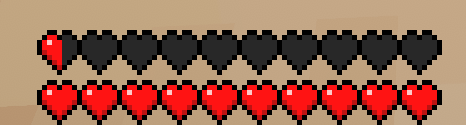
- When a player picks up a dropped player head (from someone's death) and puts it on as a helmet, they receive +20 bonus hearts (10 extra full hearts, for a total of 20 full hearts).
- A chat message tells them about the bonus hearts.
- The "Kopf hoch!" advancement is awarded (appears as a toast notification).
- A level-up sound plays.
- When the player takes the head off, their hearts go back to normal (10 full hearts).
- The bonus hearts amount, sound, and volume are all configurable.
Head Protection
Dropped player heads are valuable revival tokens. By default, they can be destroyed by lava and explosions. You can change this in the config:
head.kill-at-lava: false→ Heads survive lavahead.kill-at-explosion: false→ Heads survive explosions (TNT, Creepers, etc.)
Items & Crafting Recipes
Respawn Point
| Property | Value |
|---|---|
| Base Item | Player Head (with dead player's skin) |
| Display Name | §bRespawn Point of [PlayerName] |
| Effect | Place to revive the specific player |
Crafting Recipe:
[Soul Sand] [Soul Sand] [Soul Sand]
[Soul Sand] [Player Head] [Soul Sand]
[Soul Sand] [Soul Sand] [Soul Sand]
Place a dead player's dropped head in the center, surrounded by 8 Soul Sand blocks.
All Commands
| Command | Description | Permission |
|---|---|---|
/revive |
Shows help and available commands | Everyone |
/revive <player> |
Revives a dead player instantly | revivesystem.use |
/revive reload |
Reloads config and messages without server restart | revivesystem.admin |
/rev |
Alias for /revive |
Same as /revive |
Command Examples
/revive Steve          → Revives the player "Steve"
/revive reload         → Reloads all configuration files
/rev Alex              → Short form: revives "Alex"
All Permissions
| Permission | Description | Default |
|---|---|---|
revivesystem.use |
Allows using the /revive <player> command |
Everyone |
revivesystem.head |
Allows using the Head Mechanic (bonus hearts) | Everyone |
revivesystem.admin |
Allows /revive reload and admin commands |
OP only |
Full Configuration Guide
After the first server start, the file plugins/ReviveSystem/config.yml is created. Here's every option explained:
# ============================================================
# ReviveSystem Configuration v2.0
# ============================================================

# Language for all messages. Options: de, en, es
# You can also create your own language file (see Language section below)
language: de

# ============================================================
# Head Mechanic Settings
# ============================================================
head:
  # Set to false to completely disable the head mechanic
  # (bonus hearts, advancement, sound — everything)
  enabled: true

  # How many BONUS hearts the player gets when wearing a head.
  # 20 = +10 full hearts (total: 20 full hearts = 40 HP)
  # 10 = +5 full hearts (total: 15 full hearts = 30 HP)
  # 40 = +20 full hearts (total: 30 full hearts = 60 HP)
  bonus-hearts: 20

  # Should dropped player heads be destroyed when they fall in lava?
  # true = yes, the head will burn and be lost forever
  # false = no, the head is immune to lava damage
  kill-at-lava: true

  # Should dropped player heads be destroyed by explosions (TNT, Creepers)?
  # true = yes, explosions can destroy heads
  # false = no, heads are protected from explosions
  kill-at-explosion: true

  # The sound that plays when a player puts on a head.
  # Must be a valid Minecraft sound name.
  # Examples: ENTITY_PLAYER_LEVELUP, UI_TOAST_CHALLENGE_COMPLETE,
  #           ENTITY_ENDER_DRAGON_GROWL, BLOCK_BEACON_ACTIVATE
  advancement-sound: ENTITY_PLAYER_LEVELUP

  # Volume of the sound (0.0 = silent, 1.0 = normal, 2.0 = loud)
  advancement-sound-volume: 1.0

  # Pitch of the sound (0.5 = deep/slow, 1.0 = normal, 2.0 = high/fast)
  advancement-sound-pitch: 1.0

# ============================================================
# Revive System Settings
# ============================================================
revive:
  # After how many deaths should the player become a spectator?
  # 1 = after the first death (default, most hardcore)
  # 2 = after the second death (more forgiving)
  # 3 = three strikes and you're out
  deaths-required: 1

  # How long (in ticks) the death info GUI stays open.
  # 20 ticks = 1 second. Default: 100 ticks = 5 seconds.
  spectator-gui-duration: 100

  # Should a player head drop when a player dies?
  # true = yes, a head with the player's skin drops at the death location
  # false = no head drops (disables the Respawn Point mechanic)
  drop-head-on-death: true

  # How many times can a player be revived?
  # Set to -1 for infinite revives, or any positive number (e.g. 1, 2, 3) for a limit.
  max-revives: 1

  # Health the player gets after being revived.
  # 20.0 = full health (10 full hearts)
  # 10.0 = half health (5 full hearts)
  # 2.0  = barely alive (1 full heart)
  revive-health: 20.0

# ============================================================
# Data & Performance Settings
# ============================================================
data:
  # Auto-save player data every X seconds.
  # 300 = every 5 minutes (recommended)
  # 60  = every minute (more frequent, slightly more disk I/O)
  # 0   = disabled (data is only saved when it changes)
  auto-save-interval: 300
Language & Messages
ReviveSystem supports multiple languages out of the box: German (de), English (en), and Spanish (es).
Changing the Language
- Open
plugins/ReviveSystem/config.yml - Change
language: deto your desired language code (e.g.,enores) - Run
/revive reloador restart the server
Customizing Messages
All messages are stored in YAML files in the plugin folder:
plugins/ReviveSystem/messages_de.yml— Germanplugins/ReviveSystem/messages_en.yml— Englishplugins/ReviveSystem/messages_es.yml— Spanish
You can edit any message directly in these files. Use § color codes for formatting:
§a= green,§b= aqua,§c= red,§e= yellow,§7= gray§l= bold,§o= italic,§n= underline
Available placeholders:
%player%— Player name%level%— Player level%playtime%— Total playtime in hours%deaths%— Number of deaths%hearts%— Bonus heart count
Creating a New Language
- Copy
messages_en.ymltomessages_xx.yml(replacexxwith your language code) - Translate all messages
- Set
language: xxinconfig.yml - Run
/revive reload
Installation Guide
Requirements
- A Minecraft server running Paper, Spigot, or Bukkit
- Minecraft version 1.21 or newer (tested up to 26.2)
- Java 21 or newer
Step-by-Step Installation
- Download the latest
ReviveSystem.jarfile - Stop your Minecraft server (if it's running)
- Copy the JAR file into your server's
plugins/folder - Start the server
- Verify the plugin loaded by checking the console for:
ReviveSystem v2.0 aktiviert! - Configure the plugin by editing
plugins/ReviveSystem/config.yml - Reload with
/revive reload— no server restart needed!
Updating from v1.0
If you're updating from ReviveSystem v1.0:
- Your existing
playerdata.ymlis fully compatible — no data loss! - Old player heads (without PDC tags) will still be recognized
- The new config options will be added automatically with default values
- Your old config values (
kill_at_lava,kill_at_explosion) will need to be manually transferred to the new format (head.kill-at-lava,head.kill-at-explosion)
Frequently Asked Questions
General
Q: What happens when a player dies?
They drop their head as an item, enter Spectator Mode, and see a brief info screen showing their level and playtime. They can fly around and watch but cannot interact with the world.
Q: Can a dead player still chat?
Yes! Chat is not restricted. Dead players can communicate with living players to coordinate their revival.
Q: What happens if nobody revives a dead player?
They stay in Spectator Mode indefinitely until someone revives them or an admin uses
/revive <player>.
Q: Can I have multiple lives before becoming a spectator?
Yes! Change
revive.deaths-requiredin config.yml. Set it to2for two lives,3for three, etc.
Q: Can players be revived multiple times?
Yes! You can configure the maximum number of revivals via the
revive.max-revivesconfig option. Setting it to-1allows infinite revivals.
Q: Does the plugin affect vanilla advancements?
No. The "Kopf hoch!" advancement is in its own namespace (
revivesystem:) and does not interfere with any vanilla Minecraft advancements.
Troubleshooting
| Problem | Solution |
|---|---|
| Plugin doesn't load | Check that you're running Java 21+ and Paper/Spigot 1.21+ |
| Head doesn't give bonus hearts | Check that head.enabled: true in config.yml and the head has the correct format |
| Messages are in the wrong language | Change language in config.yml and run /revive reload |
| Changes to config don't apply | Run /revive reload to apply changes without restart |
Support
For support, feedback, or suggestions, feel free to contact me on Discord: desertlox
(Feature with the Advancement pack coming in the future)
License
This plugin is not open source. All rights reserved.
- Edition: Minecraft Java
- File type: .jar
- Minecraft versions listed: 1.21, 1.21.1, 1.21.2
- How to install: Install the matching mod loader (Forge, Fabric or NeoForge) for your Minecraft version. → Download the .jar. → Put it in the .minecraft/mods folder and launch that loader profile.
- Where to get it: Opens on Modrinth — not every file is mirrored on our own servers.
Install steps are the general flow for this file type — How to install Minecraft Java mods & modpacks walks through it step by step.
- Ships as revivesystem-2.1.jar — drop this file into the mods folder
- Download size: 38 KB
- Download link checked 19 Oct 2026 — working
These come from our own check of the pack file, not from the source page.