
AlexPlugins - ServerTools
Java mod listed for Minecraft 26.x. Downloads from the MC Java Mods app on Android.
⬇ Download on Modrinth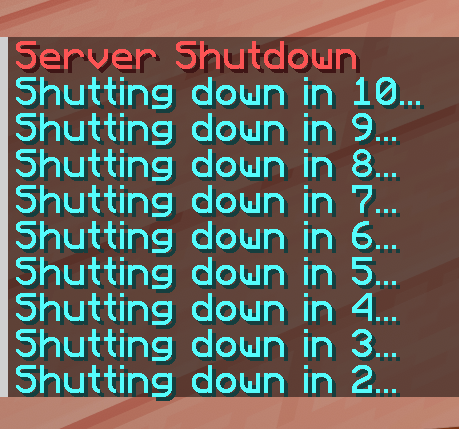
🧰 AlexPlugins – ServerTools
Update to 0.0.5 Release before 7/25
ServerTools
ServerTools is a modular utility plugin for Paper and Purpur 26.2 Minecraft servers. It provides focused administrative tools, player timezones, configurable custom items, and an optional Python expansion system.
ServerTools integrates with PlaceholderAPI when installed. Plugins such as TAB can display ServerTools placeholders through PlaceholderAPI; TAB is not a direct dependency.
⚠️ ServerTools is actively developed and considered a work in progress.
Features, commands, configuration, and expansion APIs may change between beta releases.
Requirements
- Paper 26.2 or Purpur 26.2
- Java 25
- PlaceholderAPI 2.12.3+ — optional, required only for placeholders
- TAB — optional
ServerTools does not support Spigot, CraftBukkit, Folia, Sponge, BungeeCord, Velocity, or Waterfall.
✨ Core Features
🕒 Player Timezone System
A local, per-player timezone system using real IANA timezone identifiers, such as America/New_York and Europe/London.
- Per-player timezone storage
- Configurable server-default timezone
- Automatic daylight-saving-time handling
- Case-insensitive timezone input
- Join reminders for players without a configured timezone
- Configurable reminder delay and interval
- Timezone removal and fallback to the server default
- PlaceholderAPI integration
Example placeholder output:
6:18 PM [EDT]
Timezone commands:
/tz
/tz set <ZoneId>
/tz change <ZoneId>
/tz remove
🧩 PlaceholderAPI Integration
When PlaceholderAPI is installed, ServerTools automatically registers its internal expansion at runtime.
No PlaceholderAPI eCloud download is required.
Available placeholder:
%servertools_time%
The placeholder returns the player’s local time. If the player has not selected a timezone, the configured server default is used.
TAB can display this value through its normal PlaceholderAPI support.
🎨 Configurable Special Items
ServerTools can create custom items defined in servertools.yml.
Special items support:
- Material selection
- Custom display names
- Configurable stack amounts
- Custom model data
- Unsafe enchantment levels
- Persistent ServerTools item identifiers
- Giving items to online players
- Removing ServerTools items from player inventories
- Tab completion for item IDs and player names
Commands:
/specialitem give <item> [player]
/specialitem list
/specialitem remove <player>
/specialitem reload
A matching Minecraft 26.2 resource pack is included for the default Owner’s Sword and Owner’s Pickaxe examples.
🐍 Python Expansion System
ServerTools includes an optional expansion system powered by Jython 2.7.
Expansion files can:
- Register dynamic commands
- Unregister commands
- Run console commands
- Write messages to the server log
- Use startup and shutdown lifecycle functions
- Disable themselves at runtime
Expansion files are loaded from:
plugins/ServerTools/expansions/
Expansions execute inside the Minecraft server and can dispatch console commands. Only install expansion files you fully trust.
Management commands:
/expansions list
/expansions reload
/expansions remove <id>
/expansions dev list
/expansions dev stop <id>
The shorter /expans alias is also available.
🛠️ Server Utilities
ServerTools currently includes:
/disconnect— disconnect yourself with a configurable message/stopserver [seconds]— schedule a server shutdown/stopserver cancel— cancel a scheduled shutdown/servertools version— display the installed version/servertools reload— reload configuration and expansions/servertools disable— disable ServerTools/servertools verifyclient— show login verification and client-brand information/servertools playeridentification— show player identification information/tz— manage player timezones/specialitem— manage configured custom items/expansions— manage Python expansions
Administrative commands are protected by permissions defined in plugin.yml.
📋 Modular Configuration
ServerTools stores its primary configuration in:
plugins/ServerTools/servertools.yml
Configuration defaults are loaded automatically, while existing server configuration values are preserved.
Example:
plugin:
  enabled: true

disconnect:
  enabled: true
  message: "Disconnected!"

timezones:
  enabled: true
  default: "America/New_York"
  request-on-join: true
  reminder-delay-seconds: 2
  reminder-interval-seconds: 30

expansions:
  enabled: true
  developer-mode: false

special-items:
  owners_sword:
    material: NETHERITE_SWORD
    amount: 1
    display-name: "&6Owner's Sword"
    custom-model-data: 1001
    enchants:
      SHARPNESS: 255
      SMITE: 5
📦 Installation
- Install Java 25.
- Download
ServerTools-0.0.5-Beta.jar. - Place the JAR in the
plugins/directory of a Paper 26.2 or Purpur 26.2 backend server. - Optionally install PlaceholderAPI for
%servertools_time%. - Optionally install TAB to display the placeholder.
- Restart the server.
- Edit
plugins/ServerTools/servertools.yml. - Restart the server or run
/servertools reload.
If your network uses Velocity, BungeeCord, or Waterfall, install ServerTools on the Paper/Purpur backend servers—not on the proxy.
DESCRIPTION WRITTEN WITH CODEX
- Edition: Minecraft Java
- File type: .jar
- Minecraft version listed: 26.2
- How to install: Install the matching mod loader (Forge, Fabric or NeoForge) for your Minecraft version. → Download the .jar. → Put it in the .minecraft/mods folder and launch that loader profile.
- Where to get it: Opens on Modrinth — not every file is mirrored on our own servers.
Install steps are the general flow for this file type — How to install Minecraft Java mods & modpacks walks through it step by step.
- Ships as ServerTools-0.0.5-Beta.jar — drop this file into the mods folder
- Download size: 48.5 MB
- Download link checked 21 Oct 2026 — working
These come from our own check of the pack file, not from the source page.