
ModsJava
MessageCore
Java mod listed for Minecraft 1.21. Downloads from the MC Java Mods app on Android.
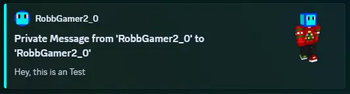
This Plugin adds an custom /message & /reply Command, which you can customize and log with an Discord Webhook.
⬇ Download on Modrinth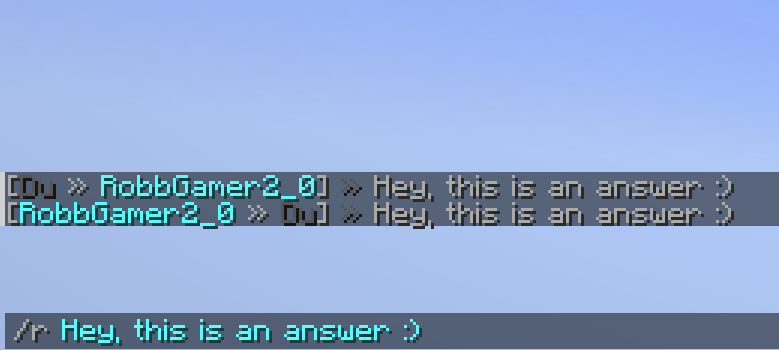
MessageCore
Commands
| Command | Aliases | Permission |
|---|---|---|
| /message | /m, /msg, /tell, /tellraw | message.send |
| /reply | /r | message.reply |
Support
If you need Support with the Configuration or hav found an Bug, please contact us via our linked Discord Server. Thanks for using our plugin :D
Configuration
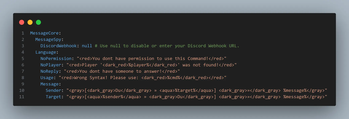
The config.yml will always start with the MessageCore Tag which will contain all contents.
- MessageSpy:
- DiscordWebhook: null | "https://discord.gg/api/webhooks/..."
- Language:
- NoPermission: "..." (This message shows up if the Player tries to execute a command he’s not allowed to)
- NoPlayer: ".." (This message shows if the Player that tried to contact is not online)
- NoReply: "..." (This message shows if the player has nobody to answer)
- Usage: "..." (This message explains users how to use the Command, if they did something wrong)
- Message:
- Sender: "..." (This message will get the sender of a private Message)
- Target: "..." (This message will get the recipient of a private Message)
Quick facts
- Edition: Minecraft Java
- File type: .jar
- Minecraft versions listed: 1.21, 1.21.1, 1.21.2
- How to install: Install the matching mod loader (Forge, Fabric or NeoForge) for your Minecraft version. → Download the .jar. → Put it in the .minecraft/mods folder and launch that loader profile.
- Where to get it: Opens on Modrinth — not every file is mirrored on our own servers.
Install steps are the general flow for this file type — How to install Minecraft Java mods & modpacks walks through it step by step.
File checked by MCModsHub
- Ships as MessageCore-1.0.jar — drop this file into the mods folder
- Download size: 21 KB
- Download link checked 22 Oct 2026 — working
These come from our own check of the pack file, not from the source page.