
NewPlayerPanel v3.1.0
Features
Villager Tracker Module
The Villager Tracker module provides comprehensive monitoring and logging of villager death events:
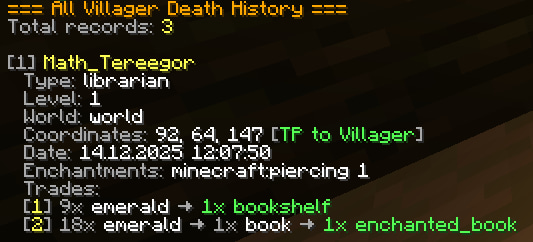
- Death Event Recording: Automatically tracks all villager deaths with full metadata
- Killer Identification: Records player name, UUID, and related information
- Location Tracking: Saves exact coordinates (X, Y, Z) and world name for each event
- Villager Type Detection: Detects and logs the specific type of villager
- Enchantment Preservation: Captures enchantment data from villager trades
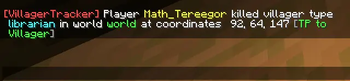
- Interactive Coordinates: Clickable coordinates for instant teleportation to the villager death location
- Clickable Teleport in Notifications: Coordinates in villager death notifications are clickable for quick teleportation
- Automatic Dimension Detection: Automatically determines the correct dimension (overworld/nether/end) for proper cross-world teleportation
- Advanced Search: Query records by player name, coordinates, or combined criteria
- Notification System: Real-time notifications for administrators with appropriate permissions
- Data Purging: Automatic cleanup of historical records based on time criteria
Player Restrictions System
An advanced restrictions system allowing precise control over player actions:
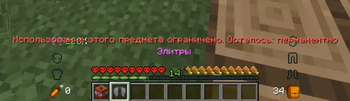
- Multiple Restriction Types: Support for EQUIPMENT, ITEM, ENTITY, and COMMAND restrictions
- Default Restrictions: Automatically apply restrictions based on a player's playtime on the server
- Time Control: Set temporary or permanent restrictions
- In-Game Management: Create and modify restrictions via a command interface
- Action Granularity: Fine-tune restrictions using action types (DAMAGE, USE, DROP, EQUIP, EXECUTE)
- Personal Overrides: Apply individual restrictions that override default settings
- Real-Time Enforcement: Restrictions are checked and enforced every 0.1 seconds
- Player Viewing: Players can view their active restrictions using
/restrictions - Time-based Default Restrictions: Default restrictions count time from the player's first join, not from server startup
Spawn Protection
Flexible spawn protection system with detailed configuration:
- Multiple Zones: Create an unlimited number of protected zones
- Three Zone Geometry Types:
- CIRCLE — circular zone (center + radius, default)
- RECT — rectangular zone (two corners, set via
pos1/pos2) - POLY — polygonal zone (arbitrary number of vertices, minimum 3)
- Zone Editing: Change radius, center, world, PvP/explosions/fire, remove polygon vertices — all in-game
- Management Commands: List zones, add and remove zones (with confirmation), reload config
- Info and Playtime: Any player can check the module status and their playtime; admins can check any player's playtime
- Block Protection: Control block breaking and placing (BLACKLIST/WHITELIST modes)
- Interaction Protection: Configure allowed blocks for interaction (crafting tables, anvils, ender chests, etc.)
- PvP Protection: Disable PvP in protected zones
- Explosion Protection: Block TNT, creepers, end crystals, and other explosions
- Fire Protection: Prevent fire spread
- Playtime Bypass: Automatically lift restrictions after a certain amount of playtime on the server
- Permission Bypass: Ability to bypass protection for administrators
Storage Systems
Multiple storage backends for maximum flexibility:
- YAML/JSON Storage: File-based storage using JSON format in the plugin data directory
- H2 Database: Lightweight embedded SQLite database (default, requires no setup)
- MySQL Support: Full integration with MySQL database with connection pooling
- MariaDB Support: Native support for MariaDB database with optimized queries
Localization
Full support for internationalization:
- Multilingual: Full support for English and Russian languages included
- Extensibility: Easily add additional languages via message files
- Customizable Messages: All user-facing text can be modified via configuration
- Real-Time Language Switching: Change language without restarting the server
Commands
Administrative Commands
| Command | Description | Permission | Usage Example |
|---|---|---|---|
/npp reload |
Reloads the plugin configuration and applies changes | newplayerpanel.admin |
/npp reload |
/npp addrestriction |
Creates a new restriction definition | newplayerpanel.admin |
/npp addrestriction elytra_ban EQUIPMENT EQUIP minecraft:elytra time:-1 default:false |
Command Syntax:
/npp addrestriction <name> <type> <actions> [targets...] [time:N] [default:true/false]
History Commands
| Command | Description | Permission | Usage Example |
|---|---|---|---|
/history |
Displays all villager death records | newplayerpanel.history |
/history |
/history <player> |
Shows records for a specific player | newplayerpanel.history |
/history Steve |
/history <x> <y> <z> |
Shows records near coordinates | newplayerpanel.history |
/history 100 64 200 |
/history coords |
Shows records at your current location | newplayerpanel.history |
/history coords |
/history purge <time> |
Deletes records older than the specified time | newplayerpanel.history.purge |
/history purge 7d |
Time Format Examples:
7d- 7 days30d- 30 days1h- 1 hour2w- 2 weeks1M- 1 month
Restrictions Management Commands
| Command | Description | Permission | Usage Example |
|---|---|---|---|
/restrict <player> <restriction> <time> |
Applies a restriction to a player | newplayerpanel.restrictions.restrict |
/restrict Steve elytra_ban 3600 |
/unrestrict <player> <restriction|all> |
Removes restriction(s) from a player | newplayerpanel.restrictions.restrict |
/unrestrict Steve elytra_ban |
/restrictions |
Displays your active restrictions | newplayerpanel.restrictions.view |
/restrictions |
/restrictions [player] |
Displays a player's active restrictions | newplayerpanel.restrictions.view.others |
/restrictions Steve |
Time Values:
-1- Permanent restriction0- Remove restriction>0- Duration in seconds (e.g.,3600= 1 hour)
Note: Players can view their restrictions using /restrictions with no arguments. Administrators can view other players' restrictions by specifying the player name.
Spawn Protection Commands
Available to everyone (no special permission required):
| Command | Description | Example |
|---|---|---|
/spawnprotect info |
Module info: enabled/disabled, zone count, playtime bypass setting | /spawnprotect info |
/spawnprotect playtime |
Your playtime and (if bypass is enabled) remaining time until bypass | /spawnprotect playtime |
Administrators only (newplayerpanel.spawnprotect.admin):
| Command | Description | Example |
|---|---|---|
/spawnprotect playtime [player] |
Any player's playtime | /spawnprotect playtime Steve |
/spawnprotect list |
List of zones with type and size | /spawnprotect list |
/spawnprotect add <name> [radius] |
Add a circular zone (confirmation: ... add <name> confirm) |
/spawnprotect add spawn 100 |
/spawnprotect add <name> rect |
Add a rectangular zone using pos1/pos2 (confirmation: ... add <name> rect confirm) |
/spawnprotect add market rect |
/spawnprotect remove <name> |
Remove a zone (confirmation: ... remove <name> confirm) |
/spawnprotect remove spawn |
/spawnprotect pos1 |
Remember the 1st corner of a rectangle (current position) | /spawnprotect pos1 |
/spawnprotect pos2 |
Remember the 2nd corner of a rectangle (current position) | /spawnprotect pos2 |
/spawnprotect addpoint <name> |
Add a vertex to a polygonal zone (creates the zone on the first point, then adds) | /spawnprotect addpoint arena |
/spawnprotect edit <zone> <parameter> <value> |
Edit a zone parameter | /spawnprotect edit spawn radius 150 |
/spawnprotect reload |
Reload spawn protection configuration | /spawnprotect reload |
Zone Creation:
- Circular (CIRCLE):
/spawnprotect add <name> [radius]→... add <name> confirm - Rectangular (RECT): stand in 1st corner →
/spawnprotect pos1→ stand in 2nd corner →/spawnprotect pos2→/spawnprotect add <name> rect→... add <name> rect confirm - Polygonal (POLY): walk around the vertices and run
/spawnprotect addpoint <name>at each one (minimum 3 points)
Zone Editing (edit):
| Parameter | Description | Example |
|---|---|---|
radius |
Zone radius (CIRCLE) | /spawnprotect edit spawn radius 200 |
center |
Zone center = current position (CIRCLE) | /spawnprotect edit spawn center |
world |
Zone world = current world | /spawnprotect edit spawn world |
pvp |
PvP protection | /spawnprotect edit spawn pvp true |
explosions |
Explosion protection | /spawnprotect edit spawn explosions false |
fire-spread |
Fire protection | /spawnprotect edit spawn fire-spread true |
removepoint |
Remove a polygon vertex by index (POLY) | /spawnprotect edit arena removepoint 2 |
Confirmation: Adding and removing zones requires a repeated command with the confirm argument within 30 seconds.
Permissions
| Permission Node | Description | Default Access |
|---|---|---|
newplayerpanel.admin |
Full administrative access to /npp commands |
Operators only |
newplayerpanel.history |
View villager death history records | Operators only |
newplayerpanel.history.purge |
Permission to purge old history records | Operators only |
newplayerpanel.notify |
Receive notifications about traded villager deaths | Operators only |
newplayerpanel.restrictions.bypass |
Bypass all restrictions from configuration | Operators only |
newplayerpanel.restrictions.restrict |
Apply and remove player restrictions | Operators only |
newplayerpanel.restrictions.view |
View your own active restrictions | All players |
newplayerpanel.restrictions.view.others |
View other players' restrictions | Operators only |
newplayerpanel.spawnprotect.admin |
Manage zones (list, add, remove, reload), view any player's playtime | Operators only |
newplayerpanel.spawnprotect.bypass |
Bypass spawn protection | Operators only |
Configuration
Main Configuration File (config.yml)
language: en
storage: H2
database:
  host: localhost
  port: 3306
  database: newplayerpanel
  username: root
  password: ""
  pool:
    maximum-pool-size: 10
    minimum-idle: 2
    connection-timeout: 30000
    idle-timeout: 600000
    max-lifetime: 1800000

villager-tracker:
  only-traded: true
  notify-enabled: true
  save-debug-files: false

spawn-protect:
  enabled: true
Spawn Protection Configuration (spawnprotect.yml)
Three zone types are supported: CIRCLE (default), RECT, POLY.
# Playtime bypass (in seconds, 0 = disabled)
bypass-after-playtime: 0

# Zone types:
#   CIRCLE — center + radius
#   RECT   — rectangle (min/max corners)
#   POLY   — polygon (list of vertices, min 3)

zones:
  # --- Circular Zone ---
  spawn:
    world: world
    type: CIRCLE
    center:
      x: 0
      z: 0
    radius: 100

    block-break:
      enabled: true
      mode: WHITELIST
      list: []
    block-place:
      enabled: true
      mode: WHITELIST
      list: []
    interact:
      enabled: true
      mode: WHITELIST
      list:
        - ENDER_CHEST
        - CRAFTING_TABLE
        - ENCHANTING_TABLE
        - ANVIL
        - SMITHING_TABLE
        - GRINDSTONE
        - STONECUTTER
    entity-interact:
      enabled: false
      mode: WHITELIST
      list:
        - VILLAGER
        - WANDERING_TRADER
    pvp:
      enabled: true
    explosions:
      enabled: true
    fire-spread:
      enabled: true

  # --- Rectangular Zone ---
  # z1:
  #   type: RECT
  #   min:
  #     x: -50
  #     z: -30
  #   max:
  #     x: 50
  #     z: 30

  # --- Polygonal Zone ---
  # z2:
  #   type: POLY
  #   points:
  #     - {x: 100, z: 100}
  #     - {x: 200, z: 100}
  #     - {x: 250, z: 200}
  #     - {x: 150, z: 250}
  #     - {x: 50, z: 200}
Restrictions Configuration File (restrictions.yml)
restrictions:
  - name: elytra_ban
    type: EQUIPMENT
    actions: EQUIP
    item: [minecraft:elytra]
    time: -1
    default: false

  - name: tnt_restriction
    type: ITEM
    actions: USE
    item: [minecraft:tnt]
    time: 28800
    default: true

  - name: villager_hit_restriction
    type: ENTITY
    actions: DAMAGE
    entity: [minecraft:villager]
    time: -1
    default: false
Restriction Types
| Type | Description | Target Field |
|---|---|---|
EQUIPMENT |
Restricts equipping items in armor/elytra slots | item |
ITEM |
Restricts using or placing items | item |
ENTITY |
Restricts interaction with entities | entity |
COMMAND |
Restricts executing commands | command |
Action Types
| Action | Description |
|---|---|
DAMAGE |
Dealing damage to entities |
USE |
Using or placing items |
DROP |
Dropping items |
EQUIP |
Equipping items in armor/elytra slots |
EXECUTE |
Executing commands |
Restriction Logic
Default Restrictions:
- When
default: true, restrictions are automatically applied to all players - Time is calculated from the player's first join (not from server startup)
- Example: If
time: 3600(1 hour), the restriction is applied during the first hour after the player's first join - If
time: -1, the restriction is permanent for all players - Default restrictions are automatically removed when the time expires
Personal Restrictions:
- Applied via the
/restrictcommand - Time is calculated from the moment of application (not from first join)
- Personal restrictions override default restrictions
- If a player has a personal restriction, default restrictions with the same name are ignored
- Personal restrictions can be manually removed using
/unrestrict
Priority Order:
- Personal restrictions (highest priority)
- Default restrictions (if no personal restriction exists)
Viewing Restrictions:
- Players can view their own restrictions:
/restrictions - Administrators can view any player's restrictions:
/restrictions <player> - Both personal and default restrictions are displayed with remaining time
Storage Systems
YAML/JSON Storage
File-based storage using JSON format. All data is stored in plugins/NewPlayerPanel/data/:
messages.json- Localization messagesvillager_deaths.json- Villager death recordsrestrictions.json- Player restriction data
Advantages:
- No database setup required
- Easy to backup (just copy files)
- Readable format
Configuration:
storage: YAML
H2 Database (Default)
Embedded SQLite database, stored as plugins/NewPlayerPanel/database.db.
Advantages:
- No external dependencies
- Automatic setup
- Good performance for small to medium servers
Configuration:
storage: H2
MySQL Database
Full integration with MySQL database with connection pooling via HikariCP.
Advantages:
- Scalable for large servers
- Supports multiple server instances
- Advanced querying capabilities
Configuration:
storage: MYSQL
database:
  host: localhost
  port: 3306
  database: newplayerpanel
  username: root
  password: your_password
MariaDB Database
Native support for MariaDB with optimized connection handling.
Advantages:
- Compatibility with MariaDB features
- High performance
- Enterprise-grade reliability
- Optimized connection with proper parameters
- Automatic schema validation for backwards compatibility
Configuration:
storage: MARIADB
database:
  host: localhost
  port: 3306
  database: newplayerpanel
  username: root
  password: your_password
  pool:
    maximum-pool-size: 10
    minimum-idle: 2
    connection-timeout: 30000
    idle-timeout: 600000
    max-lifetime: 1800000
Compatibility
Supported Server Software
- Spigot - Full compatibility
- Purpur - Full compatibility
- Any Bukkit-based server - Compatible with standard Bukkit API
Minecraft Versions
- 1.21.x - Fully supported
- Future versions - Should work with 1.20+ API
Java Requirements
- Java 17 - Minimum required version
- Java 21 - Recommended for optimal performance
Database Requirements (if using MySQL/MariaDB)
- MySQL 8.0+
- MariaDB 10.3+
- Database must support UTF-8 encoding
Support and Documentation
- Author: Math_Tereegor (ava ex666)
- Help and Support: MISQZY and 6oJIeH
- Plugin Version: 3.1.0
- Edition: Minecraft Java
- File type: .jar
- Minecraft versions listed: 1.21, 1.21.1, 1.21.2
- How to install: Install the matching mod loader (Forge, Fabric or NeoForge) for your Minecraft version. → Download the .jar. → Put it in the .minecraft/mods folder and launch that loader profile.
- Where to get it: Opens on Modrinth — not every file is mirrored on our own servers.
Install steps are the general flow for this file type — How to install Minecraft Java mods & modpacks walks through it step by step.
- Ships as newplayerpanel-3.1.0.jar — drop this file into the mods folder
- Download size: 16.2 MB
- Download link checked 13 Sept 2026 — working
These come from our own check of the pack file, not from the source page.