
CombatPlus (Combat+) — Summary
CombatPlus is a fork of No Combat Commands, a combat-tag plugin for Paper/Spigot servers that restricts risky actions during PvP combat, protects spawn zones, and punishes combat logging — all configurable in-game via GUI or commands.
Core Features
- Combat Tagging — Players are tagged on PvP damage (or custom
EntityDamageEvent.DamageCause.CUSTOMsources). Tag duration is configurable and refreshes on each hit. - Visual Timer — Choose between a Boss Bar or Action Bar countdown, color-coded (red → yellow → green) as time runs out.
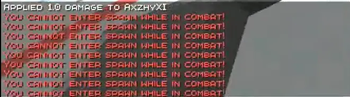
- Spawn Protection — Define a rectangular spawn zone; combat-tagged players are blocked from entering, pushed out if already inside, and PvP can be disabled within it. A particle "wall" renders along the border, visible only to tagged players near it.
- Combat Restrictions — Configurable cooldowns/disables for:
- Ender Pearls
- Wind Charges
- Tridents (including Riptide-enchanted, with its own cooldown)
- Elytra gliding
- Blocked Commands — Maintain a custom list of commands players can't run while tagged.
- Anti-Combat-Log (ACL) — Punish disconnecting mid-fight:
KILL— instant deathWARN— grace period to reconnect before inventory drops and death finalizes*— log only, no punishment
- In-Game Config GUI — Edit every setting (durations, cooldowns, ACL method, combat bar style, toggles) without touching
config.ymlor restarting. - Combat Log History — View the 10 most recent combat-log entries via command, with a pointer to the full log file for older entries.
- Update Checker — Automatically checks Modrinth on startup and notifies admins in-game and in console if a new version is available.
Admin Command Overview
/NCC addcommand <cmd>
/NCC removecommand <cmd>
/NCC enable <trident|elytra|enderpearl|windcharge>
/NCC disable <trident|elytra|enderpearl|windcharge>
/NCC setcd <windcharge|enderpearl> <seconds|-1>
/NCC setspawn center
/NCC setspawn radius <lengthXwidth>
/NCC toggle spawnpvp <true|false>
/NCC combatlog <true|false>
/NCC setcombatlogmethod <KILL|WARN|*>
/NCC setwarntimer <seconds>
/NCC setcombattag <seconds>
/NCC tag <player> [seconds]
/NCC untag <player>
/NCC logs
/NCC gui
Permission required: ncc.admin
Quick facts
- Edition: Minecraft Java
- File type: .jar
- Minecraft versions listed: 1.21, 1.21.1, 1.21.2
- How to install: Install the matching mod loader (Forge, Fabric or NeoForge) for your Minecraft version. → Download the .jar. → Put it in the .minecraft/mods folder and launch that loader profile.
- Where to get it: Opens on Modrinth — not every file is mirrored on our own servers.
Install steps are the general flow for this file type — How to install Minecraft Java mods & modpacks walks through it step by step.
Verified by MCModsHub
- Ships as NCC-4.0.0_1.21.11.jar — drop this file into the mods folder
- Download size: 102 KB
- Download link checked 10 Sept 2026 — working
These come from our own check of the pack file, not from the source page.