
awamenu
Java mod listed for Minecraft 1.19–1.21. Downloads from the MC Java Mods app on Android.
⬇ Download on Modrinth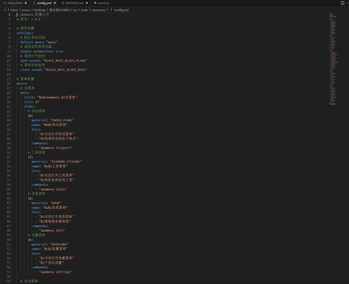
AWAmenu - Minecraft Paper Multi-Functional Menu Plugin
English Summary
AWAmenu is a powerful multi-functional menu plugin for Minecraft Paper servers that provides intuitive GUI interfaces for players to easily execute various commands and operations. It offers a comprehensive menu system with extensive customization options, sound effects, permission controls, and full version compatibility.
Description
AWAmenu is designed to enhance the player experience on Minecraft Paper servers by providing a sophisticated menu system that allows server administrators to create custom GUI menus for players. This plugin eliminates the need for players to remember complex commands and provides a user-friendly interface for accessing server features.
Key Features
- 🎯 Multi-level Menu System - Supports main menus, sub-menus, and complex menu hierarchies
- 🎨 Highly Configurable - Customize menu content, items, commands, and layouts through YAML configuration
- 🔊 Sound Effects Support - Configurable open/close sound effects for better user experience
- 🔄 Dynamic Reload - Hot-reload configuration without server restart
- 👥 Permission Control - Complete permission system with granular access controls
- 🎮 Full Version Compatibility - Supports Paper 1.13+ and all modern Minecraft versions
- ⚡ Performance Optimized - Lightweight and efficient with minimal server impact
- 🔧 Developer Friendly - Easy to extend and integrate with other plugins
What Does This Plugin Add?
AWAmenu adds a comprehensive GUI menu system to your Minecraft server that allows:
- Command Execution: Players can execute commands through intuitive GUI interfaces
- Custom Menu Creation: Server administrators can create unlimited custom menus
- Permission-based Access: Different menus can be restricted to specific permission groups
- Dynamic Content: Menus can display dynamic information and conditional items
- Cross-version Support: Works seamlessly across multiple Minecraft versions
Why Should Users Download It?
- User-Friendly: Makes server features accessible to all players regardless of technical knowledge
- Time-Saving: Reduces the need for players to memorize complex commands
- Customizable: Highly adaptable to fit any server theme or purpose
- Reliable: Stable and well-tested with minimal performance impact
- Active Development: Regular updates and community support
中文版本
AWAmenu - Minecraft Paper 多功能菜单插件
AWAmenu 是一个适用于 Minecraft Paper 服务器的多功能菜单插件,提供直观的GUI界面让玩家可以方便地执行各种命令和操作。
Installation
Installing to Server
- Download the
AWAmenu-1.0.0.jarfile - Copy the JAR file to your server's
pluginsdirectory - Restart the server
- The plugin will automatically generate default configuration files
安装方法
安装到服务器
- 下载
AWAmenu-1.0.0.jar文件 - 将 JAR 文件复制到服务器的
plugins目录 - 重启服务器
- 插件会自动生成默认配置文件
Usage
Basic Commands
/awamenuor/menu- Open the default menu/awamenu <menu-name>- Open a specific menu/awamenu open <menu-name>- Open a specific menu/awamenu reload- Reload configuration (requires permission)/awamenu list- View available menu list (requires permission)
Permission Nodes
awamenu.use- Basic permission to use menus (default for all players)awamenu.admin- Administrator permissions (default for OPs)awamenu.*- All permissions
使用方法
基本命令
/awamenu或/menu- 打开默认菜单/awamenu <菜单名称>- 打开指定菜单/awamenu open <菜单名称>- 打开指定菜单/awamenu reload- 重载配置(需要权限)/awamenu list- 查看可用菜单列表(需要权限)
权限节点
awamenu.use- 使用菜单的基本权限(默认所有玩家拥有)awamenu.admin- 管理员权限(默认OP拥有)awamenu.*- 所有权限
Configuration
Configuration file is located at plugins/AWAmenu/config.yml
Main Configuration Options
# Plugin Settings
settings:
  default-menu: "main"  # Default menu name
  enable-animations: true  # Enable animations
  open-sound: "BLOCK_NOTE_BLOCK_PLING"  # Open sound effect
  close-sound: "BLOCK_NOTE_BLOCK_BASS"  # Close sound effect

# Menu Configuration
menus:
  # Menu Name
  main:
    title: "&6&lMain Menu"  # Menu title
    size: 27  # Menu size (must be multiple of 9)
    items:
      # Slot number (0-53)
      10:
        material: "ENDER_PEARL"  # Item material
        name: "&b&lTeleport Menu"  # Item name
        lore:  # Item description
          - "&7Click to open teleport menu"
        commands:  # Commands to execute
          - "awamenu teleport"

# Message Configuration
messages:
  no-permission: "&cYou don't have permission to use this feature!"
  menu-not-found: "&cMenu not found!"
  menu-opened: "&aMenu opened successfully!"
  reload-success: "&aConfiguration reloaded successfully!"
Command Types
- Menu Commands:
awamenu <menu-name>- Open other menus - Player Commands: Execute commands as player
- Console Commands:
console:<command>- Execute commands as console - Player Variables:
{player}- Will be replaced with player name
配置文件说明
配置文件位于 plugins/AWAmenu/config.yml
主要配置项
# 插件设置
settings:
  default-menu: "main"  # 默认菜单名称
  enable-animations: true  # 是否启用动画
  open-sound: "BLOCK_NOTE_BLOCK_PLING"  # 打开音效
  close-sound: "BLOCK_NOTE_BLOCK_BASS"  # 关闭音效

# 菜单配置
menus:
  # 菜单名称
  main:
    title: "&6&l主菜单"  # 菜单标题
    size: 27  # 菜单大小(必须是9的倍数)
    items:
      # 槽位编号(0-53)
      10:
        material: "ENDER_PEARL"  # 物品材质
        name: "&b&l传送菜单"  # 物品名称
        lore:  # 物品描述
          - "&7点击打开传送菜单"
        commands:  # 执行的命令
          - "awamenu teleport"

# 消息配置
messages:
  no-permission: "&c你没有权限使用此功能!"
  menu-not-found: "&c菜单不存在!"
  menu-opened: "&a菜单已打开!"
  reload-success: "&a配置重载成功!"
命令类型
- 菜单命令:
awamenu <菜单名称>- 打开其他菜单 - 玩家命令: 直接执行玩家命令
- 控制台命令:
console:<命令>- 以控制台身份执行命令 - 玩家变量:
{player}- 会被替换为玩家名称
Default Menus
The plugin includes the following default menus:
- Main Menu (
main) - Primary feature entry point - Teleport Menu (
teleport) - Quick teleportation features - Tools Menu (
tools) - Get tools and items - Info Menu (
info) - View server information - Settings Menu (
settings) - Time and weather settings
Custom Menus
To create custom menus, simply add new menu configurations in the menus section of the configuration file:
menus:
  my-custom-menu:
    title: "&d&lMy Custom Menu"
    size: 27
    items:
      10:
        material: "DIAMOND"
        name: "&b&lGive Me Diamonds"
        commands:
          - "give {player} diamond 64"
      16:
        material: "EMERALD"
        name: "&a&lGive Me Emeralds"
        commands:
          - "give {player} emerald 64"
默认菜单
插件包含以下默认菜单:
- 主菜单 (
main) - 主要功能入口 - 传送菜单 (
teleport) - 快速传送功能 - 工具菜单 (
tools) - 获取工具和物品 - 信息菜单 (
info) - 查看服务器信息 - 设置菜单 (
settings) - 时间和天气设置
自定义菜单
要创建自定义菜单,只需在配置文件的 menus 部分添加新的菜单配置:
menus:
  my-custom-menu:
    title: "&d&l我的自定义菜单"
    size: 27
    items:
      10:
        material: "DIAMOND"
        name: "&b&l给我钻石"
        commands:
          - "give {player} diamond 64"
      16:
        material: "EMERALD"
        name: "&a&l给我绿宝石"
        commands:
          - "give {player} emerald 64"
- Edition: Minecraft Java
- File type: .jar
- Minecraft versions listed: 1.19.3, 1.20, 1.20.1
- How to install: Install the matching mod loader (Forge, Fabric or NeoForge) for your Minecraft version. → Download the .jar. → Put it in the .minecraft/mods folder and launch that loader profile.
- Where to get it: Opens on Modrinth — not every file is mirrored on our own servers.
Install steps are the general flow for this file type — How to install Minecraft Java mods & modpacks walks through it step by step.
- Ships as AWAmenu-1.0.0.jar — drop this file into the mods folder
- Download size: 17 KB
- Download link checked 3 Oct 2026 — working
These come from our own check of the pack file, not from the source page.