Transparent Mod (1.21.5, 1.20.1) – Create Glass-Like Armor and Decor
Java mod listed for Minecraft 1.20–1.21. Downloads from the MC Java Mods app on Android.
⬇ Download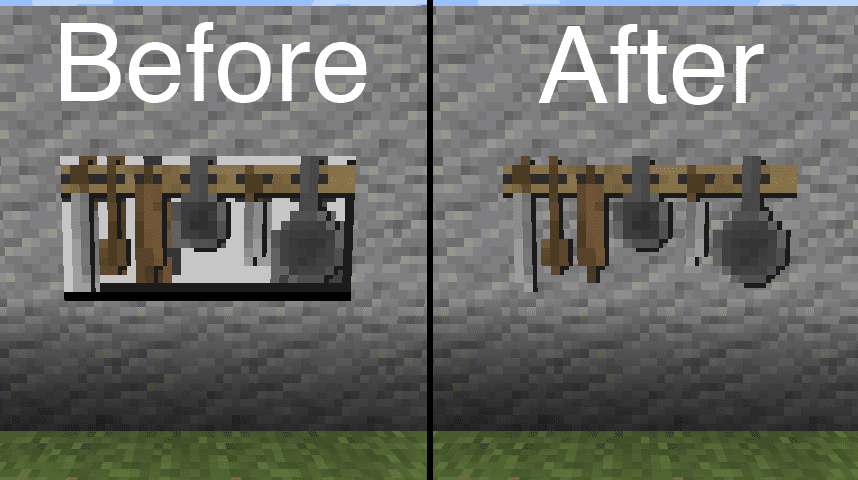
Transparent Mod lets resource packs make certain items and objects in Minecraft see-through. With this mod, you can use textures that have transparent or translucent parts on things like paintings, item frames, and armor stands. Simply use a resource pack designed with transparency to see the effect in your world.
Features:
- Makes Armor Stands support see-through textures.
- Allows Paintings and Item Frames to have transparent areas.
- Adds transparency to End Crystals and their beams.
- Enables see-through textures for Player Capes and Armor.
- Includes support for Beacon Beams, which is turned off by default.
How to Use:
- Find or create a resource pack that has transparent textures for a supported item.
- Apply the resource pack in the game’s settings.
- The mod will then allow the transparent textures to appear correctly in your world.
Configuration:
You can change which items are affected by creating a file in your resource pack. The file must be located at /assets/transparent/transparent.json with the following content:
{
    "armor_stand": true,
    "beacon_beam": false,
    "end_crystal": true,
    "end_crystal_beam": true,
    "item_frame": true,
    "painting": true,
    "player_cape": true,
    "player_armor": true
}
Screenshots:
Transparent Mod Download Links
For Minecraft 1.15.2
Forge version: Download from Server 1
For Minecraft 1.16.5
Forge version: Download from Server 1
Fabric version: Download from Server 1
For Minecraft 1.17.1
Forge version: Download from Server 1
Fabric version: Download from Server 1
For Minecraft 1.18.2
Forge version: Download from Server 1 – Download from Server 2
Fabric version: Download from Server 1 – Download from Server 2
For Minecraft 1.19.2, 1.19.1, 1.19
Forge version: Download from Server 1 – Download from Server 2
Fabric version: Download from Server 1 – Download from Server 2
For Minecraft 1.19.4, 1.19.3
Forge version: Download from Server 1 – Download from Server 2
Fabric version: Download from Server 1 – Download from Server 2
For Minecraft 1.20.1, 1.20
Forge version: Download from Server 1 – Download from Server 2
Fabric version: Download from Server 1 – Download from Server 2
For Minecraft 1.20.4
Forge version: Download from Server 1 – Download from Server 2
NeoForge version: Download from Server 1 – Download from Server 2
Fabric version: Download from Server 1 – Download from Server 2
For Minecraft 1.20.6
Forge version: Download from Server 1 – Download from Server 2
NeoForge version: Download from Server 1 – Download from Server 2
Fabric version: Download from Server 1 – Download from Server 2
For Minecraft 1.21.1, 1.21
NeoForge version: Download from Server 1 – Download from Server 2
Fabric/Quilt version: Download from Server 1 – Download from Server 2
For Minecraft 1.21.4
NeoForge version: Download from Server 1 – Download from Server 2
Fabric/Quilt version: Download from Server 1 – Download from Server 2
For Minecraft 1.21.5
NeoForge version: Download from Server 1 – Download from Server 2
Fabric/Quilt version: Download from Server 1 – Download from Server 2
- Edition: Minecraft Java
- File type: .jar
- Minecraft versions listed: 1.21.5, 1.20.1
- How to install: Install the matching mod loader (Forge, Fabric or NeoForge) for your Minecraft version. → Download the .jar. → Put it in the .minecraft/mods folder and launch that loader profile.
- Where to get it: In MC Java Mods, or directly above on this page.
Install steps are the general flow for this file type — How to install Minecraft Java mods & modpacks walks through it step by step.
- Downloads as 178584.mcaddon
- Download size: 32 KB
- Download link checked 24 Jul 2026 — working
- Mirrored on our own servers — the download does not depend on the original host
These come from our own check of the pack file, not from the source page.