
Zombie Horror Shader
Java shader pack listed for Minecraft 1.17–26.x. Downloads from the MC Java Mods app on Android.
A desaturated, horror-themed shader pack for OptiFine and Iris. Features atmospheric film-grain night lighting and automatically makes the eyes of…
⬇ Download on Modrinth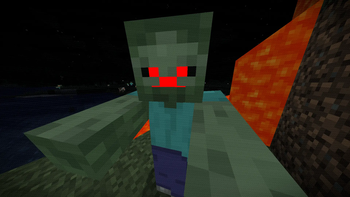
ZombieHorrorShader
ZombieHorrorShader is a lightweight post-processing shader pack for Iris and OptiFine designed to turn your Minecraft world into a gritty, suspenseful zombie apocalypse.
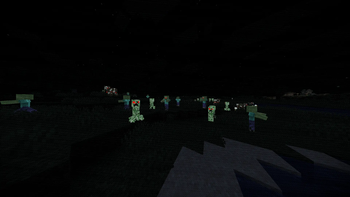
Instead of requiring heavy custom resource packs or complex mod setups, this shader handles everything dynamically. It alters the game's colors to create a cold, desaturated, horror-movie aesthetic while automatically forcing the eyes of hostile and passive mobs to glow blood-red in the dark.
Features
- Atmospheric Night Lighting: Deep shadows are lifted slightly with a cold, pale-blue "ambient moonlight." This keeps the night incredibly spooky and suspenseful while ensuring the terrain remains navigable and playable.
- Sickly Movie Palette: The game's colors are desaturated and shifted toward a pale, greenish-grey tone. Warm lighting from torches, lanterns, and fire remains vibrant, creating a stark visual contrast.
- Automatic Red Glowing Eyes: No resource packs required! The shader automatically isolates the eyes of key mobs and forces them to glow bright, emissive red in the dark:
- Zombies, Skeletons, Strays, Husks, Drowned, and Wither Skeletons
- Creepers
- Pigs, Cows, Sheep, and Chickens
- Smart Pixel Targeting: The glowing eye feature uses model height and color-detection checks to ensure only the actual dark pupils of the mobs glow, preventing any red bleeding on their bodies, legs, or armor.
- Vignette & Film Grain: A subtle, animated VHS-style film grain and a dark vignette frame the screen to create a claustrophobic, retro horror atmosphere.
Installation
Requirements
- Iris Shader Loader (Fabric/Quilt) OR OptiFine (Forge/Vanilla).
Steps
- Download the
ZombieHorrorShaderZIP file. - Place the ZIP file inside your Minecraft directory's
shaderpacksfolder. - Launch Minecraft, open Options -> Video Settings -> Shaders.
- Select
ZombieHorrorShaderand press Done. - Note: Ensure that your in-game brightness is adjusted to your liking to match the horror theme!
Performance
- Because this shader operates purely on a lightweight post-processing and entity rendering pipeline, it has an incredibly minimal impact on performance (FPS), making it highly optimized for lower-end systems and large modpacks.
- Compatible with standard vanilla and modded zombie entities from popular mods (such as Rotten Creatures, The Graveyard, Mutant Monsters, and Born in Chaos).
- Edition: Minecraft Java
- File type: .zip (resource pack)
- Minecraft versions listed: 1.17, 1.17.1, 1.18
- How to install: Download the .zip resource pack — do not unzip it. → Put it in .minecraft/resourcepacks. → Enable it in Options → Resource Packs.
- Where to get it: Opens on Modrinth — not every file is mirrored on our own servers.
Install steps are the general flow for this file type — see the MC Java Mods guides for the full walkthrough.
- Downloads as ZombieHorrorShader.zip
- Download size: 3 KB
- Download link checked 17 Oct 2026 — working
These come from our own check of the pack file, not from the source page.