
HereTowny
Java mod listed for Minecraft 1.21–26.x. Downloads from the MC Java Mods app on Android.
A paper plugin to turn towns into daily quest hubs to have the players care for each town and make them thrive
⬇ Download on Modrinth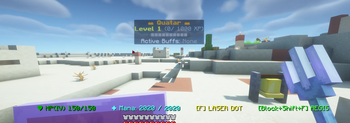
HereTowny
A premium Paper Minecraft plugin for town progression, visual title greetings, and cooperative daily tasks — establish safe havens, automate villager feeding, build town fortifications, and fight invaders to level up your town and unlock passive beacon buffs for all players and villagers within town limits!
Features
- Cooperative Daily Tasks — Shared progression logs tracked in a local SQLite database (
plugins/HereTowny/towns.db) that scale targets with town level and reset daily at midnight. - HereRolePlay Skill integration — Completing a daily task awards a massive 100 XP reward to all players who contributed to that task today in the respective character skill tree:
- Collect XP (100) — Feed Villagers, Breed Villagers.
- Craft XP (100) — Build Fortifications, Establish Workstations, Reinforce Security (Golems).
- Combat XP (100) — Defend the Gates (slaying monsters).
- Holographic Town Board — Displays a floating client-mod-free holographic display (
TextDisplay) showing the town's Name, Level, XP bar progress§8[§a■■■■§7■■■■■■§8], and currently active beacon buffs. - Beacon Buff Rewards — Levels 2 through 5 grant passive potion buffs to all players and villagers within the 100-block town radius:
- Level 1: No active buffs.
- Level 2: Speed I
- Level 3: Speed I + Jump Boost I
- Level 4: Speed I + Jump Boost I + Resistance I
- Level 5: Speed I + Jump Boost I + Resistance I + Regeneration I
- Town Entry Welcome Cards — Displays big, temporary title cards in the center of the player's screen when crossing town boundaries (e.g. Title: Welcome to, Subtitle: Camelot), complete with soft chimes.
- Automated Food Granary (
[Food Here!]) — An optional chest utility that automatically scans nearby villagers and feeds them from chest storage to automate breeding preparations. Only bread, carrots, potatoes, and beetroots are accepted in the chest. - HereNavy Naming & BlueMap Integration — If HereNavy is installed, establishing a town automatically inherits its custom/historic explorer name, and BlueMap town markers are relegated to
HereNavy's custom API to display using nice, biome-specific custom village icons rather than default POI pins. If absent, players are prompted in chat to name the town, and a basic POI marker is used.
Commands
Commands can be prefixed with /heretowny, /htown, or /town.
| Command | Description | Permission |
|---|---|---|
/town claim |
View information about automatic claiming. | heretowny.use |
/town status |
Open the interactive Status chest GUI to view daily quest progress. | heretowny.use |
/town list |
List all registered towns on the server with levels. | heretowny.use |
/town unclaim |
Disband the town at your location (Creator or Operator only). | heretowny.use |
How to Set Up
1. Register a Town (Automatic)
- Find an unnamed village or a spot with a village structure you wish to develop.
- Simply approach or enter the village boundaries.
- If
HereNavyis active, the town will automatically register under the village name once the village is discovered and named inHereNavy, and its BlueMap marker will be delegated toHereNavyto render using the appropriate custom village icon and the custom name. - If
HereNavyis not active, you will see a chat prompt to name the town. Type your custom name in chat to register it, and a basic town POI marker will be placed on the map.
- If
2. Configure the Granary (Optional)
- Place a Chest anywhere within the 100-block town limits.
- Attach a Sign directly next to it or on it, and write
[Food Here!]on the first line. - Open the chest and place Bread, Carrots, Potatoes, or Beetroots inside. Any other block will be blocked.
- Villagers low on food within 12 blocks will be fed automatically every 10 seconds.
3. Check Progress
- Open the Status Dashboard with
/town status. - Inspect the beacon icon to see current level, XP, and active beacon buffs.
- Hover over task icons (Bread, Seeds, Cobblestone Wall, Lectern, Sword, Iron Block) to check daily progress.
- Edition: Minecraft Java
- File type: .jar
- Minecraft versions listed: 1.21, 1.21.1, 1.21.2
- How to install: Install the matching mod loader (Forge, Fabric or NeoForge) for your Minecraft version. → Download the .jar. → Put it in the .minecraft/mods folder and launch that loader profile.
- Where to get it: Opens on Modrinth — not every file is mirrored on our own servers.
Install steps are the general flow for this file type — How to install Minecraft Java mods & modpacks walks through it step by step.
- Ships as HereTowny-1.1.1.jar — drop this file into the mods folder
- Download size: 74 KB
- Download link checked 25 Oct 2026 — working
These come from our own check of the pack file, not from the source page.